No quick matches. Press enter to see full results.

No quick matches. Press enter to see full results.
Insurance intelligent document processing (IDP) sorts insurance documents, from ACORD forms to FNOL reports, and extracts key fields, with human review for data that falls below the confidence threshold. But success depends on getting documents into the system correctly and keeping related files linked to the right submission or claim. DataBank brings mailroom processing, document scanning, IDP, and expert validation together to manage intake from arrival through delivery to your claims or policy system.
A commercial insurance application rarely shows up on its own. The ACORD 125 even has an attachments section, with boxes for a schedule of values and a loss summary. And 49% of commercial-heavy agencies rely on email for submissions, so multiple documents can arrive together in a single message.
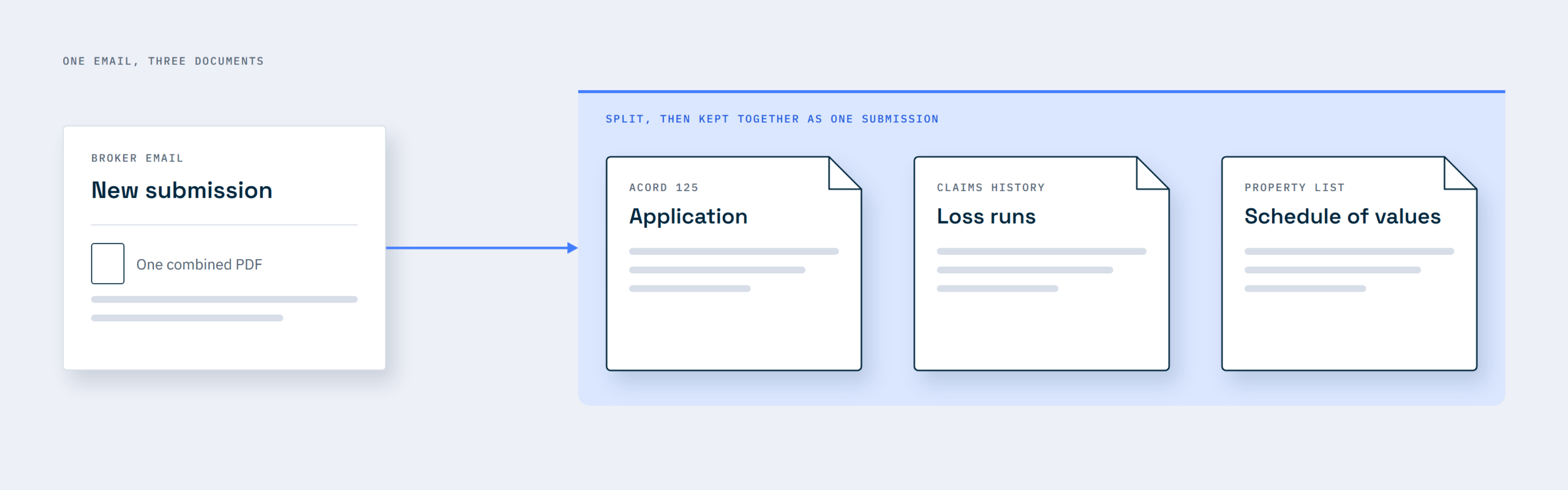
The challenge with insurance document processing isn’t just extracting information from each document; it’s knowing which documents belong together. A model might correctly extract every field from a loss run without knowing which insurance submission it belongs to, risking the information being attached to the wrong application.
That’s why intelligent document processing for insurance starts with getting submissions into the system correctly and keeping related documents together. This article explains how to build that intake process, set up the wider document processing workflow, and measure its success.
After partnering with DataBank, Central States Health & Life Co. of Omaha (CSO) moved its incoming mail off paper and into a digital workflow. As a result, pending cases and document backlogs fell, staff could work remotely without sacrificing efficiency, and workflow management became more streamlined, reducing the time and steps they needed to process insurance documents.
On the claims side, a major healthcare payer’s fraud prevention and claims integrity division uses DataBank to standardize intake across paper, fax, CD, and portal uploads, with subject matter experts validating key fields. The program now serves 16 payer clients on one framework, with 100% SLA adherence on fraud-related and claims integrity communications.
We have been in the data operations business since 1991, and we process more than a billion records a year. We have helped insurance companies successfully get mixed submission packets into their underwriting and claims systems, and that experience informs the approach outlined in this article.
Intelligent document processing (IDP) is software that sorts your documents, pulls out the data inside them, checks that it is accurate, then routes it onward. OCR only copies the words off a scanned page but can’t tell what it means.
Here’s how they differ:
| Processing stage | What OCR does | What IDP does |
|---|---|---|
| Classification | Turns a broker’s submission packet into one long run of text | Labels each document inside a broker’s submission |
| Extraction | Gives you the words “Total Incurred” and a dollar amount nearby. | Pairs the label with its value and returns total incurred as a field you can load. |
| Validation | Can copy a wrong date as faithfully as a right one | Catches wrong data, flagging values that don’t add up, like an expiration date before the effective date. Then routes any field it isn’t sure of to a person to confirm. |
| Routing | Someone has to read every page and decide where it goes. | Sends each document and its data to the right team. For example, a first notice of loss goes to claims, and an endorsement request goes to underwriting. |
Insurance IDP typically handles seven core document types, each with its own format and way of arriving. Here’s where each document comes from, which key fields it contains, and why template-based processing often falls short.
| Document | Where it arrives | Key fields | Why templates fail |
|---|---|---|---|
| ACORD applications (125, 126, 140) | Broker email, portal, mail | Named insured, FEIN, NAICS code, lines of business, effective date | The supplements behind the 125 change with each line quoted |
| Loss runs | Emailed PDF from the prior carrier | Valuation date, date of loss, paid, reserved, total incurred, status | There’s no standard format, so every carrier’s layout differs |
| Schedules of values (SOVs) | Spreadsheet in the broker’s submission | Address, construction, year built, occupancy, sprinklers, insured values | Carriers and lenders can request their own workbook, so columns move |
| Submissions and broker emails | Underwriting inbox | Broker, named insured, lines requested, effective date, quote deadline | Key facts sit in an email body that doesn’t have a layout |
| Claims files and FNOL | Portal or phone, then mail, email, and fax | Policy number, date of loss, location, description, police report number | The ACORD 3 description is free text, and attachments vary by claim |
| Endorsements and change requests | Agent email or carrier portal | Policy number, change date, item added or removed | Agents can use an ACORD 175 or just email the change, so there isn’t always a form |
| Certificates of insurance (COIs) | Emailed PDFs or portal uploads | Insurers, policy numbers, dates, limits, additional insured, certificate holder | ACORD replaced the 2016/03 ACORD 25 with a 2025/12 edition, so you’ll see both layouts for a while |
Sorting has to come first, because every fax, scan, email, and upload needs to reach the same queue before extraction. That’s what an insurance digital mailroom is for.
Underwriting and claims need different IDP pipelines because they handle documents differently. Underwriting starts with a broker’s submission packet, which needs to be assembled and checked for completeness before the insurer can quote. Claims start with a first notice of loss (FNOL), followed by more documents over days or weeks, with each new document needing to be matched to the correct open claim.
Here’s what each pipeline extracts, the deadline that drives it, and the downstream system its data feeds.
| Underwriting | Claims | |
|---|---|---|
| Key fields | Named insured, locations, values, limits, and loss history | Policy and claim numbers, date and cause of loss, amounts |
| Deadline driver | Quote turnaround for the broker | State claims-handling rules |
| Where data goes | Policy admin, rating or agency management system | Claims system, on the open claim |
| Cost of an exception | A slower quote | Days off a legal deadline |
In underwriting, a missing loss run means another request to the broker, and each round trip adds time. That back-and-forth further delays a quote cycle that 55% of commercial agents say already takes four to seven days. Check each submission packet for required documents at intake. If a loss run or another supporting document is missing, flag the gap early so the broker can provide it before it delays the quote.
For claims, legal deadlines vary by state. The NAIC model regulation gives a P&C insurer 21 days after proof of loss to decide a claim or explain the delay. Every day a proof of loss waits unmatched in a queue counts against you. Assign someone to resolve claims exceptions the same day.
From there, both claims and underwriting can carry on into claims processing automation and insurance process automation.
An insurance document workflow runs in seven steps, starting when a packet arrives and ending when its record is retired.
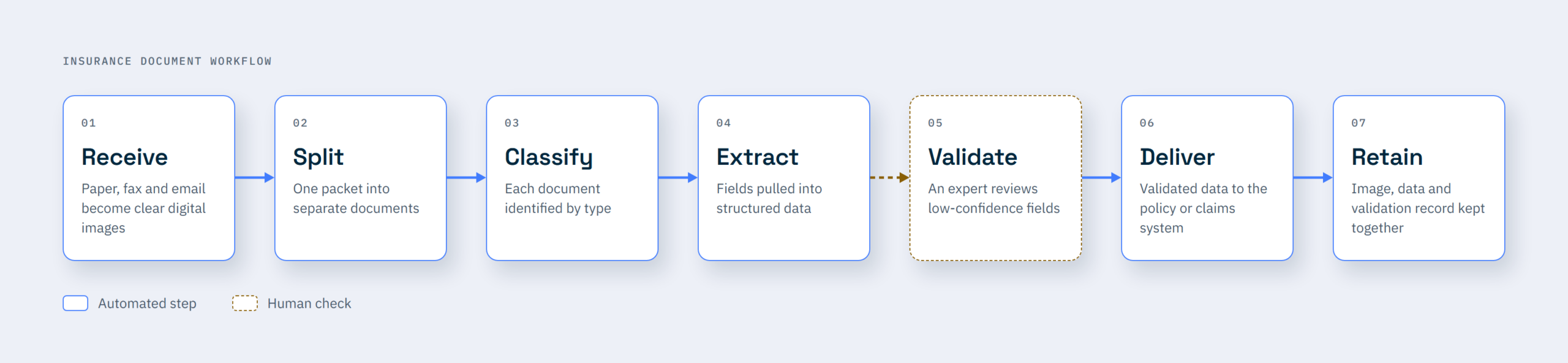
Every document needs to become a clear, readable digital image before processing. For paper, that means pulling staples, flattening folds, and keeping pages in the order they arrived. At DataBank, prep also covers removing clips and binding, repairing torn pages, and finding page breaks by eye where needed.
Fax needs extra care because standard fax resolution can be as low as 204 × 98 dpi, below the 300 dpi recommended in OCR guidance. If a broker can email the file, ask them to. With email, capture the message body too, since a broker may type the requested limits right into it.
One broker email may combine an application, loss runs, and a schedule of values (SOV) into a single PDF. Split the file into separate documents before classification, since the model needs to identify each document type individually. To check that no pages were lost or duplicated, make sure the page counts add up to the original.
Once the packet is split, identify each document by type so the system knows how to process it. ACORD forms are easier to identify because each has a form number and edition date, like the ACORD 25 Certificate of Liability Insurance. Loss runs have no standard form number, so the system has to classify them by their content and layout.
Once documents are classified, extract the relevant fields into structured data. Loss runs and schedules of values (SOVs) often contain tables, so rows must stay intact across page breaks to keep each claim or property record accurate. If an SOV arrives as a spreadsheet, extract the data directly from its cells rather than converting it to an image first.
Send any field below your confidence threshold to a subject matter expert for review. Add business rules too, like flagging a loss date outside the policy period. These checks can catch errors even when the model is confident in its extraction.

Send validated data to the policy or claims system through an integration, keeping the source image attached to its record for reference. Then, route rejected records to an exception queue for review and resolution.
Assign each document a retention class during classification, then keep its image, extracted data, and validation record together so auditors can trace each field back to its source page. Place litigated claims on legal hold and also keep paper originals until the scanned images pass quality control, so you can rescan any pages that fail.
Insurance IDP projects commonly stall when:
Regulators expect you to keep insurance documents for a set period and protect the personal data inside them. You also need to trace each document from the day it arrived. These obligations continue after IDP converts a submission packet into structured data.
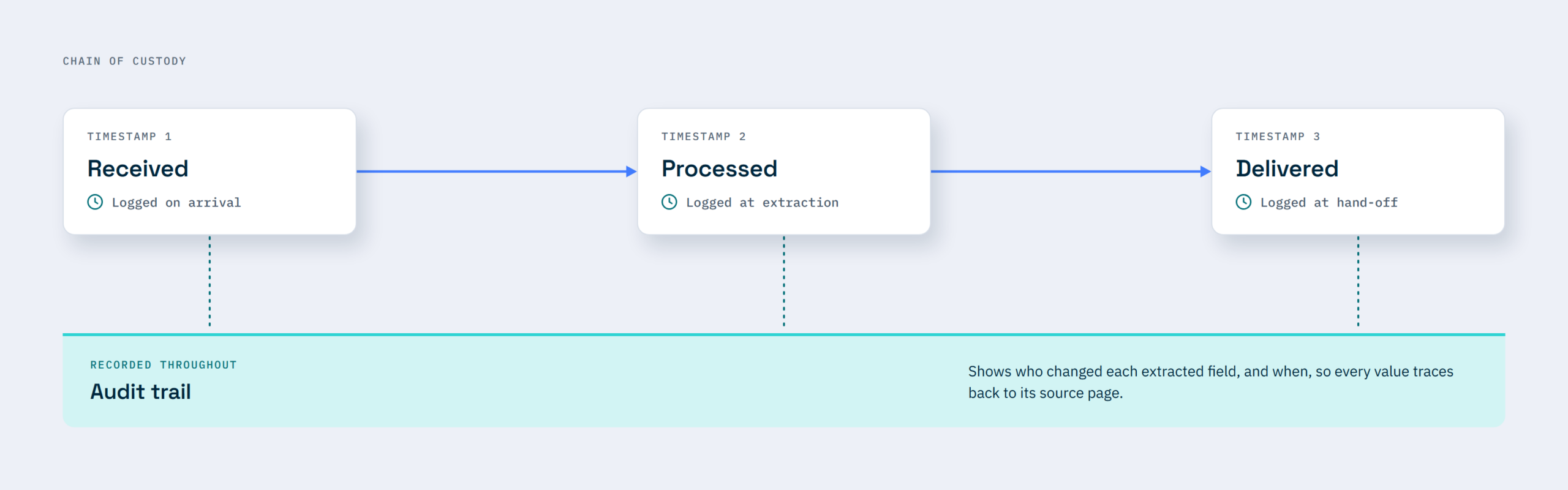
Often, retention periods are set state by state. For example, California requires insurers to keep claim files for the current year and the preceding four years. Each file must also record when every material document was received, processed, and sent.
For data security, the NAIC’s Insurance Data Security Model Law sets the standard. As of October 2026, 27 states plus Puerto Rico had adopted it. It enforces the protection of nonpublic information like Social Security numbers, driver’s license numbers, and account numbers that insurers collect throughout underwriting and claims. It also requires you to vet any vendor that holds that data, including anyone who scans your mail.
To meet these compliance obligations, ensure the workflow you want to sign off on maintains an unbroken chain of custody. Check to see that:
See how DataBank maintains data security.
To measure IDP success in insurance, track your touchless rate, processing time, exception rate, and cost per document. Record each metric before go-live to establish a baseline, then measure it regularly to see whether the new workflow is improving performance.
Report underwriting and claims metrics separately, since a blended number hides the pipeline that is falling behind. Don’t inflate the touchless rate by lowering confidence thresholds. Otherwise, an incorrectly extracted loss total could bypass human review and end up in an insurance quote.
You can run your insurance IDP projects in-house using software, outsource to a service provider, or combine both. Here are the factors that determine your options:
| Factor | Software | Managed service | Hybrid |
|---|---|---|---|
| Volume | Steady and predictable | High or seasonal | Steady base, peaks sent out |
| Paper share | Low, mostly digital | High mail and fax | Paper sent out, digital managed in-house |
| Document variety | Few consistent types | Many broker layouts | Common forms kept in-house |
| In-house IT capacity | A team to maintain models | Little to spare | Enough for integrations |
| Timeline | Time to build and tune | Live without new hires | Phased, one line of business first |
To decide, first consider the document forms you get. If much of your claims paperwork arrives by mail, software alone leaves the prep and scanning to your staff.
Be honest about your IT capacity, too. Technology roles are among the hardest for US carriers to fill, according to The Jacobson Group and Aon. So a plan that depends on new hires can stall early. If your current team lacks the capacity to maintain models and integrations, a managed service can provide staff for scanning and validation.
Ultimately, choose a model that assigns a clear owner to every step, from receiving documents to delivering usable data to your claims or policy system.
DataBank IMX runs document intake and data operations for insurers and other regulated US organizations.
We take in mail, fax, and email, scan the paper, run IDP over it, and validate the output with subject matter experts before it reaches your systems. For insurers, that means we run intake and IDP as one operation, keeping related documents linked to the correct submission or claim from arrival through delivery to the core system. Our intelligent claims operations work for commercial insurers is built on the same intake.
Our outsourced mailroom processing brings your mail, fax, and email into one managed process. Paper records are scanned either at your premises or at our facilities in Pennsylvania, Indiana, Texas, and Massachusetts through our insurance document scanning service.
AI then classifies each scanned document and extracts key fields, which our subject matter experts validate before the data reaches your claims or policy system.
With DataBank, you can choose the engagement model that fits your needs: Project-Based, Managed Services, Hybrid, or Optimization & Training. For clients on Managed Services, we run daily mail intake and processing so claims files stay current without them needing to increase headcount.
Schedule a consultation to discuss what comes into your mailroom and how to get those documents into the right workflows.
Does IDP work on handwritten loss runs?
Yes, IDP can read handwriting on a loss run, though less reliably than typed text. A loss run is a report the carrier generates, so the handwriting on one is usually a note added later. Because handwriting varies far more than print, have a person check any handwritten field the model isn’t sure of.
Can it read ACORD forms from different brokers?
Yes. The same ACORD form follows a standard layout regardless of who completes it. However, brokers may submit different editions or attach extra pages. Some agencies still use the 2011/09 ACORD 125, while the ACORD 25 directs users to an ACORD 101 Additional Remarks Schedule when they need more space. Test the editions and attachments your brokers actually submit to ensure your IDP workflow handles them correctly.
How long does implementation take?
A phased rollout can get IDP live sooner by starting with one line of business and its most common document type. The timeline depends on how much testing is needed to confirm the model handles your brokers’ submission packets accurately and how complex the integration with your claims or policy system is. Assess both before setting a go-live date.
What happens to the paper originals?
You may be able to securely shred paper originals once the scanned images pass quality control, but check your state’s requirements first. The NAIC’s model regulation on record retention allows accurate image reproductions to serve as originals if they are equally legible, preserve signatures, and are stored in a way that prevents alteration. State rules determine whether this applies to your records.
Read enough headlines and you’d think every company is a few months away from running on autonomous agents, but that isn’t the reality for most organizations.
I grew up around this industry in Oklahoma City, and at DataBank we’ve worked with more than 40 oil and gas operators, midstream companies and service firms. The people I talk to aren’t against AI. Most of them are already using it somewhere. What they’re running into is more basic. AI can only work with records you can find and actually trust. For many operators, those records aren’t in shape yet. That gap, between what AI can do and what your records will let it do, is where most projects either pay off or stall.
Oil and gas isn’t dragging its feet on AI. When 451 Research surveyed energy and utilities organizations this year, 27% said agentic AI is already integrated across their organization, compared with 18% across all organization types. Energy organizations have always focused heavily on innovation.
But about a third of the AI projects energy and utilities companies started in the past year have already been killed, compared with about a quarter in other industries. Only 37% are delivering business value. When people explained what went wrong, the top answers were system integration, data quality and data access.
When we talk with people at oil and gas events, they almost never lead with AI. They lead with “I can’t find the record I need,” or “I found it, but I’m not sure it’s the current version.” If your team doesn’t trust the information it has today, putting AI on top of it is like strapping rockets to a garbage can. You’ll go fast, but you won’t end up anywhere you wanted to go. Gartner says roughly the same thing, more politely: it predicts that through 2026, organizations will abandon 60% of AI projects that don’t have AI-ready data behind them.
The pile keeps growing, too. Enverus counted $38 billion in U.S. upstream M&A in the first quarter of 2026, the biggest quarter in two years, and expects more consolidation to come. Every one of those deals comes with someone else’s leases, title files, division orders and well histories, usually on paper and filed however the last owner liked it.
Land teams feel it first. One in-house landman told Permian Basin Oil and Gas Magazine in June that he can only use AI about 10% to 15% of the time outside the office, because so much of what he needs was never digitized. No AI tool can fix that on its own.
I heard a good example of this in September at the Box Content + AI Summit in Dallas. Nena Calligaro, senior cloud services and infrastructure leader at Merit Energy Company, sat down with our chief revenue and operations officer, Adam Herrmann, to discuss how Merit handles the records that accompany each acquisition. Before 2017, those files arrived in boxes and went onto shelves, and Merit’s engineers and land staff would dig through physical files to find what they needed.
Since Merit started working with DataBank, its land and production records have been digitized, indexed and consolidated into one repository, and files from new deals go through an automated intake process. When an office flood hit, Merit didn’t lose any data. (Here’s the full case study.) Even so, Nena was candid that paper hasn’t gone away: “a lot of the transactions that we see, we’re still seeing a lot of physical files.” That’s the reality for almost everyone in this industry, and it’s why the operators who get value from AI are the ones with a dependable way to bring paper and digital records together as they arrive.
The order we see work is pretty simple. Get the records in when the deal closes. Clean them up so there’s one current version of each document, tied to the right well, lease or tract. Then put AI to work on narrow jobs you can check, like lease provision lookups and due diligence questions, and build from there.
Oil and gas is a show-me industry. People here have sat through plenty of pitches, and they can spot hype from a mile away. Silicon Valley can mistake that skepticism for resistance, but this is the same industry that made horizontal drilling and real-time production monitoring standard practice. It adopts new technology when the technology proves itself in the field. AI will be no different, and it’ll prove itself fastest on records the team already trusts.
So if you’re being asked about your AI plan and you’re not sure your records are ready, start small. Pull the files from your most recent acquisition and take an honest look. They’ll tell you pretty quickly how much work sits between you and AI that actually pays off. And if you want a second set of eyes, our team is happy to help.
Most of them stall on data. Energy companies in 451 Research’s 2026 survey named system integration, data quality and data access as their biggest technical obstacles, and they shut down AI projects at a higher rate than other industries.
Bring them in as soon as the deal closes. Digitize and index the files before they go into storage, match them to the assets you bought and merge them into one repository so land, engineering and accounting are all working from the same source.
Payer digital transformation can help you reduce manual work, improve data exchange, and give members and providers better digital experiences. But to get those results, you have to follow a specific sequence:
DataBank supports healthcare payers across this entire transformation sequence, from information readiness assessment and document and data intake through content migration, ECM hosting, and managed services.
When the typical healthcare payer wants to transform its operations, it first spends significant time and money building a modern member portal where members can check benefits, find providers, and track claims online. And that works tremendously well to simplify routine interactions and reduce the work teams have to handle manually.
Until someone files an appeal.
According to the 2024 CAQH Index, 68% of medical claim attachments still arrive non-electronically, through channels like phone, mail, fax, and email.
If this appeal is part of that majority and arrives, for example, as a faxed letter with six pages of medical records, your team has got a lot of manual work to do.
A staff member has to print the fax, walk it to a scanner, and scan it into a shared drive. Then, they have to manually key the member ID, date of service, and appeal category into the claims system. If any of those fields are entered incorrectly, the appeal routes to the wrong queue and sits there until someone discovers the error.
So, even with your shining new digital portal, you still inherit many manual tasks when unstructured information that can’t sync directly with your portal comes in.
This article teaches you how to ensure your digital transformation project actually saves you time by following the right setup sequence.
DataBank IMX has been running document and data operations for regulated US organizations since 1991. We process over one billion records annually across owned mass scanning facilities in Pennsylvania, Indiana, Boston, and Texas, and we’re SOC 2 Type II certified.
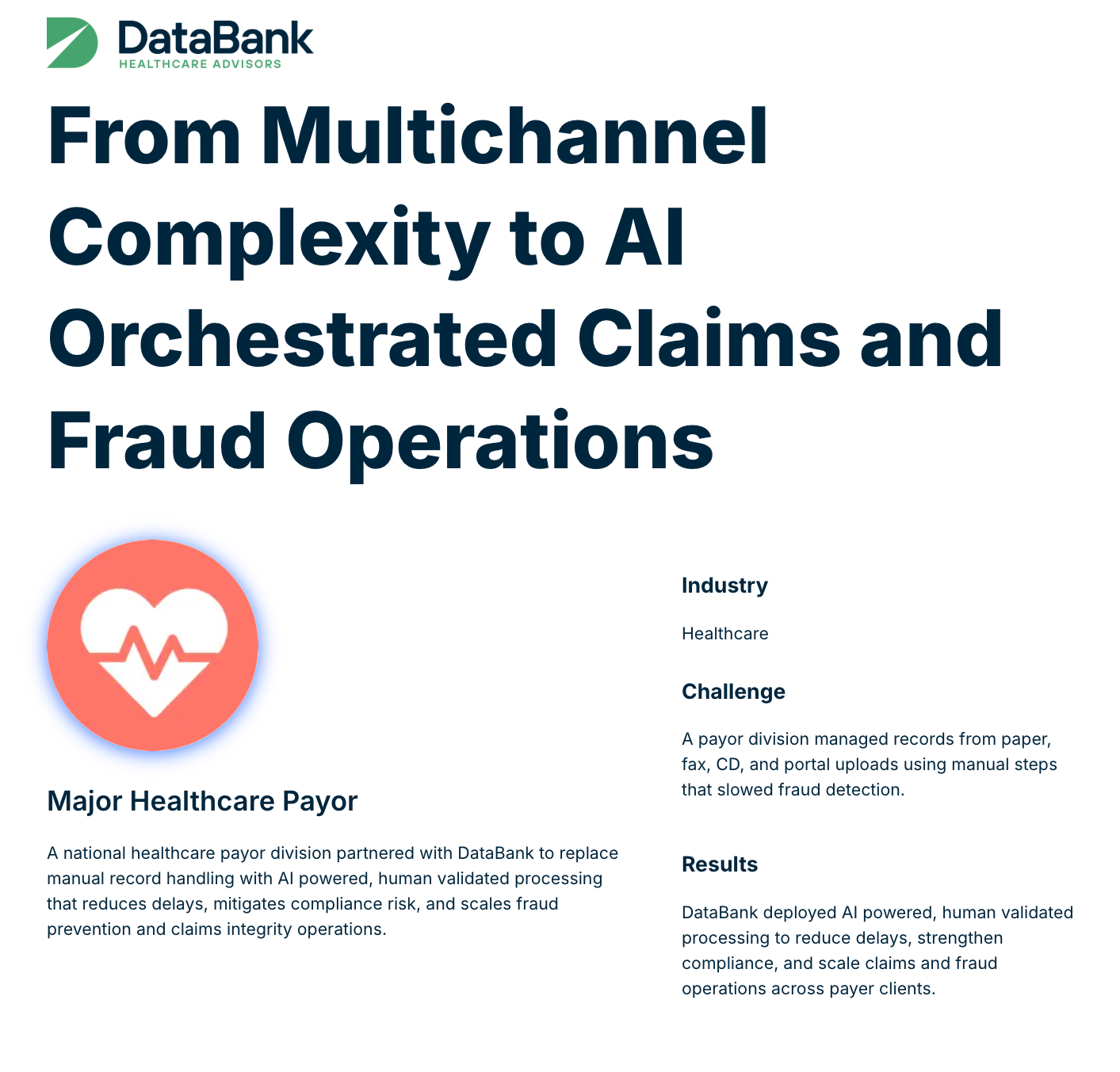
One major national healthcare payor partnered with us to transform multichannel claims and fraud operations through AI-driven document processing, and we helped them process 3.5M images in one month and build a correspondence pipeline capable of 176,550 letters per month, all while maintaining 100% SLA adherence.
This article is based on our experience helping health plans with claims and correspondence intake, content platform migrations, and the document-level work behind every automation initiative.
Healthcare payer digital transformation is a system-wide shift that replaces manual, paper-dependent, and legacy-system-bound operations with connected digital workflows. It covers how claims and prior authorizations enter the organization, how member data flows between systems, and how providers access plan information.
But most organizations tackle just one part of this, especially the parts members and providers interact with, and call that transformation.
But a plan that just builds a new member portal has modernized only one surface.
To capture the full value of digital and AI transformation, payers also need to ensure the transformation work reaches the data, operational core and systems every front-end experience depends on. That can mean digitizing intake, consolidating content platforms, modernizing legacy systems, and improving how data moves between them.
While that might seem like a lot of work, the potential value gain makes it worth it. McKinsey estimates that, for every $10 billion in payer revenue, AI solutions could save $150 million to $300 million in administrative costs, save $380 million to $970 million in medical costs, and increase revenues by $260 million to $1.24 billion.
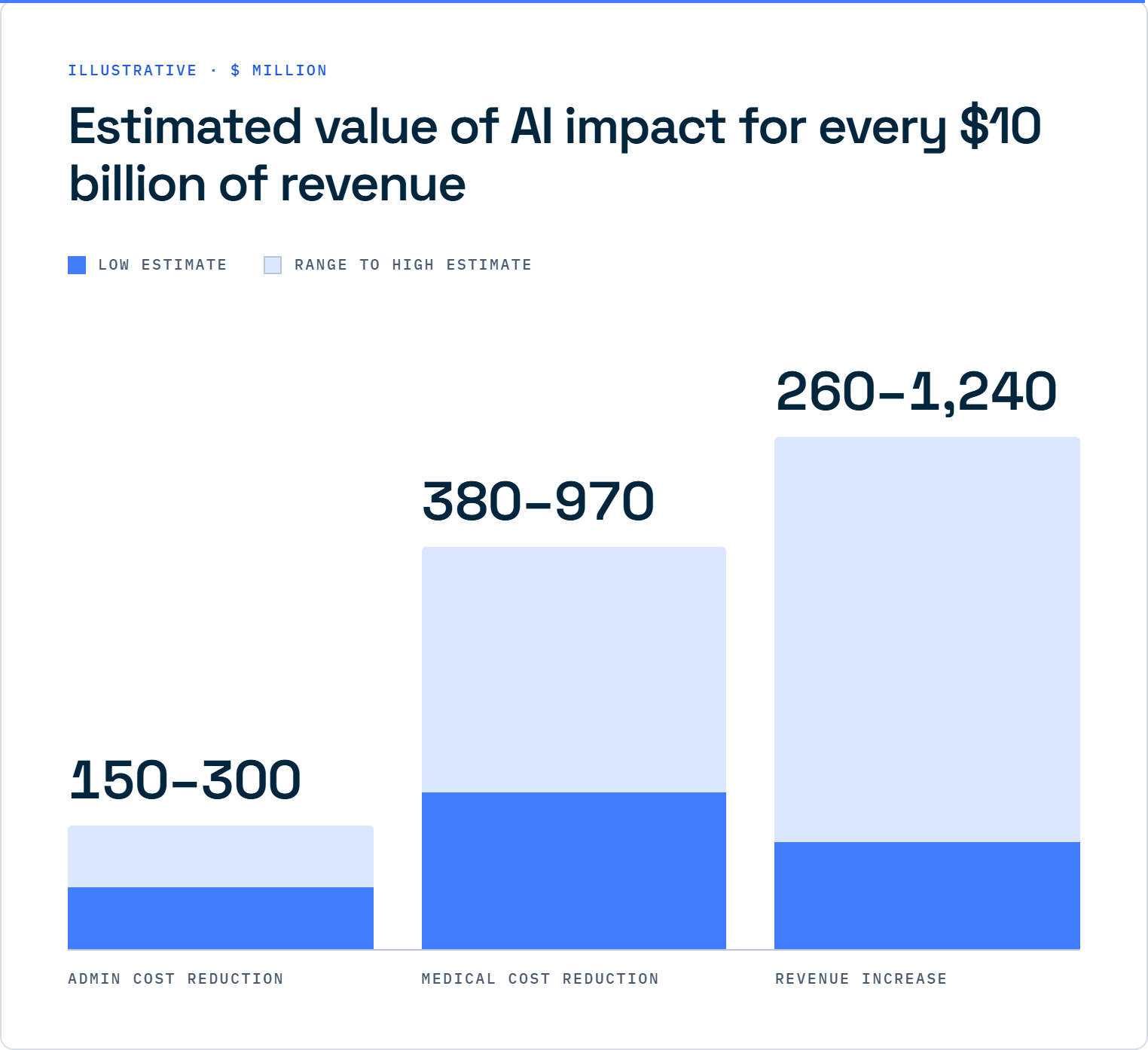
Here are the four issues that tend to derail payer transformation programs from delivering the expected results:
Payer transformation programs often try to automate processes before all the information flowing through them is structured and fit for the automation system.
For example, a plan buys a workflow engine and connects it to its claims system even though half its incoming documents are unstructured images with no reliable metadata. So, the automation fires on with incomplete or inaccurate data, and exception queues fill up. Then, staff still end up doing the manual work they were trying to bypass with automation.
Claims operations owns one system. IT owns another. Compliance owns the records retention schedule. And none of these systems interact with each other. That creates gaps where documents get lost, and metadata gets entered inconsistently.
When a transformation initiative is launched, connecting these systems can require significant integration work. Without clear ownership of those integrations and the processes that span multiple systems, it becomes harder to coordinate the changes needed to succeed at digital transformation.
Payers know they need to move off legacy platforms. Legacy consolidation and modernization is a common part of payer transformation efforts. But knowing it and doing it are different things.

Legacy systems carry decades of configuration, custom integrations, and institutional knowledge that may not be documented. So most plans decide to keep the old system running alongside the new one for a while. Then, the temporary parallel operation becomes permanent and stalls modernization efforts.
Many payers have already tried a transformation initiative that promised results and delivered only a partial implementation. When the next one comes along, operations teams can be skeptical, and for good reason.
They’ve seen new systems that didn’t integrate with existing workflows. They’ve seen automations that created more exceptions than they resolved. Getting buy-in for a second digital transformation attempt is harder because the organization remembers what happened the last time.
Payer digital transformation doesn’t stop at one project. It touches six operational domains, each with its own systems, stakeholders, and failure modes. Understanding what each one involves makes it easier to sequence the work properly.
This includes the claims adjudication engine, enrollment and eligibility systems, and billing infrastructure.
For many payers, some of these systems still run on platforms that were built or configured decades ago. Modernizing them usually means migrating to a newer platform or adding an integration layer around the existing one. Either way, core administration sits at the center of the payer’s technology environment, so modernization must account for the systems and workflows connected to it.
This is where documents enter the organization. Claims, attachments, prior authorization requests, appeals, grievances, and provider correspondence are some of the document types that typically come in. They can arrive by mail, fax, email, portal, or EDI, and they don’t all come structured or in the same format.
That makes the intake workflow an important part of any payer’s digital transformation. It helps ensure there’s no gap between what payers receive and what reaches their claims systems.
This covers prior authorization, concurrent review, case management, and disease management. These processes rely on clinical and administrative information moving between the plan and its provider network.
The CMS Interoperability and Prior Authorization rule (more on that below) is also pushing payers toward more electronic data exchange, with key API requirements taking effect January 1, 2027.
Payers that still handle prior authorization through fax-based workflows and phone queues face both operational inefficiencies and a looming compliance deadline.
This domain covers provider directories, credentialing, contracting, and network adequacy. Provider data can be difficult to keep accurate when it’s maintained across multiple systems and sources. A digital transformation effort therefore needs a reliable source of provider information that can feed the systems that use it, from the member portal to the prior authorization engine.
This is where members actually see the plan: portals, mobile apps, digital ID cards, telehealth, and communications. EOBs, benefit booklets, SBCs, and plan notices also fall within this domain.
Many payers start their digital transformation here because it’s the most visible part of the operation. But a better member experience still depends on the accuracy of the information behind it. A portal showing incorrect provider data or stale claims status is worse than having no portal at all.
This covers population health analytics, risk adjustment, quality reporting (HEDIS, Stars), fraud detection, and the data warehouse infrastructure that supports them. These capabilities depend on clean, consistent, and timely data. That makes the upstream domains, particularly intake, provider data, and core administration, important sources for the analytics layer.
The right sequence matters for your digital transformation project because each step lays the foundation for the next. Skip a step or do things out of order, and you risk automating bad data, connecting systems with inconsistent information, or building analytics on a foundation that can’t support them. Here’s the right sequence to follow:
Before you buy a platform or launch an initiative, you need to understand your information’s current state. Audit how documents and data enter the organization, where they live, how they’re indexed, and whether they’re accurate enough to automate against.
You’ll want answers to specific questions: How many intake channels do you have? What format does each one deliver? What percentage of incoming documents require manual data entry before reaching a downstream system? How many content platforms hold the same types of documents, and do they use consistent metadata?
This assessment gives you a readiness baseline that you can use to measure progress throughout the transformation. You can also use the maturity model discussed later in this piece to score where you stand.
Once you know where the gaps are, intake is the first thing to fix. You need incoming documents, regardless of channel, flowing into a structured stream with consistent metadata.
For most payers, that means consolidating paper mail, fax, email, and portal submissions into one intelligent document processing pipeline. This pipeline then classifies, extracts, validates, and indexes each document before it reaches a downstream system. And the keyword is “before.” A claims document that reaches the adjudication engine with the wrong member ID creates an exception that costs far more to fix downstream than it would at intake.
This step is also where AI and human validation can work together. Intelligent document processing can classify and extract data from many standard document types, but it can struggle with handwritten notes, poor-quality faxes, and documents that contain multiple record types. Subject matter expert validation catches what the machine misses and creates a feedback loop that can improve extraction accuracy over time.
Most payers have documents spread across multiple platforms. There’s usually a legacy ECM for older records, a newer system for recent claims, and shared drives for correspondence. Each often has its own metadata schema, access controls, and retention rules, making it hard to maintain a consistent view of all the information.
Consolidation means choosing one governed platform or a connected pair) and migrating everything into it. That often involves mapping fields across systems that were never really designed to interoperate, validating that records transferred correctly, and maintaining a chain of custody. Effectively accomplishing those 3 tasks can be hard, and that’s what makes data and content migrations tasking.
But get them done right and the payoff is a single source of truth for every document in the organization.
That means when compliance needs a retention report, they run it from one system. When a claims examiner needs documentation on an appeal, you find it in that same place with the right metadata. And when an auditor asks for a record, you produce it with a full audit trail.
With intake stabilized and content consolidated, you can start retiring legacy systems that the organization has been maintaining alongside newer platforms. That’s the step everyone agrees is necessary, but everyone is reluctant to do. And it’s understandable. Years of configuration, custom integrations, and undocumented dependencies can make shutting down those systems feel like the wrong move.
If that’s how you are feeling, try an incremental migration to reduce the risk of something going wrong. Move one function or document type at a time, validate that the new system handles it correctly, and then decommission the old one once the replacement has been in production long enough to prove itself.
This approach takes longer than simply cutting out the old systems, but it limits the risk of a failed migration disrupting production.
Cloud migration adds another layer to consider. If you’ve got on-premises ECM platforms that need to be moved to the cloud, you need clear answers on where the data lives, who can access it, and how it’s protected before migrating. This is especially important if your plan handles PHI.
Once your data is trustworthy, you can then build APIs and integrations to connect it to the partners and systems that need it. Think your claims system, care management platform, provider directory, and member portal.
That is where the CMS 2027 API requirements (covered below) come into play. The FHIR-based APIs required by the rule aren’t just a compliance checkbox. They’re a signal that the industry is moving toward interoperability.
For payers covered by the rule, building your APIs on clean, well-governed data will make it easier to meet the requirements and support the systems that depend on them.
This is the last step, and for good reason. With clean data, consolidated platforms, and working APIs, you can build workflows that run without constant human intervention. Workflow and process automation at this stage means you are routing claims to the right queue based on reliable metadata, triggering prior auth decisions based on complete clinical data and generating member communications from accurate benefit information.
When you do this automation step last, you’ll see a clear difference in your exception rate. Automation built on clean, well-governed data produces little to no exceptions and less manual rework. That’s the efficiency gain that makes your digital transformation sustainable.
This model gives you a way to score where your organization’s information stands and spot the gaps to close before moving to the next step:
That gap between where you stand and Level 4 is the information-readiness gap, and your ability to close it determines whether your automation investments deliver the expected results.
The CMS Interoperability and Prior Authorization Final Rule (CMS-0057-F) was finalized in January 2024. It requires certain payers to implement and maintain FHIR-based APIs, with the main API requirements taking effect January 1, 2027. CMS estimates the rule will save approximately $15 billion over ten years by reducing friction in the prior authorization process.
Medicare Advantage organizations, Medicaid managed care plans, CHIP managed care entities, and Qualified Health Plan issuers on the Federally Facilitated Exchanges. State Medicaid and CHIP fee-for-service programs have until January 1, 2027, to comply.
The rule mandates three new FHIR-based APIs: the Provider Access API, which gives in-network providers access to specified patient claims, encounter data and clinical information; the Payer-to-Payer API, which lets plans exchange data when a member switches coverage; and the Prior Authorization Requirements, Documentation, and Decision (PARDD) API, which lets providers submit, track, and receive decisions on prior auth requests electronically.
It also expands the existing Patient Access API to include certain prior authorization information.
Urgent prior auth requests must receive a decision within 72 hours, and standard requests must receive a decision within 7 calendar days, down from the previous 14-day window. These requirements already took effect on January 1, 2026.
Payers must publicly report approval and denial rates, processing times, and denial reasons annually. They must also disclose specific denial reasons to providers at the time of denial.
P.S.: If you’ve followed the sequencing above, you’ve already done much of the foundational work that ensures these APIs connect to clean data. So compliance becomes a natural extension of your previous digital transformation efforts.
But if you haven’t and still have data quality and interoperability problems, for example, an information-readiness gap, the APIs will only expose those problems to the members and providers relying on the data they return.
Every department that handles documents tends to develop its own method of storing and indexing them. And those methods rarely match. Claims might use one system with one set of index fields, Appeals another, while Provider Relations relies on a shared drive.
That means locating a document can become a completely different process, depending on which department you need to pull it from. This makes it difficult to set up consistent automation workflows for processes that cross departmental lines.
Inconsistent provider data is a well-known industry challenge, but member data can have similar problems. A member’s demographics might differ between the enrollment system, claims system, and member portal, and the same can happen with provider information across credentialing, contracting, directory, and claims systems.
Without a reliable source of truth, downstream systems can inherit inconsistent information from the systems feeding them. That can affect everything from claims processing to what members and providers see through digital channels.
Health plans must comply with federal and state retention requirements, which vary by document type, line of business, and jurisdiction.
Add legal holds to those retention mandates, and you’ve got another layer of complexity around how you must handle information and documents. For example, a document that would otherwise be eligible for destruction has to be preserved if it’s subject to litigation or a regulatory inquiry.
Managing all those requirements across multiple platforms can make it difficult to apply and monitor retention policies consistently. That’s why most payers consolidate their information onto a single governed platform to simplify records management and easily meet regulatory obligations.
Organizational leaders may hesitate to approve a transformation initiative when they’re not convinced the time, cost, and disruption will be worth it.
To get past that resistance, start with a smaller, measurable project and show early wins before asking the organization to commit to the full roadmap. A measurable improvement in intake accuracy or a claims queue that actually clears will do more for buy-in than any executive presentation.
DataBank IMX is a document and data operations firm for regulated U.S. organizations. We handle much of the foundational work behind payer digital transformation, including intake, content management, and legacy migration steps that often stall programs.
Our approach maps directly to the sequence above. We start with your information readiness, assessing how documents and data enter your organization and where data inconsistencies start.

We then stabilize intake through high-volume document scanning, intelligent document processing, and subject matter expert data validation. Your claims, correspondence, and attachments reach downstream systems clean and indexed.
Next, we consolidate your content platforms through data and content migrations, mapping metadata across legacy and modern systems and maintaining chain of custody. We then host and manage the resulting environment through ECM cloud hosting and managed services.
Our entire operation is US-based, so we can handle your protected health information that has data-residency requirements. We also support HIPAA compliance through SOC 2 Type II certified operations.
If your transformation program has stalled because the underlying information isn’t ready, we can solve that. Connect with our team to start your information readiness assessment and see the gap you have to close.
If your plan has already invested in a digital transformation initiative but the result hasn’t been promising, take a closer look at how your current intake process is set up.
Healthcare payer digital transformation is a sequenced set of operational changes that starts and depends heavily on the underlying information before working outward toward automation, analytics, and interoperability.
Audit how documents and data enter the organization, where they live, and whether they’re accurate enough to automate against. Only when that intake process has been unified across all channels, document types, and formats should you move on to the next step in the sequence.
Don’t want to handle all this alone? DataBank’s transformation experts can help you assess your information readiness and build the foundation for the next stage of your digital transformation.
Start with an information readiness assessment. Check where documents and data enter your organization, where they are stored, and whether they’re accurate enough to automate against. That assessment tells you which of the six domains needs attention first and keeps you from automating on top of bad data.
They can fail when payers automate on top of poor-quality information. If incoming documents aren’t consistently classified, extracted, and validated before reaching downstream systems, the automation produces more exceptions and manual work. Siloed ownership, legacy dependency, and change fatigue can also cause program failures.
The CMS Interoperability and Prior Authorization Final Rule (CMS-0057-F) requires affected payers to implement three FHIR-based APIs by January 1, 2027. These include the PARDD API, the Provider Access API, and the Payer-to-Payer API. CMS estimates it’ll save approximately $15 billion over ten years.
It means your documents and data are accurate, consistently indexed, and housed in governed systems that downstream processes can rely on. A plan with high information readiness can automate with confidence because the data feeding its workflows is clean. A plan with low readiness will see high exception rates and need lots of manual rework.
It depends on the scope and the starting point. A realistic timeline for the full sequence is two to four years for a mid-sized plan. Trying to compress it by skipping steps, especially intake stabilization and content consolidation, is how programs fail after you’ve invested significant time and money.
Digitizing your insurance mailroom helps you process incoming documents faster without scaling headcount every time volume spikes. One tested approach is to:
Most health plans outsource this to a specialized outsourced processing partner like DataBank because mail volume spikes mostly happen during open enrollment. Staffing at max capacity just for that peak means paying for idle capacity for much of the rest of the year.
You’d think most providers and members would send supporting documentation electronically by now. But according to data reports, that’s still not the case.
For example, the 2024 CAQH Index found that only 32% of medical claim attachments were submitted fully electronically. The other 68% were still handled through manual channels like phone, mail, fax, and email.
So even when the underlying claim is electronic, your team may still be opening envelopes, processing faxes, downloading email attachments, and sorting portal submissions before the information can even enter the right workflow.
And that manual intake becomes an even bigger problem when volumes spike. During the Medicare Annual Enrollment Period, from October 15 through December 7, enrollment applications, plan change requests, and supporting documents can reach three to five times normal volume. Your manual intake process that works during a normal month can quickly become a bottleneck when the workload spikes.
A digital mailroom lets you handle that volume without relying on manual sorting and routing for every document. It brings paper and digital documents into one intake workflow, then uses scanning, classification, data extraction, validation, and workflow automation to get the right information to the right system or team.
Let’s break down what that looks like in an insurance operation.
DataBank has been processing mail for insurance companies for more than 30 years.
Central States Health and Life Co. of Omaha (CSO) partnered with us to move from a paper-based mailroom to a digital workflow. After implementation, their claims processing got faster, pending-case backlogs shrank, and staff could access incoming documents remotely even when their offices closed.
CSO has since expanded their work with us into investment approvals, new account onboarding, and accounts payable.
Outsourced Mailroom Processing is one of our core intake services, and this article draws on our experience helping insurance companies move from manual mail handling to a more streamlined digital intake workflow.
An insurance digital mailroom is a system that converts every piece of incoming physical mail into an indexed digital record and delivers that record to your claims, enrollment, or correspondence system the same day it arrives. It can either be operated in-house or outsourced.
Using a single claim attachment envelope as an example, here’s how it works.
A member mails a paper claim with, for example, three pages of supporting medical records to your P.O. box. A prep operator opens it, removes staples, and separates the claim from the attachments. Both get scanned and quality checked.
Classification software tags the claim as an HCFA-1500 claim, and the extraction layer pulls the member ID, date of service, provider NPI, and billed amount. The system then matches the member ID against your enrollment database, confirms that the policy is active, and indexes the scanned image under that member’s record. The indexed claim is then sent to your claims processing queue within hours, not days, without losing chain of custody or violating HIPAA.
This same digital mailroom workflow can be applied across the different document types your plan receives.
Adopting an insurance digital mailroom helps you:
A large North American carrier can process 10 million or more document images annually through its mailroom alone, and during AEP, that volume can jump 3 to 5x. If your team is staffed for a normal month, a spike like that can quickly overwhelm your intake operation. A digital mailroom gives you the capacity to absorb higher volumes without having to triple headcount for two months.
Paper-based mailrooms take an average of 5 to 7 days to go from envelope receipt to indexed record. But a digital mailroom operating at a standard SLA can complete the process within 2 business days, and priority items can hit the queue within 4 hours.
For grievances and appeals, where your plan may face a 30-day resolution deadline under CMS rules, getting documents into the right workflow sooner gives your team more time to actually work the case.
A digital mailroom logs every touch or change made to a document, from the moment the envelope arrives through scanning, classification, and delivery. That gives you a digital chain of custody you can pull up in seconds when an auditor asks for it, instead of digging through filing cabinets.
Your claims adjusters, enrollment processors, and compliance staff sit in different offices, and some may work from home. They shouldn’t have to wait for a physical folder to make its way from the mailroom to their desk or apartment before they can get work done.
A digital mailroom ensures that once a document is scanned, indexed, and routed, the right team can access it from wherever they work.
Health plan mailrooms handle a wide mix of document types, each with its own index fields. Here are the key ones to understand:
| Document type | Common index fields | Why it matters |
|---|---|---|
| Claims and attachments (CMS-1500, UB-04) | Member ID, provider NPI, date of service, billed amount, claim number | These are the highest-volume inbound documents. Missing or misread index fields delay adjudication. |
| Explanation of Benefits (EOBs) | Member ID, claim number, date of service, allowed amount, patient responsibility | EOBs returned by members often include attached disputes. Accurate linking to the original claim is critical. |
| Grievances and appeals | Member ID, date of grievance, category (clinical, administrative, billing), resolution deadline | CMS requires tracking and resolution within 30 days (standard) or 72 hours (expedited). Late intake shortens your working window. |
| Enrollment forms | Member name, SSN or application ID, plan selected, effective date, group number | High volume during AEP. Errors here affect coverage effective dates and downstream eligibility files. |
| Provider correspondence | Provider NPI, TIN, contract reference, document type (credentialing, contract amendment, dispute) | Misrouted provider mail can stall credentialing or trigger contractual disputes. |
| Checks and remittances | Payer name, check number, amount, date, associated claim or invoice numbers | Checks require separate handling (Image Cash Letter or Remote Check Deposit) before the remittance advice gets indexed. |
Understanding the index fields associated with each document helps you avoid getting those fields wrong at intake, which could create downstream errors. A claim indexed under the wrong member ID, for example, can land in the wrong queue and get adjudicated against the wrong coverage, generating a denial your team then has to rework.
The right option depends on a few specific factors:
| Factor | Leans towards in-house management | Leans towards outsourcing |
|---|---|---|
| Daily mail volume | Under 500 pieces/day with stable volume | Over 500 pieces/day or highly variable |
| PHI exposure comfort | Your compliance team wants all PHI handled on-premises | You’re comfortable with a BAA and SOC 2 Type II-certified facility like DataBank’s. |
| Seasonality | Flat volume year-round | AEP or open enrollment creates 3 to 5x spikes |
| IT capacity | You’ve got staff to maintain scanners, OCR software, and system integrations | You’d rather not own the scanning infrastructure |
| Capital vs. operating cost | You can absorb the upfront investment in equipment and space | You’d prefer a per-piece operating expense with no capital outlay |
| Speed to launch | You’ve got 6 to 12 months to build and test | You need to be live in weeks |
Most mid-size health plans decide to outsource because the seasonality problem alone can make the math work. Staffing an in-house mailroom for just AEP peak means carrying excess capacity for 10 months of the year, and that fixed overhead adds up quickly.
The hybrid option is worth considering too. Some plans keep a small in-house team for urgent or sensitive documents, like expedited grievances and legal correspondence, then outsource the high-volume, steady-state work. That gives them direct control over the most time-sensitive items while letting the outsourced provider absorb the rest of the volume.
Mail arrives at a dedicated P.O. box or gets forwarded from your existing address. Most outsourced providers recommend a dedicated P.O. box so mail goes directly to the processing facility without an extra forwarding step, which can cut a day or more from turnaround time.
Operators open every envelope, remove staples and paper clips, unfold documents, and repair any tears. If an envelope contains more than one document, separator sheets are used to keep the records distinct. For example, one envelope might contain a claim form and a separate appeal letter. If those documents aren’t separated properly, they could be scanned together and indexed incorrectly.
The documents are scanned to produce a clear, legible digital image. Color scanning may be used for documents like checks or medical records where color annotations matter. Quality checks at the scanning stage catch blank pages, skewed images, and double feeds before the documents move further into the workflow.
Intelligent document processing analyzes each scanned image and assigns it a document type. A CMS-1500 gets tagged as a professional claim, and a UB-04 as an institutional claim. A member letter gets tagged as correspondence or, if it meets certain keywords, as a grievance. Classification accuracy at this stage directly affects everything downstream, so most operations send low-confidence classifications for human review before the document moves to the next step.
Once the document is classified, the system extracts the index fields associated with that document type. For a claim, that might include the member ID, provider NPI, date of service, and billed amount. For an enrollment form, it could include the member name, plan selected, and effective date.
Extraction can be fully automated for structured forms like a CMS-1500 with fixed field positions. For unstructured documents like a handwritten appeal letter, extraction is semi-automated, and a human validator confirms the extracted data.
The extracted data gets attached to the scanned image as an index record. This makes the document searchable and routable in your claims or enrollment system.
The system checks information like the extracted member ID or policy number against your enrollment database to confirm the record belongs to an active member. If the information doesn’t match an existing record, the document is flagged and routed to the exception queue for review.
Documents that fail classification, extraction, or matching land here. A subject matter expert reviews each exception, corrects the data, and releases the document back into the workflow.
N.B.: You don’t want this queue growing. If more than 10 to 15% of your daily volume is hitting exceptions, your classification rules or extraction templates need tuning.
The indexed image and its metadata are delivered to your claims system, enrollment platform, or ECM repository. This may happen through SFTP, an API integration, or a direct import into platforms like Hyland OnBase or Box. The document is now available to the team responsible for acting on it.
Scanned images and their index data are retained according to your plan’s retention schedule and applicable state and federal regulatory requirements. Your digital mailroom provider should also be able to retrieve any retained records on request within your SLA window.
After scanning and quality verification, physical originals are stored securely for a hold period, typically 30 to 90 days. They’re then destroyed under a documented destruction protocol. The hold period gives your team time to flag any scanning issues before the originals are gone.
Most outsourced digital mailroom providers quote per piece or per page, and several factors shape what that rate looks like for your operation.
The main factors that affect your cost include:
To see whether outsourcing makes financial sense, compare the per-piece rate with your fully loaded in-house cost. That includes staff salaries and benefits, scanner leases and maintenance, OCR and IDP software, facility space, and management overhead. This gives you a more realistic basis for comparing the two models.
Every document in a health plan mailroom is presumed to contain protected health information (PHI). That means your digital mailroom operation, whether in-house or outsourced, must meet HIPAA’s Administrative, Physical, and Technical Safeguard requirements. These include:
The average civil monetary penalty for a mailing-related HIPAA violation is $212,000, and Tier 4 penalties can reach over $2.1 million per violation category. So, getting any of these regulatory requirements wrong isn’t just an audit risk. It could become a huge financial burden.
If your exception rate runs above 10 to 15% of daily volume, something may be wrong upstream. That could be poor document quality, outdated classification rules, or index field templates that don’t match your current forms. Fixing the root cause is usually more effective than simply adding staff to the exception queue.
When you transition from an in-house mailroom to an outsourced provider, some documents will inevitably be in transit to your old address. Plan for a 30- to 60-day overlap period where both addresses remain active, and set up forwarding from the old address to the processing facility. Otherwise, documents can fall through the cracks during the transition, creating exactly the kind of gap an audit will flag.
Even with an outsourced provider, you still need to plan for AEP and open enrollment. Give your provider volume forecasts at least 60 days before the enrollment period so they can plan staffing and capacity. You want a provider that can handle a significant increase in daily volume without compromising turnaround times or quality.
Getting your index fields right from the start saves enormous rework later. Every document type needs a defined set of fields, and those fields need to match exactly what your downstream system expects. A mismatch (like capturing “date of service” when your claims system calls it “service date”) creates a manual mapping step that slows delivery. Align field names with your claims or enrollment system before the digital mailroom goes live.
Paper is only one part of what enters a health plan. Your mailroom will also receive faxes, email attachments, portal uploads, and EDI transactions (837 claims, 834 enrollment, 835 remittance).
But the challenge isn’t managing each channel individually. It’s bringing them into a single intake operation where you can classify, validate, route, and track incoming information from all channels using the same set of rules.
That’s what a consolidated intake operation gives you. Without one, you end up with parallel processes, separate queues, and limited visibility into everything that comes in each day. A member might call about a claim submitted by fax, for example, but the team handling paper mail would have no visibility into it.

Instead of treating each channel as a separate intake source and having different teams translate and process them, build one intake operation that brings information from all channels together before moving it into downstream workflows.
DataBank is a US-based data infrastructure and intelligent information management company with SOC 2 Type II-certified processing facilities in Pennsylvania, Indiana, Texas, and Massachusetts.
We offer Outsourced Mailroom Processing as a core intake service. We centralize physical mail, email, fax, and other intake channels into one managed process so documents are captured, classified, validated, and routed from a single operation. Our intelligent document processing then extracts key data points with AI, and our subject matter expert validators review anything the system flags as low-confidence.
For health plans, we handle the document types covered in this guide, from claims and enrollment forms to grievances and provider correspondence. We index them against the fields your claims or enrollment system expects. We also handle data migration if you need to move legacy records to a new platform. Additionally, we provide ECM hosting for plans that want us to manage the repository where those records live.
If you’d like to talk through whether outsourcing makes sense for your plan’s volume and document mix, connect with our team today.
If your team is struggling with growing volumes, seasonal spikes, or slow document turnaround, a digital mailroom could help you handle intake more efficiently.
Our experts can assess your current mailroom operation, document mix, and system requirements, then help you determine whether moving to a digital mailroom makes sense for your plan.
Message our team to start the conversation.
A digital mailroom is a system that converts incoming physical mail into indexed digital records and routes them to the right business system. It can also handle faxes, email, and portal uploads. With a digital mailroom, every document gets scanned, classified, and delivered electronically, usually the same day it arrives.
Most providers can have you live in a few weeks. But the exact timeline depends on how many document types you need to process and how complex your indexing and integration requirements are. The biggest variable is usually integration testing with your downstream system (claims platform, enrollment system, or ECM), not the scanning setup itself.
Yes, it can be, if your provider has the appropriate safeguards in place to protect PHI. You’ll need a signed BAA covering the full document lifecycle, from receipt through destruction, along with appropriate physical, administrative, and technical safeguards. Look for SOC 2 Type II certification, chain-of-custody logging, and encryption in transit and at rest. And ask for current audit reports before signing.
It depends on your document mix, prep complexity, the number of index fields per document type, your exception rate, and turnaround requirements. Providers typically quote per piece or per page once they have reviewed a sample of your mail. Connect with our team for a quote based on your volume.
They’re held securely for 30 to 90 days, then destroyed under a documented protocol. You then keep the digital copies for 7 to 10 years per most health plan retention schedules.
Government process automation replaces manual paper routing and data entry with software that moves work through approval chains, while keeping audit trails intact. Your tested approach is to:
DataBank can help you easily put these steps into practice, from digitizing incoming records to connecting the information they contain to the systems your agency relies on.
If you work at a government agency, you’ve probably experienced this scenario many times.
Someone submits a public records request, but the required documents are buried in filing cabinets or scattered across systems that don’t talk to each other. Your staff then spends hours tracking them down, even as other requests keep piling up.
The scale of this problem is clear from the federal FOIA backlog, which reached 339,000 cases in fiscal 2025, up from 267,000 the year before, a 27% jump in unfulfilled public records requests.
And if you think hiring more staff is the easy fix, think again. Because federal civilian employment dropped by roughly 348,000 positions between October 2024 and April 2026.
The better solution is to automate repetitive processes and take manual document sorting and routing off your staff’s plate. This article teaches you how to do that without breaking compliance rules.
DataBank IMX has scanned, digitized, and built workflows that automatically route government records through approval chains for 30+ years.
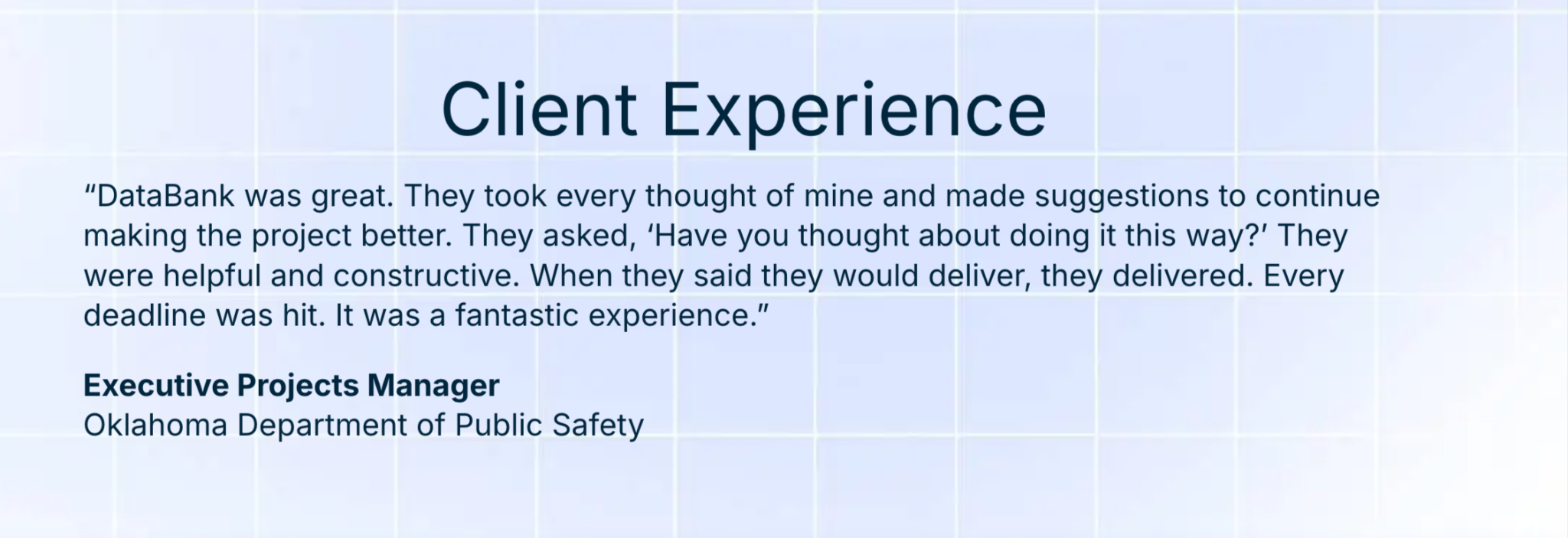
This article draws on our government document processing operations, which include secure transport, a documented chain of custody, quality validation, and delivery into the systems your agency already uses.
We do all of that from three owned scanning facilities, and we are SOC 2 Type II certified.
Government process automation uses software to handle the repetitive, rule-based work that staff still handle manually. It routes documents and decisions through government approval chains without manual handoffs.
Without automation, a single permit application at a county planning office might look like this.
A clerk keys the information into the permitting system, photocopies the application, and walks it down the hall to the zoning reviewer. If zoning approves it, someone routes it to the building department, and eventually the whole thing gets scanned and filed.
In this unautomated setup, every handoff is manual, and the paper is the only record until someone gets around to scanning it.
But if that same application were automated, the paper chase would be eliminated, nobody would have to rekey anything, and the audit log would stay complete on its own.
The process would become a digital workflow whereby the resident submits the application, and intelligent document processing extracts the relevant information and flags anything missing.
From there, the system routes the application to the right reviewer and records each action. Once the permit is approved, the system automatically files and indexes it, then stores it according to the applicable retention schedule.
With automation, you can eliminate the manual routing and data entry that eat your staff’s time so they can focus on work that actually needs judgment.
Five pressures are pushing government agencies toward automation, and they all reinforce each other:
Federal civilian employment shrank by roughly 11.5% from October 2024 through April 2026. Retirements and hiring freezes continue to shrink the workforce, and private-sector competition makes backfilling even harder.
As staffing constraints persist, agencies are struggling to keep up with growing workloads and backlogs. Automation can help by handling repetitive intake, routing, and review tasks that would otherwise consume staff time. For example, the VA reported that AI-assisted review helped reduce average claims-processing time by 42%, from 141 days in January 2025 to 81 days by March 2026,
People increasingly expect to complete everyday tasks online, from filing taxes to applying for permits. When government services still depend on paper forms, manual handoffs, or in-person visits, the experience feels slow and unnecessarily difficult. Automating routine processes can make services faster and easier to access without requiring agencies to add staff for every increase in demand.
Federal agencies also face growing pressure to modernize their technology and data practices. Executive Order 14179 directed agencies to remove barriers to AI adoption, while subsequent OMB guidance requires agencies to update policies around IT infrastructure, data, cybersecurity, and privacy to support responsible AI use.
Records management adds another requirement: federal records must be assigned retention periods and ultimately destroyed or transferred to the National Archives according to approved schedules.
State and local agencies received roughly $350 billion in ARPA funds, with a spending deadline of December 2026. If you haven’t committed those dollars yet, the spending window’s narrowing fast.
Across all your government processes, here’s where automation can be applied:
| Process | What can be automated? | Why it automates well |
|---|---|---|
| Permitting and licensing | Building permits, business licenses | Standardized forms, clear approval criteria |
| Benefits administration | Claims intake, eligibility verification | Repetitive data entry, rule-based decisions |
| Records management | FOIA responses, retention scheduling | Paper records create risk at scale |
| Procurement | Invoice matching, vendor onboarding | High rekeying volume, clear matching rules |
| Case management | Constituent complaints, inspections | Multiple handoffs, long cycle times |
| HR and onboarding | Benefits enrollment, credential checks | Document-heavy, deadline-driven |
The processes that are easiest to automate tend to follow a clear pattern: they involve manual data entry, paper or digital documents, and need routing through multiple approvers. If a process also requires you to retain records on a set schedule, that’s another strong reason to consider automation.
The automation principles are the same at every agency level, but the compliance rules aren’t. Here’s what changes:
| Requirement | Federal | State and local |
|---|---|---|
| Records retention | NARA General Records Schedule | State-specific schedules (vary widely) |
| Cloud authorization | FedRAMP required | StateRAMP or GovRAMP (where adopted) |
| Criminal justice data | CJIS Security Policy | Same CJIS Security Policy |
| Procurement path | GSA MAS contracts | State purchasing cooperatives, local RFPs |
| Data residency | May require US-only hosting | Often requires in-state or US-only hosting |
The automation tools your agency adopts have to meet the compliance requirements for your specific jurisdiction, data, and use case. A platform that’s FedRAMP-authorized, for example, doesn’t automatically satisfy CJIS requirements, and CJIS compliance doesn’t make a platform FedRAMP-authorized.
That’s why compliance should be part of your tool evaluation from the start, rather than something you check after selecting a platform. Identify the requirements that apply to the process, then confirm that each tool and its hosting, security, records management, and procurement model can meet them.
Government process automation often involves stacking technology layers on top of the systems your agency already uses. Here are the common layers and some examples of tools in each:
| Layer | What it does | Common tools |
|---|---|---|
| Capture and extraction | Converts paper into searchable data | ABBYY FlexiCapture, Kofax, IDP platforms |
| Content management | Stores and indexes documents with retention rules | Hyland OnBase, Box, SharePoint, Laserfiche |
| Workflow automation | Routes documents through approval chains | OnBase Workflow, Power Automate |
| System integrations | Connects automation to line-of-business systems | APIs, middleware, orchestration tools |
| Security and compliance | Encrypts data, controls access, logs actions | SSO, role-based access, audit logging |
| Cloud hosting | Hosts the content and automation layer | FedRAMP/StateRAMP cloud, ECM hosting |
When setting up your stack, either internally or with a technology partner, lean toward a platform-agnostic approach. That gives you flexibility to work with the systems already in place instead of locking your automation to one vendor.
If your agency already runs OnBase, for example, you can build automation around it. If you’re using Box or SharePoint, you can connect those systems through different integrations. The winning stack makes the systems you already have work together, not replace them just to automate a process.
You can’t automate all your government processes at once, so start with the ones where automation can deliver a clear operational win. To identify them, score each process on four factors:
Processes that score high on the first three and low on complexity are your best starting points. Permit applications, benefits intake, invoice processing, and records requests tend to fit this profile.
Sea Girt, New Jersey, gives a useful example. The borough automated its zoning permit application and issuance process and achieved an 80% faster entry into its system, reducing entry time from five minutes to one.
That’s a high-volume, self-contained process with a clear before-and-after, and it’s the kind of win that builds support for the next automation phase.
One important rule for this step: Don’t start with processes that cross multiple agencies or require statutory changes. Those are worth automating eventually, but trying to prove the automation concept on a multi-agency workflow is a recipe for a stalled pilot.
Automation breaks down if you don’t fix the messiest part of your operation: the intake point where paper, email, fax, and digital submissions all arrive.
Whatever information you capture at intake is what moves through the rest of the workflow. So if that info is wrong, incomplete, or outdated, automation just moves bad information downstream faster.
So, implement high-volume document scanning to convert paper documents into structured digital data, and outsourced mailroom processing to handle sorting and routing. From there, use intelligent document processing to extract key fields from PDFs and scanned images so nothing needs rekeying.
The goal here is simple. Get every incoming document into the same structured digital pipeline within hours. Everything downstream depends on this step being accurate.
You probably can’t replace your core systems overnight, and you shouldn’t have to. Legacy ERP and permitting systems hold years of data and institutional knowledge, and replacing financial systems can be costly and disruptive.
The better approach is to build an integration layer between your legacy systems and new automation tools. This layer pulls data from your existing systems, feeds it into automated workflows, and pushes the results back so those systems stay up to date.
If you already run a platform like OnBase, you may be using only a fraction of its capabilities. Find a technology partner like DataBank that can configure what you already have, set up the necessary integrations, and make your existing systems work harder without replacing them.

Every automated government process has to produce a complete audit trail and follow a retention schedule.
For audits, your system should log key actions on each document so you can trace who accessed, changed, approved, or routed it and when. That gives you a clear record of what happened if a decision is challenged or you need to demonstrate compliance.
For retention mandates, NARA’s General Records Schedule sets minimum retention periods for broad record categories at the federal level. You can set your own schedules for records the GRS doesn’t cover. For your federal agency records, attach an approved disposition authority to each series so your automation system knows what to keep, for how long, and what happens when that period ends.
State and local retention rules vary widely. Some states mandate seven-year retention for financial records, while others require permanent retention for certain land records. If you are a state or local agency, your automation system must enforce those rules automatically, flagging records for review or destruction when their retention period expires.
Compliance and records management is where automation pays for itself, because the manual alternative is slower and more expensive, and mistakes are much harder to catch.
Government automation projects often start with a paper backlog that needs to go digital, and that’s where DataBank starts too.
We handle high-volume scanning and intake, then implement platforms like OnBase and Box for content management. From there, we build the automated workflows that connect intake to disposition, with audit trails and retention rules built in from day one.
Because our entire workforce is US-based, we can meet CJIS data-residency requirements without subcontracting. We’re also platform-agnostic, so if your agency already has a system in place, we’ll build on it rather than have you replace it.
If you’d like to talk through what automation could look like for your government agency, get in touch with our team.
Government process automation is a large program, so don’t try to do it all at once.
The best way to start is by picking one high-volume, document-heavy process that’s causing visible pain. Audit it, fix the data intake, automate it, and measure the difference compared to your pre-automation baseline. Then use that win to establish the next automation project.
And you don’t have to do it alone. Our team can help you assess your current processes, digitize and organize incoming documents, integrate your existing systems, and build workflows that fit how your agency already operates. Talk to our automation experts to identify your first automation opportunity.
Robotic process automation handles repetitive digital tasks like copying data between screens and generating reports. Intelligent document processing reads unstructured documents, like scanned forms and PDFs, and converts them into structured data your systems can use. Government automation programs often need both because the workflows mostly start with paper or other unstructured documents before moving into digital systems.
Federal agencies need FedRAMP-authorized cloud services for systems that store or process federal data. State and local agencies follow their own standards, which may include StateRAMP or GovRAMP. Not every tool needs its own authorization, but the hosting environment and any system that touches regulated data does.
A single-process pilot can go live in 8 to 12 weeks if the data’s clean and the scope’s tight. Broader programs that span multiple departments tend to take 6 to 18 months with phased rollouts. The biggest variables are the data preparation and buy-in, not the technology.
Yes. You can automate the data gathering, routing, and documentation around a discretionary decision without automating the decision itself. A building inspector can still decide whether to approve a variance, while the system automatically gathers the application and supporting documents, routes them to the right reviewer, and presents the relevant case history.
Claims processing automation removes the manual re-keying, system-switching, and routing that slow down claims before they even reach an adjudication engine. To do it the right way:
DataBank can help you easily put these steps into practice, from capturing and processing incoming claims documents to validating the data and routing it into your existing systems.
Before even a single health plan claim can be manually processed and paid, your claims team has to reconcile information across eligibility data, medical codes, supporting documentation, and payer-specific rules.
Multiply that across the thousands of claims you receive each day, and the administrative workload adds up fast. And so does the cost of the staff time required to keep those claims moving.
In fact, the 2024 CAQH Index found that U.S. healthcare still spends roughly $90 billion a year on routine administrative transactions. An estimated $20 billion in savings is also available just by switching from manual workflows to electronic ones.
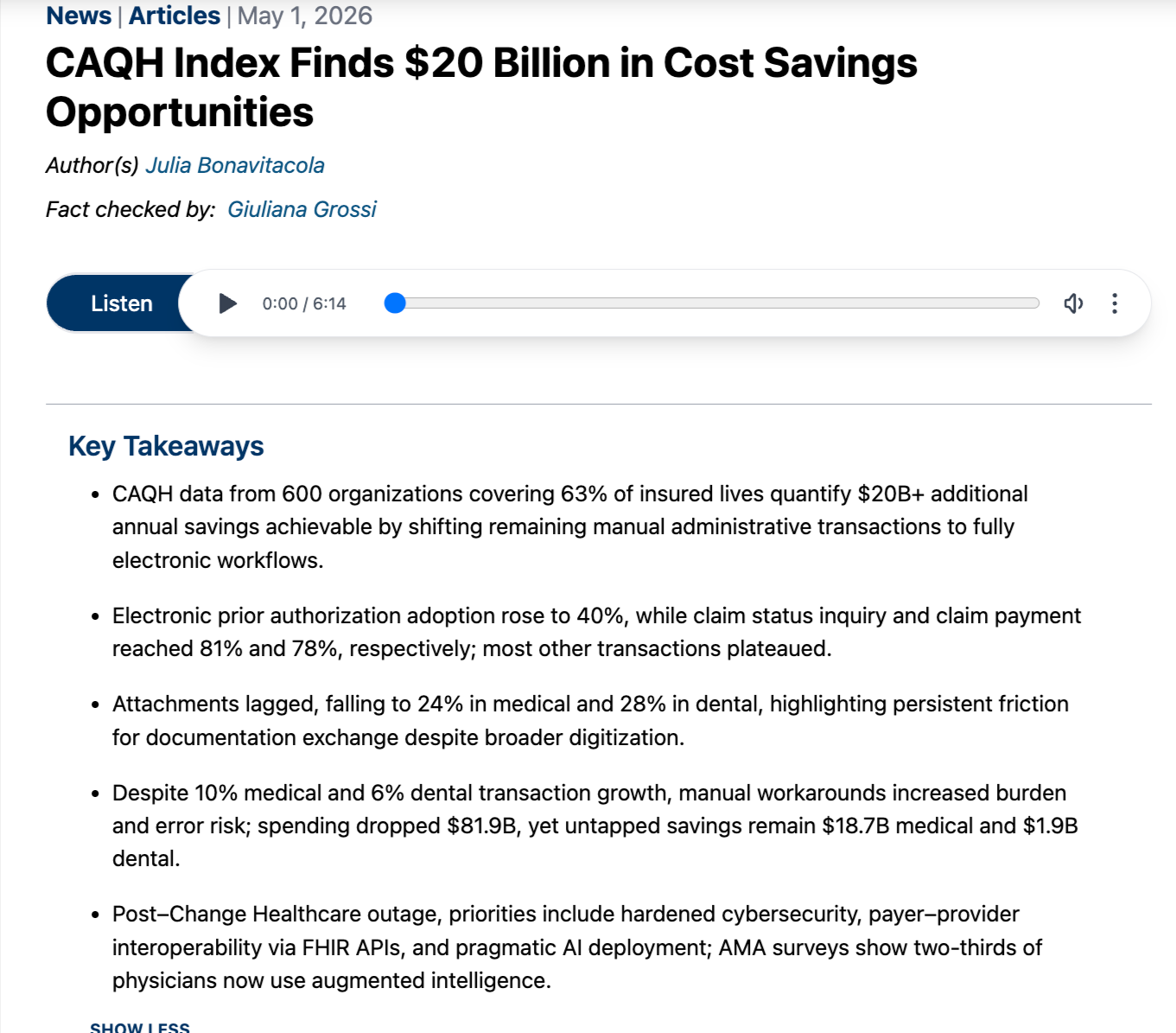
And that’s only the financial cost.
Operationally, manual claims processing involves handoffs between multiple people and teams. Each handoff creates another opportunity for errors to compound, denials to increase, and processing times to stretch. And when claims processing slows down, providers wait longer to get paid, and members wait longer for answers.
The obvious fix is to automate your claims processing. But that doesn’t mean ripping out your core administration system and plugging in another piece of software. It means building automation around the system you already use, so routine work moves faster while your claims professionals stay in the loop where human judgment is needed. This article teaches you how to do exactly that.
DataBank has processed claims-related documents for healthcare payers for over 30 years. For one national healthcare payor division, we processed 3.5 million images in one month across 16 payer clients, with 100% SLA adherence on fraud and claims integrity communications.
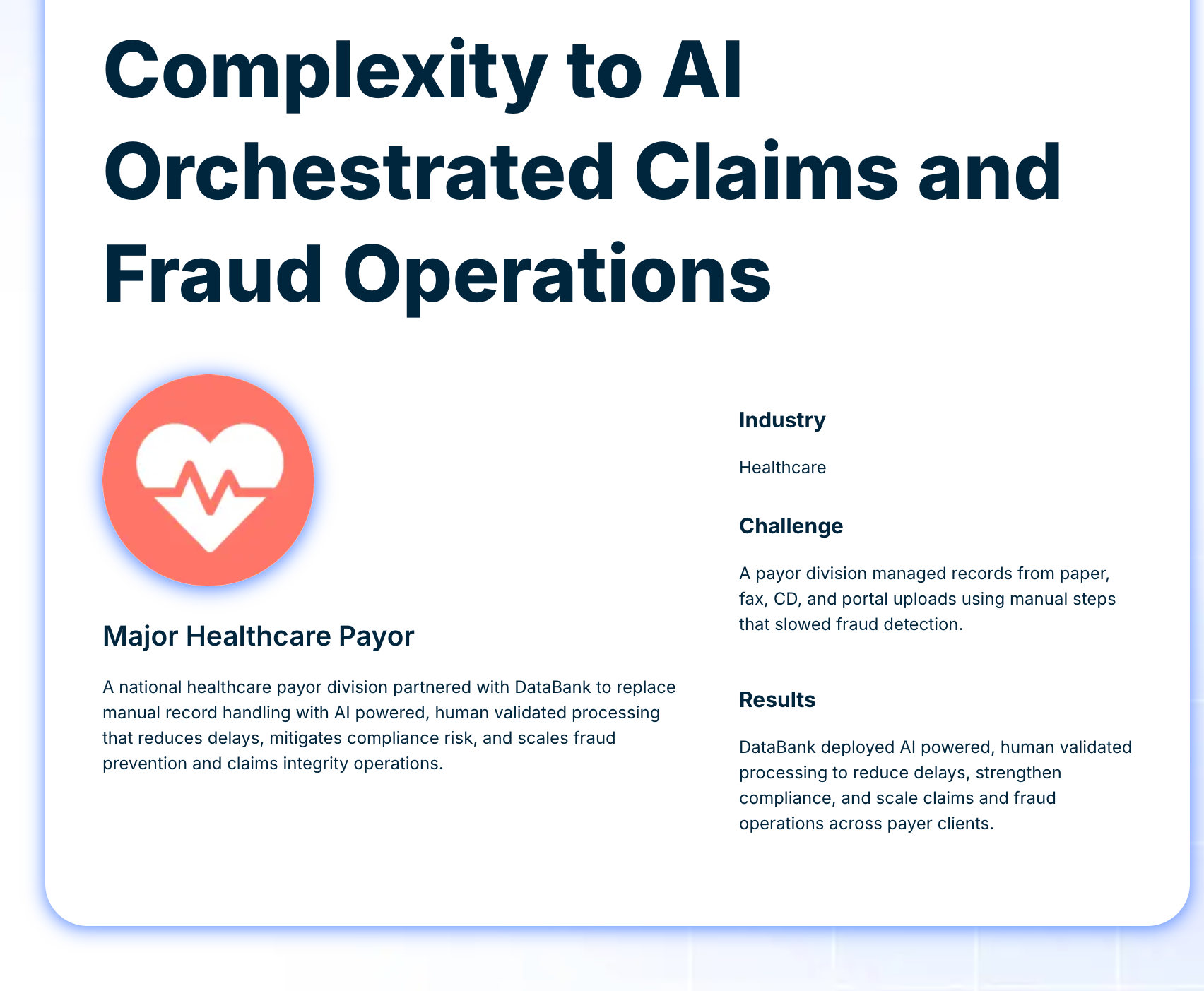
Our experience combining AI-powered processing with human validation for claims processing automation is what informs this article.
Claims processing automation uses technology to handle repetitive, rule-based steps in the claims lifecycle so staff can focus on the steps that actually require human judgment.
Once in place, it flows something like this.
A member visits an orthopedic specialist. The provider submits an 837 Professional transaction through a clearinghouse. If the claim is clean, it flows straight into the payer’s adjudication engine and gets matched against the member’s plan. An 835 remittance goes back to the provider. The entire routine processing happens automatically, without a person having to move the claim between systems.
But without automation, multiple people, systems, and handoffs would be involved.
Someone would download the 837 and re-key the procedure codes into a separate system. They’d pull up the member’s eligibility in another screen, check the benefit limits in a third, and flag a question about a modifier. They’d email a colleague, wait for a response, and finally enter the payment once it comes in. That’s three systems, two handoffs, and at least a day of lag for a straightforward claim.
Automation helps you avoid this time waste without replacing clinical judgment.
It removes the re-keying, system-switching, and manual routing that slow claims that never needed a human decision, letting your team focus on exceptions, complex claims, and decisions that require expertise.
Claims processing automation matters because:
Health plan enrollment has climbed steadily since 2020, and every new member means more claims, more correspondence, and more exceptions. But hiring hasn’t matched that growth. Automation can fill that capacity gap.
Two adjusters reviewing the same claim may reach different conclusions.
But if that process is automated, the same rules are applied the same way every time. This keeps decisions consistent, especially for routine checks like eligibility checks, benefit limit lookups, duplicate validation and coding validation, which shouldn’t need a judgment call in the first place.
When multiplied across your entire claims volume, manual processing costs add up quickly. Automation can reduce those costs by cutting the time your team spends on each claim. For example, in May 2026, Aetna, a payer with 37 million members, reported that its Claims Assist Manager cut processing time by over 20% on complex claims requiring manual review.
Vendors use a lot of overlapping terminology when they talk about claims processing automation. Here are the main ones you’ll come across and what they mean:
OCR converts text in an image into machine-readable characters. For example, it can take a scanned CMS-1500 and turn the form’s text into digital text. But OCR doesn’t understand the meaning or context of the text it extracts. It can pull out a string of numbers from an image, but can’t tell whether they represent a procedure code, date, or member ID.
OCR works best on clear, typed documents. Handwriting, poor scans, and inconsistent layouts can reduce accuracy.
IDP goes a step further by turning document content into usable data.
An IDP system doesn’t just read the text. It identifies the document type, locates relevant fields, extracts their values, and validates them against expected formats. For claims processing, that might mean recognizing a CMS-1500, finding the member ID and procedure codes, and passing those values into the next step of the workflow.
Modern IDP platforms use AI and machine learning to handle different document layouts and formats and can achieve a field-extraction accuracy of 95 to 99%.
RPA automates repetitive actions that a person would normally perform across applications. It can log into a legacy portal, check eligibility, copy the result, and enter it into another system.
That makes RPA useful when systems don’t have APIs or other ways to exchange data directly. But RPA follows predefined instructions, so it can struggle when a screen changes or an unexpected situation requires a different action.
Workflow orchestration is the routing layer. It controls what happens next as a claim moves through the process. It uses rules, data, and claim information to route claims to the appropriate system, queue, or person.
For example, a clean claim might move to adjudication, while one that fails a validation check goes to a review queue. A claim that has been waiting too long can also be escalated.
Orchestration doesn’t process the claim itself or make clinical decisions. It just coordinates the different steps so claims get to the right place at the right time.
Agentic AI is a newer automation layer, and unlike RPA, which follows scripted steps, agentic AI can reason through a claim. It can gather information from multiple sources, assess findings, and decide what to do next
Aetna’s Claims Assist Manager is an example. It uses AI agents to pull eligibility, coverage, member, and provider data together and recommend next actions.
But while Agentic AI systems can handle exceptions that don’t neatly fit predefined rules, they still need human oversight for clinical and coverage decisions.
N.B.: Most automation setups combine several of these technologies rather than rely on just one. The right combination depends on where the manual work is in your claims process.
The claims best suited for automation are those that can be solved efficiently, even if they move from intake to payment, without a single human reviewing them. Those kinds of claims often meet these 4 criteria:
They arrive electronically, so they can be processed without manual data capture. For example, EDI 837 forms.
They include the correct info across all relevant fields, and so can pass all validation checks on the first submission.
They involve routine services with clear plan rules, so there’s little or no need for a clinician’s interpretation.
They don’t require supporting documentation, so there’s no need to route them for a manual review.
Claims that meet these criteria are relatively straightforward, so having your team spend time reviewing them is a huge time drain.
Instead, automate them and let your adjusters focus on the claims that actually need their attention: the ones that arrive by paper or fax, contain missing or inconsistent information, involve non-routine services, or require supporting medical or operative reports.
Once you decide which claims you want to automate their processing, here’s how to layer your automation workflow step by step.
Your automation workflow should first capture claims from the channels you receive them through. That could be an EDI 837 transaction through a clearinghouse, a paper CMS-1500 form in the mail, a fax, a portal submission, or a mix of all of the above. The information you receive is mostly the same across these channels, just in different formats.
Next, your workflow should turn incoming claim information into a structured format your claim systems can use.
EDI transactions are already structured, so they can move through with minimal processing. But paper forms, faxes, and other documents need to be digitized and processed to extract fields like the member ID, date of service, procedure and diagnosis codes, provider NPI, and billed charges.
This is where OCR or IDP can replace much of the manual data entry involved in processing unstructured claims and prevent potential errors from creeping in.
Once the claim data is structured, your workflow should check it against your eligibility and coverage data. It should verify whether the member was covered on the date of service, whether the provider is in network, whether the service required prior authorization, and whether the benefit plan covers the service.
Claims that pass these checks should continue to adjudication. Claims that fail, though, should be routed to a queue for further review.
Now comes the actual payment decision. Your system should apply the plan’s payment rules, fee schedules, and coordination-of-benefits logic to determine whether the claim gets paid and at what rate.
Routine claims should usually move through adjudication automatically. But claims with medical-necessity questions or coordination across multiple plans should go to an adjuster to cross-check.
Finally, your automation system should issue the payment or denial and generate the explanation of benefits for the member. It should also send an 835 remittance advice to the provider showing how the claim was processed.
If a provider appeals a denial, the claim should move into a separate workflow with its own documentation and review requirements.
Healthcare payers face distinct data formats, regulatory requirements, and documentation rules that make their claims automation different. If you’re running health plan claims, here are the specifics that matter:
The HIPAA-mandated 837 transaction is the standard format for submitting health claims electronically. It comes in Professional, Institutional, and Dental versions. The 835 is the electronic remittance advice sent back to the provider after you process the claim.
Together, these transactions form the backbone of electronic claims exchange. Before an 837 reaches you, the clearinghouse will typically validate it to catch formatting errors, missing fields, and code-set violations.
Industry benchmarks from HFMA and MGMA define a clean claim as one that passes all validation checks on first submission. That means the member ID is correct, the provider NPI is valid, the coding is accurate, and any required authorization is on file. These claims are good candidates for efficient, high-volume automation because there’s little reason to stop them for manual review.
A dirty claim is the opposite: it has an issue that needs to be resolved before it can move forward. That might be an invalid member ID, a procedure code that doesn’t match the diagnosis, a missing referral, or an expired authorization.
Treating clean and dirty claims the same, especially by sending dirty claims straight through the same automated workflow for clean claims, is where you can start running into problems.
Dirty claims should first be flagged and routed to the appropriate team for correction or review. Otherwise, an issue that could have been caught early can move further into the claims process and result in an incorrect payment or denial.
The KFF analysis of 2024 marketplace plans illustrates why this matters. Insurers denied 19% of in-network claims, with reported reasons including administrative errors (25%), excluded services (13%), and missing prior authorization (9%). Some of these issues could have been identified and resolved earlier if dirty claims had been flagged and routed for review before processing.
Some health claims require supporting documentation that doesn’t typically arrive with the 837 transaction. These might include operative reports, pathology results, discharge summaries, prior authorization letters, or documentation from another payer for coordination of benefits.
These records often arrive separately by fax, mail, or portal upload. Because they’re usually unstructured, capturing the information, extracting the relevant data, and linking it to the right claim can be one of the more difficult parts of health claims automation.
When a health claim is denied, the provider or member can appeal. That appeal creates additional documentation requirements, review timelines, and correspondence beyond the original claims workflow.
And the appeal workflow is harder to automate because most appealed cases are complex and require thorough clinician or coverage review.
This creates a situation in your health claims automation whereby the most complex cases end up getting the least technological support.
Here are some challenges you might run into as you try to automate your claims processing:
OCR accuracy drops significantly when forms are handwritten or scans are low quality. A CMS-1500 that has been faxed and copied multiple times, for example, may not extract cleanly, and those errors can cascade into downstream processing.
IDP can improve extraction, but the lasting fix is a validation layer that catches errors before they enter the adjudication workflow. That’s where subject matter expert validation comes in. Trained reviewers can check fields that IDP flags as low-confidence before the data moves forward.
You can read more about the practical limits of IDP and where human oversight fits in this DataBank guide.
A single claim can come with several supporting documents: an operative report, lab results, a prior authorization letter, or a coordination-of-benefits explanation. These documents may arrive together, or they may show up days apart through different channels.
Your automation needs to be able to match all these documents into a single claim package and flag missing fields before adjudication. Otherwise, someone would have to track down missing documents and manually piece the claim together.
When a member ID doesn’t match the eligibility system, everything downstream stops. The claim can’t be validated, can’t be adjudicated, and sits in a queue until someone resolves the mismatch.
And the cause might be as simple as a transposed digit or outdated member information. It could also be a name change or a retroactive enrollment or termination. Automated validation can catch these issues at intake and flag them for correction before they become a bigger problem.
Most payers don’t run a single claims system. They run several, often from different eras, with different data models and different interfaces.
Connecting a new automation layer to this kind of legacy core admin system is usually the hardest part of the project. The data mapping, testing, and parallel-run requirements can easily take much longer than estimated.
Every claims operation has exception queues for claims that failed a rule, need additional documentation, or require a manual decision. But when no one owns those exception queues, claims sit, age, and eventually get worked in batches, often by whoever has capacity rather than whoever is best equipped to resolve them.
If you automate the straightforward claims without fixing your exception handling, you haven’t really removed the bottleneck. You’ve just left the hardest-to-process claims in a queue where they’re more likely to be delayed or mishandled.
When it comes to automating your health claims processing, the success of everything downstream depends on the quality of your intake.
While structured EDI 837 transactions, which are already automation-ready, make up the majority of claims volume for most payers, other formats still come in, too.
Paper claims still arrive, especially from smaller provider offices, out-of-network providers, and member-submitted claims. Fax also remains common for attachments, medical records, and additional correspondence, even when the claim itself arrived electronically. And email and portal submissions are still part of the mix, often combining structured fields with attachments in different formats.
These claim formats range from semi-structured to completely unstructured, so you need to capture, digitize, classify, and convert them into usable data before your automation can act on them.
Without this processing layer, your automation workflows get only some, not all, of the available information, leaving claims incomplete and creating gaps that still require manual intervention.
So, unify your intake across all channels. Bring all structured and unstructured documents into one workflow, so your automation can process complete, connected information from the start.
DataBank’s work with payers starts with that most important step: quality data intake across all channels. That means high-volume document scanning across paper, fax, email, and portal submissions.

From there, our intelligent document processing classifies and extracts your claim data with built-in human validation. We then build workflow automation that routes everything into your downstream systems.
One national payor division moved its fraud and claims integrity operation to DataBank, and we helped them scan 3.5 million record images in one month from paper, fax, CD, and portal sources. Their documents were then matched and merged with human expert review on edge cases. The result was a 100% SLA adherence across 16 payer clients.
DataBank’s approach runs through three connected layers. Document Intake and Data Capture handles the physical and digital conversion. Content management governs the records over time. And workflow automation connects the pieces so claims move through your operation instead of sitting in disconnected queues.
All of that processing happens in DataBank’s 3 U.S.-based, SOC 2 Type II-certified facilities. If you are a payer handling PHI under HIPAA or an organization with data residency requirements, DataBank can provide the secure processing infrastructure to support your claims workflow.
Ready to take the manual work out of claims intake? Talk to DataBank about how we can help your claims and benefits processing.
Most claims automation conversations start at the wrong end, with the adjudication engine. But your adjudication engine is only as good as the data it receives.
For most payers, the real bottleneck is further upstream. It’s the paper that hasn’t been scanned, the fax that hasn’t been matched, and the portal submission that hasn’t been validated.
If you’re a payer starting out with claims automation, map every channel through which data enters your operations and work forward from there. Unify your intake first, then automate the downstream steps that are repetitive, rule-based, and don’t require manual judgment.
That gives your automation a complete, reliable stream of information to work with, and your team a clearer path to handling the claims that actually need their attention.
Need help identifying where to start? DataBank’s team can assess your current claims processing operation and help you identify the operational challenges that are good candidates for automation.
Reach out today to see what that could look like for your organization.
Claims automation covers the broader claims lifecycle, from intake and data capture through validation, routing, adjudication, and settlement. Auto-adjudication is just one part of that process. It uses predefined rules to determine how a clean claim should be processed and paid without manual review.
You can automate your adjudication process, but if the data entering the engine is incomplete or incorrect because intake is still manual, the output will be wrong too.
Costs vary by organization, but the CAQH Index consistently shows a substantial gap. The industry collectively spends roughly $90 billion a year on routine administrative transactions, with an estimated $20 billion in savings available from further automation. The specific cost difference per claim depends on your volume, your payer mix, and how many channels your claims arrive through.
It depends entirely on your claim mix and your clean claim rate. Organizations with clean claim rates above 95% can auto-adjudicate a large share of routine claims. But claims requiring medical necessity review or coordination of benefits across multiple payers will still need human involvement. The goal isn’t to automate every claim. It’s to automate as much of the routine volume as possible so your team can focus on the claims that actually need their expertise.
Yes, by catching the errors that cause denials earlier in the process. That means validating member eligibility at intake, checking coding accuracy before submission, and flagging missing authorizations before the claim reaches adjudication. The Experian 2025 State of Claims survey found that 69% of organizations using AI for claims reported reduced denials or more successful resubmissions.
No. Most claims automation sits alongside your existing systems rather than replacing them. IDP handles document intake, RPA bridges legacy systems that lack APIs, and orchestration layers route work between systems.
The end result is clean, structured data flowing into the systems you already have. You don’t need to rip out your core admin system and start over.
Insurance operations run on paperwork that arrives faster than teams can process it manually. To automate the right way:
And if you don’t want to handle the entire process alone, DataBank’s team of experts can help you manage it end to end, from document intake and data capture through compliance controls and system integration.
Across most insurance carriers, submission volume keeps climbing. If your organization’s answer so far has been to hire more underwriters, that may not be sustainable. You’d have to keep increasing headcount at roughly the same pace as submissions, and that will quickly become difficult to maintain.
Automating your insurance process is a better solution. And it has been proven to work tremendously. According to Perceptive Analytics, pairing automation with workflow redesigns and analytics lets carriers increase submissions handled per underwriter by 30–50%.
With this additional capacity, you can easily handle rising submission volumes without adding staff.
This article teaches you how to automate across the entire insurance lifecycle, plus how to tell which of your own processes are most ready for automation. We’ll also touch on what needs to be in place before you automate.
DataBank processes more than a billion records annually for organizations across regulated industries, including document-heavy insurance companies.
We know how much regulatory weight claims files, ACORD forms, and policy records carry, and we wrote this guide based on our experience processing them without any mishandling.
Insurance process automation combines document capture, data extraction, and workflow tools to move policy and claims documents through your systems faster and with less manual handling at each step.
Without automation, even a straightforward insurance process might involve a long chain of manual steps, each of which not only prolongs the process but also moves information across people and systems, increasing the risk of errors and inconsistencies.
Take, for example, a typical new-business application handled manually.
An agent submits a new commercial property application. It arrives as an ACORD 125 form, PDF-attached to an email. Someone on the intake team opens it and confirms that it’s the right form for the line of business. Then they manually key the applicant’s details, the coverage limits, and the loss history into the policy admin system. An underwriting assistant then pulls a separate loss-run report and cross-checks it against what was entered.
If a required field is missing, someone emails the agent, waits, and restarts the process when the right reply is received. Once the file is complete, an underwriter reviews it and makes a decision. A different person then types that decision into the system to trigger the policy issue.
Every step of this multi-step process adds unnecessary delay, and every time information is checked, entered or moved to a new platform, there’s a chance a record will be misinterpreted.
Automated, the same application looks very different.
Intelligent document processing reads the ACORD form as soon as it lands. It then pulls the applicant, coverage, and loss-history fields, and checks the form type on its own. If any fields are missing, it flags the gap and routes the request back to the agent before anyone touches the file.
The extracted data then flows into the policy administration system, already matched against the loss-run report. So, the underwriter opens a file that’s already been checked for completeness, and nobody has to build anything from scratch. And when the underwriter makes a decision, it triggers the policy issue workflow downstream.
With insurance policy automation, your human employees still make the underwriting call. The retyping, waiting, and manual cross-checking around that decision just disappear.
Insurance process automation is moving from an emerging technology initiative to a practical way for insurers to handle growing operational demands. In WTW’s 2026 survey of insurers, 14% said they currently use straight-through processing in claims workflow automation, while another 36% plan to introduce it.
Some reasons for that include:
Luckily, organizations that have embraced automation are actually seeing results.
For example, USI cut data entry time in insurance placement by 80 percent and now saves 30,000 hours a year. Hub International automated more than 60 processes and improved data extraction across more than 900,000 documents. And Hiscox went from an idea to a 28 percent automation rate in claims within three to four months, saving nearly 480 working hours in two months on email triage alone.
If you aren’t already automating your insurance process, you will learn how to do that here so you can join the carriers already ahead. And fret not, you don’t need to have a huge automation budget. You just need to automate the most important processes first, based on where the volume and pain call for it.
The insurance process automation landscape is full of overlapping terms. Here is what each one means and where it fits into the insurance process lifecycle:
| Category | What it does | Where it fits |
|---|---|---|
| OCR (Optical Character Recognition) | Reads text off a scanned image or PDF | The first pass on any paper or scanned document |
| IDP (Intelligent Document Processing) | Classifies document types and extracts specific fields, using AI trained on document structure | ACORD forms, loss runs, claim attachments |
| RPA (Robotic Process Automation) | Repeats a defined sequence of clicks and data entry across systems that don’t talk to each other | Moving extracted data into a policy admin or claims system |
| Workflow orchestration | Routes a file or task to the right person or system based on rules | Claims triage, endorsement approvals, exception queues |
| Agentic AI | Makes a decision or takes a multi-step action within defined guardrails, using judgment beyond a single fixed script | Early-stage; still mostly paired with a human checkpoint in insurance |
| Human validation | A person reviews and confirms extracted data or a routing decision before it moves forward | Every layer above it, especially anything tied to a coverage or payment decision |
The last row, human validation, matters more than all the capabilities described above it. Automated processes still need a person to review the output before an action with financial or regulatory implications is finalized.
That means checking the data, flagging exceptions, and confirming that the automated result makes sense in context, not simply reviewing the process after something has already gone wrong.
When evaluating automation tools or implementation partners, make sure their processes include human validation.
Not every insurance process is equally suited to automation. The best fits are usually the repetitive, document-heavy tasks that involve moving information between people and systems.
The table below shows where the biggest manual bottlenecks sit across the policy lifecycle and what insurers can automate at each stage.
| Process | The manual pain | What insurers can automate | Systems it touches |
|---|---|---|---|
| New business and underwriting | Rekeying ACORD forms, chasing missing fields, manually cross-checking loss runs | Form classification, data extraction, completeness checks | Policy admin, agency management systems |
| Policy administration and endorsements | Manually applying mid-term changes and updating every affected document | Endorsement request intake, document generation, system updates | Policy admin, document management |
| Billing and premium | Manual invoice matching, payment posting, following up on lapses | Payment matching, lapse notice triggers, reconciliation | Billing systems, general ledger |
| Claims | Sorting incoming claim documents, chasing supporting paperwork, manual routing | Intake triage, document classification, routing to the right adjuster | Claims management, document management |
| Renewals | Manually re-pulling exposure data and re-running eligibility checks | Data refresh, eligibility pre-checks, renewal document generation | Policy admin, underwriting systems |
| Compliance reporting | Manually assembling data for DOI filings and NAIC data calls | Report data aggregation, audit trail generation | Compliance systems, data warehouses |
| Customer correspondence | Manually drafting and tracking routine policyholder letters | Templated correspondence generation, delivery tracking | CRM, policy admin |
Not every process belongs in your first automation project. Before committing budget, score each process against five factors to determine whether it is a strong choice:
| Factor | Ask this | High readiness looks like |
|---|---|---|
| Volume | How many of these come through per month? | Hundreds or thousands, not a handful |
| Rules vs. judgment | Is the process governed by clear rules, or does it require human judgment? | Clear, well-defined rules, like form type or field presence |
| Input quality | How consistent is the information coming in? | Structured or semi-structured forms |
| System access | Can the tool actually reach the systems involved? | API or integration access already exists |
| Regulatory exposure | How much scrutiny does this process get from a regulator? | Lower-risk processes to start, so a rough first automation trial doesn’t create compliance risk |
New-business intake and ACORD form processing tend to score high across the board, which is why they’re the common starting point.
A claims coverage determination scores low on rules-vs-judgment, regardless of how much volume runs through it. So, leave the coverage decision with your adjuster, and automate the document handling around it instead.
Every insurance process starts with information coming in from somewhere. A fax lands, a PDF gets emailed, or a paper ACORD form arrives from an agent who still prints everything.
This makes intake very important. You can buy a sophisticated workflow tool or an RPA platform, but those work with the information they receive.
If incoming documents are inconsistent, fields are missing, or critical data is trapped in an unindexed scanned image, the automation doesn’t solve the underlying problem. It simply moves the same bad or incomplete information through the process faster.
A reliable intake layer addresses this problem before the information reaches your automation systems. To set up one, pair outsourced mailroom processing with intelligent document processing.
These involve capturing incoming documents from different channels, classifying them, extracting relevant information, then having a subject matter expert validate the extracted data before it moves downstream. Those combinations of steps turn a fax, a scanned form, or an email attachment into clean, structured data your downstream automation can actually use.
Get this intake right, and your automation gains a much stronger foundation.
Insurance automation carries regulatory weight that many other industries don’t have to contend with. State DOI oversight applies, and increasingly, so do rules specifically about AI.
The NAIC’s Model Bulletin on the Use of Artificial Intelligence Systems by Insurers, adopted in December 2023, is an important one to note. So far, more than 20 states have adopted it. It requires insurers to maintain a written program when they use AI in decisions tied to regulated practices. And the program must address governance, risk management, and how the AI’s outcomes are audited.
The bulletin applies to AI used in underwriting or claims decisioning. It could also apply to certain document processing tools, especially if they classify documents, extract fields, flag exceptions, or influence what information reaches the person making the decision. So, check with your legal and compliance teams about where those tools fall within your regulatory obligations.
In practice, these regulations mean every automated process needs a clear record of what happened and why. The end result alone isn’t enough.
If an IDP tool extracts a field and a human corrects it, for example, you should preserve both the original extraction and the correction. Don’t let the corrected value silently overwrite the history. You want to be able to see what the system produced, what a person changed, and what ultimately moved downstream.
Also, retention schedules still apply to automated records exactly as they do to paper ones. And when a regulator asks for a specific file’s history during an audit, your team should be able to retrieve it without spending hours reconstructing how it was built.
To make this compliance work easier, when evaluating automation vendors, look for strong audit trails, access controls, retention capabilities, and evidence of independent controls like SOC 2 Type II.
These ensure you choose a vendor that can support the compliance, audit, and governance requirements that come with automating your insurance processes.
For automation to deliver real business results, the automated data needs to inform the systems your teams already use.
This integration step matters as much as the automation itself. After all, a tool that perfectly extracts data but drops it into a CSV someone has to manually upload hasn’t removed the manual step. It just moved it.
For policy admin and claims, most carriers still run on Guidewire or Duck Creek. If your organization is one of them, look for a direct system integration, an API connection into Guidewire or Duck Creek.
But if you still use an older mainframe system for your policy admin and claims, you generally have three options:
Adding a modern interface is often the fastest path when the legacy system still works reliably, and the main problem is getting data in and out of it. It lets you connect the system to your automation tools without replacing the underlying system.
DataBank IMX is a document and data operations firm for regulated US organizations, and insurance is one of the industries we cater to.
If you want to automate your insurance processes, we can help you manage the lifecycle from document intake and data capture through validation, system integration and compliance controls.
Our Outsourced Mailroom Processing handles the fax, paper, and email intake that most automation projects skip. From there, our intelligent document processing extracts the data with AI. Then a subject matter expert checks it before it reaches your policy admin or claims system.
We then integrate your validated data with whatever system you use. DataBank is platform agnostic, so we can work with Guidewire, Duck Creek, and whatever legacy system you’re already running.
For security and compliance, we operate three owned scanning facilities and apply SOC 2 Type II controls to every project. And if you are a carrier with data residency requirements, our delivery is US-only, so your document processing stays within the US.
If you’re staring at a stack of unread submissions or a growing claims backlog, connect with our team. We’ll help you identify which process you can automate today.
New to insurance document automation? Then it might be wise to not try to automate your whole policy lifecycle at once.
Instead, score your processes by volume, rules versus judgment, input quality, system access, and regulatory exposure, and start with whichever scores highest. Get that one process working end to end, with the audit trail built in from the start. Then expand to the next process of the lifecycle.
And if you need an expert to help you identify where to start, talk to our team. We’ll help you find the automation opportunities that make the most sense for your current insurance operations.
Start with intake triage. Classify incoming claim documents automatically, and route them to the right adjuster based on claim type and severity. That alone removes much of the manual sorting. From there, automate data extraction from supporting documents like medical records, repair estimates, and police reports. That way, the adjuster downstream opens a file that’s already organized. They don’t have to assemble it first.
Most insurance automation falls into two types: rule-based and AI-based.
Rule-based automation covers RPA and workflow tools that follow a fixed sequence of steps, like moving extracted data between systems. AI-based automation covers IDP and, increasingly, agentic AI, which classifies documents or makes limited decisions by recognizing patterns in data.
Most insurance operations programs use both, with rule-based tools handling repetitive movement and AI handling classification and extraction.
It depends heavily on scope. A single, well-scoped pilot, like automating ACORD form intake for one line of business, can show measurable results in three to four months. A broader, lifecycle-wide program takes longer, usually 12 to 18 months to mature. The duration depends as much on system integrations and change management across multiple teams as it does on the technology itself.
Not necessarily. But you do need to confirm you have integration access into the legacy system, whether through an API or another connection point. If that access exists, you can often automate around the legacy system without replacing it first. If it doesn’t exist, solve the integration issue before you commit to a broader automation project.
It can be, as long as the vendor meets the same compliance bar you’d hold an internal team to. Look for SOC 2 Type II controls and a documented chain of custody for every document that comes through. If data residency matters for your regulatory footprint, look for US-based delivery too. The most important thing is to make sure outsourcing the work doesn’t translate to outsourcing your control over the documents or the data they contain.
Your oil and gas company likely manages millions of documents across leases, well files, regulatory filings, and land records. When those records live in filing cabinets, disconnected drives, or legacy systems, you lose time, miss deadlines, and pay fines.
To fix it:
And if you need an expert to work with on this, DataBank can handle the full document lifecycle, from scanning and digitization to content management and workflow automation, so you can bring your records, systems, and processes together.
In 2023, New Mexico’s Oil Conservation Division proposed a $2.412 million civil penalty against the oil and gas company, Ameredev, after it failed to file required production and natural gas waste reports on time.
This huge penalty shows the financial consequences of missed regulatory filings, which often happen when your critical records are missing or difficult to retrieve. But the costs of poor document management can go beyond penalties. It can also eat into your employees’ time.
Åshild Hanne Larsen, the former CIO at Equinor, estimated that oil and gas employees spend 80% of their time searching through unstructured data to inform decisions and get work done, compared to the 30% IDC benchmark across all industries.
This article discusses how to avoid these financial and operational burdens by learning where document management commonly breaks down in oil and gas companies and building a system that connects your records to the workflows that depend on them.
DataBank has processed over one billion records for companies across regulated industries, including oil and gas operators like Merit Energy.
For Merit, we implemented AI-powered intelligent document processing to centralize records, speed up due diligence, improve compliance, and prevent flood-related loss.
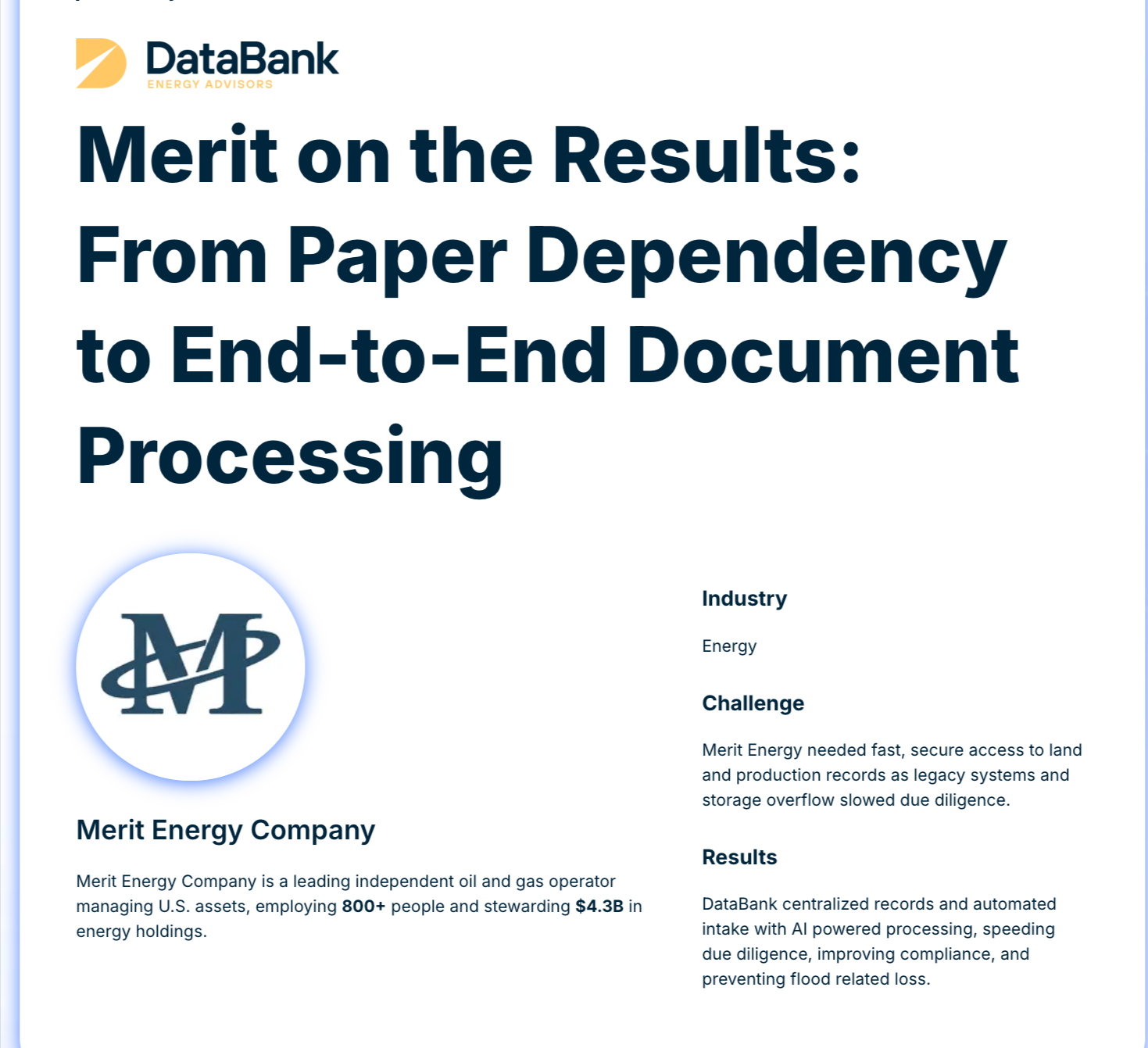
Our entire operation is built around document management, and oil and gas is one of the many regulated industries we serve. This article draws on the work we’ve done to help companies like yours manage, protect, and get more value from their records.
Oil and gas document management is the practice of capturing, organizing, storing, and retrieving the records that are needed to support operations throughout an oil and gas asset’s lifecycle.
To understand why it matters, consider all the documents that follow a single well from planning to production.
Before you drill, you’ve got lease agreements, title opinions, mineral rights documentation, and permits. During drilling, you’re producing daily reports, mud logs, directional surveys, and completion records. Once the well is producing, you need to add production reports, royalty calculations, regulatory filings, and maintenance records.
From a single well, you could have thousands of documents. Multiply that across the thousands of wells your company may own, and you are looking at millions of records.
And the challenge with these documents isn’t just how many there are. It’s that they also need to be easily retrievable and accessible to landmen, engineers, accountants, regulatory teams, and field operators. Even when each stakeholder group needs different records at different times, for different reasons.
And most of these records have legal retention requirements, so you must keep them for the stated duration and can’t simply delete them as volume grows.
Proper document management gives you a consistent way to organize and retrieve these numerous records, keep critical information accessible to the people who need it, and stay on top of retention requirements.
That way, your team can spend most of their day doing actual work instead of searching through shared drives, inboxes, paper files, or disconnected systems.
Document control in oil and gas tends to most commonly fail in three places:
Plenty of operators still have warehouses full of well files, land records, and legacy engineering documents in paper form. And some of those records go back decades.
Need to find a specific lease amendment from 1987 in a setting like this? That means sending an employee to dig through a filing cabinet.
And if that record was misfiled or was found damaged, it becomes impossible to retrieve.
Most oil and gas companies use a mix of software for different functions.
Quorum or P2 handles production accounting, SAP handles financials, and Landmark or Petra covers geosciences. Then there’s SharePoint or a shared drive for everything else.
This disconnected setup often results in the same document having multiple versions across systems. So, your land team has one version of a division order and your accounting team has another, and there’s no automated way to keep them in sync.
Federal leases, state leases, and pipeline operations all have different retention rules. Without a schedule that maps each document type to its retention requirement, you end up either keeping everything forever (causing unnecessary storage and management costs) or discarding records you’re still legally required to hold (leading to regulatory non-compliance).
The types of records you need to manage depend on where you sit in the value chain. But whether you are in upstream, midstream, or downstream operations, a few document categories show up across the industry:
Oil and gas retention rules vary by jurisdiction, document type, and the agency overseeing those assets. There’s no single standard that covers everything, which is why a centralized retention schedule matters so much.
However, here are the three most common frameworks:
Across these 3 frameworks and others, the common thread is that regulators expect you to produce records quickly when asked. During an audit, “we have it somewhere” isn’t an acceptable answer. You need to know exactly where each record is, how long you’ve held it, and when you’re legally allowed to dispose of it.
If you’re starting from scratch or fixing a document management system that has fallen behind, take these 4 steps to build a system that keeps your records organized, accessible, and compliant:
If you have warehouses full of paper records, digitize them first using high-volume document scanning and proper indexing, so every document is searchable by well name, lease number, document type, or date.
And since you are in oil and gas, where large-format documents like plat maps, surveys, and engineering drawings are notorious, use a specialized oil and gas document scanning service that can handle documents up to 54 inches wide.
Map every document type to its regulatory requirement. Federal leases, state leases, pipeline operations, and financial records all have different timelines.
Knowing what you must keep and for how long helps you build a system that manages disposal automatically.
Once your oil and gas records are digital and organized, don’t keep them in isolation. Instead, integrate them with the field and back-office systems your teams already use.
After all, a division order doesn’t help your accounting team unless they can see it in their own system. And a well completion report is pointless if production accounting doesn’t know the well exists.
Document management in oil and gas is most efficient when records connect to the systems your teams use every day. That means integrating your content management platform with tools like Quorum, P2 Energy Solutions, SAP, and Landmark. That way, when a landman updates a lease, the accounting team can see the change without re-keying anything.
And for companies running field operations across multiple basins, this connection has to extend to the field. Inspectors and field engineers need to be able to pull up safety records, work orders, and permits from a tablet, not just from a desktop at headquarters.
Once you are able to bridge the gap between where your documents live and where your team workflows run, you can eliminate re-keying, reduce version conflicts, and give regulators a single source of truth during audits.
The last step is to use intelligent document processing to handle high-volume document types like division orders, royalty statements, and incoming correspondence.
Using modern AI and machine learning technology, this process extracts key data fields automatically and routes them to the right system. Human reviewers then validate the output, which keeps accuracy high. Adopting this lets you organize large volumes of incoming records quickly, without letting manual data entry bottleneck your pace.
DataBank IMX is a document and data operations firm for regulated US industries, including oil and gas.
For document processing, we handle the full lifecycle from capturing and digitizing paper records to managing them on enterprise content platforms to automating the workflows that depend on them.
For oil and gas operators specifically, we scan and digitize leases, deeds, division orders, well files, and large-format engineering documents up to 54 inches wide. We also convert microfilm and microfiche for legacy records that predate digital systems.
Our intelligent document processing pairs AI-powered extraction with subject matter expert validation. So, for documents that carry legal and financial weight, you get the speed of automation without the risk of unchecked errors.
DataBank integrates with platforms like Quorum, P2, SAP, and Landmark and connects your records directly to the systems your teams already use every day. We also operate three owned scanning facilities across the US, with SOC 2 Type II controls and a documented chain of custody on every project. With us, you won’t have to worry about losing track of your records or compromising their security while they’re being digitized.
If you’re dealing with paper backlogs, disconnected systems, or retention headaches in your oil and gas company, connect with an expert on our team to talk through how we can help.
When it comes to document management, especially when you’re starting with lots of old paper records, disconnected systems, and manual processes, you don’t need to fix everything at once.
Instead, start with the documents that carry the most regulatory risk or cost you the most time to find. For most operators, that’s well files and land records.
Digitize them, index them properly, connect them to your existing systems, and build a retention schedule that matches your actual obligations. Once the foundation is in place, you can extend the same approach to every other document type in your operation.
And if you’d rather not build this on your own, talk to our team. We’ve helped other oil and gas operators like Merit Energy get their records under control.
The biggest categories are land and lease records, well files, regulatory filings, and production reports. Others include financial documents like joint interest billing and royalty calculations, plus field records like safety inspections and maintenance logs. Retention requirements differ for each type depending on the jurisdiction and the governing agency.
It depends on the document type and the regulator. Federal leases under BLM rules require at least seven years of retention for well records and production data. Texas RRC rules set a general floor of three years. Pipeline operators under PHMSA rules must keep pressure test records for the life of the pipeline. A centralized retention schedule is the only reliable way to stay on top of all of them.
Document management is the practice of capturing, organizing, and retrieving business documents. Records management is a subset focused on documents with legal or regulatory retention requirements. In oil and gas, the two overlap heavily because so many operational documents are also regulated records.
Yes, but it works best for specific, high-volume tasks. Intelligent document processing uses AI to extract data from documents like division orders, lease agreements, and regulatory filings. But it’s most effective when paired with human validation because oil and gas documents often include handwritten notes, poor scan quality, or non-standard formats that AI alone might capture incorrectly.
A property tax abatement request sounds routine until you picture the person behind it. Maybe a Halloween decoration sparked a house fire that took more than half of a home. Maybe a tax court order needs to be reflected in what a family owes. Whatever the reason, that resident used to have one option: drive to the county office, Monday through Friday, 8 a.m. to 4:30 p.m., and fill out one of five paper forms by hand.
That was the reality in Wright County, Minnesota, before its assessor’s department partnered with its ECM team, DataBank, and Jadu to rebuild the abatement process from the ground up. In a recent webinar, Beyond Go-Live: Turning Ideas Into Impact, Wright County’s Christina Klaphake and Misty Thibodeaux walked through what that transformation actually took, alongside Jadu’s Nic Trautman and DataBank’s Adam Herrmann. The result is a case study in what it looks like to move a government service from paper to progress without losing sight of the people it serves.
Wright County is the ninth largest county in Minnesota, spanning 714 square miles and serving a population of more than 145,000 that’s projected to grow by roughly 23.5% by 2030. An abatement, in plain terms, is a resident’s request to have their property tax bill reviewed, whether the cause is a natural disaster, a house fire, a tax court order, or a homestead credit filing.
Before the project, that request touched three departments and anywhere from three to eight staff members before it was resolved. Residents often told their story at one counter only to be sent to another to repeat it. Paperwork moved desk to desk, and when it was misplaced or simply hard to track down, nobody, staff included, could say where it stood. The result was an average processing time of 30 to 34 weeks and a process that, as Klaphake put it, wasn’t building trust or confidence with the community it served.
Interestingly, abatement wasn’t where Wright County’s digital portal ambitions began. Klaphake and Thibodeaux were first approached by Health and Human Services, which needed a way for clients to submit documents and check status without adding to already rising call volumes. After seeing the Hyland Content Portal powered by Jadu demonstrated at a prior CommunityLIVE conference, the team recognized its potential, particularly its native Section 508 and ADA compliance, a legislative requirement for public sector agencies.
But the Health and Human Services use case turned out to be too large a first step for a brand-new platform. Rather than shelve the idea, the team looked for a better-scoped pilot and found it in the assessor’s office. The abatement process needed exactly what the portal offered: a way for residents to submit applications and required documentation electronically, visibility across departments, automated notifications, and reporting for leadership. It also came with a firm deadline, full implementation by the end of 2025, which kept the project focused.
The team consolidated five separate paper applications into a single dynamic form in Jadu Central, requiring applicants to create an account so they could later check their status online. On the back end, form data was mapped to OnBase WorkView attributes and keywords, roughly 50 in total, so information collected in Jadu flowed directly into the Unity Form staff already used in OnBase, along with any supporting documentation the resident attached.
From there, the application entered a single workflow lifecycle built around seven queues, replacing what had been a manual handoff between desks and departments. Staff could now see exactly where an application stood and route it forward with ad hoc tasks rather than physically carrying a folder from office to office. The team also simplified something residents had been quietly frustrated by for years: approval and denial letters that previously arrived from two departments at different times now come from a single department, generated through document composition and delivered by mail or email depending on department preference.
Reporting was kept intentionally simple at launch, an exportable report on tax reductions, application volume, and abatement types rather than a full dashboard, with a more robust reporting view planned as a next step.
Seven months after go-live, Wright County had received 49 abatement applications electronically. The original goal was to cut the 30 to 34 week processing window by 25%. One case reviewed by the team, submitted in January and requiring a full property inspection before approval, was resolved in eight weeks, a reduction of more than 75%.
The gains extended beyond speed. With shared visibility into every application, staff can now cover for one another during turnover or shifting priorities without the process stalling. Denials caused by missing documentation, once a routine and disappointing outcome, can be caught and addressed earlier. And county leadership, for the first time, has real data on how the program is performing, insight they can use to shape policy going forward.
Asked what they’d tell other organizations starting a similar project, Trautman pointed to requirements gathering. Talking to each department in detail up front, before a single screen is built, saves teams from having to backtrack once staff see the product for the first time and raise use cases nobody accounted for. Klaphake agreed, adding that the preparation work only pays off if the department stays engaged throughout, so the people who understand the process best are available to answer questions as they come up. That engagement, she noted, is also what carried the assessor’s office through a genuine process change: staff who once relied on a physical paper trail had to trust a new system, and their willingness to adapt was central to the project’s success.
Wright County isn’t stopping with abatement. With a mandate to make its public-facing Unity forms ADA compliant, the county plans to extend the Jadu-powered portal to its most heavily used forms first, then work down to lower-volume ones across its other departments. As Trautman noted, the model has applications well beyond assessor’s offices, from licensing and permitting to onboarding and vendor portals, across government, higher education, and beyond.
Wright County’s story is a reminder that modernization doesn’t require solving every problem at once. It requires finding the right process, the right partner, and the discipline to gather requirements before writing a line of workflow. If your organization is sitting on a paper-based process that’s costing your team time and your constituents’ trust, DataBank can help you find your own version of the right place to start.
We are proud to share that DataBank has been recognized as a top performer in the 2025 Hyland Global Partner Awards, earning 3 of the 5 total partner awards presented this year, including Global Partner of the Year.
Global Partner of the Year
Awarded to the partner demonstrating the greatest overall impact on Hyland’s global strategy, growth, and customer success.
Industry Excellence Partner of the Year: U.S. & Canada
Recognizing DataBank’s strength in delivering industry-focused solutions that drive measurable value across complex and regulated environments.
Performance Partner of the Year: U.S. & Canada
Honoring sustained performance, operational excellence, and the ability to scale results for customers.
Winning three of the five total awards places DataBank at the forefront of Hyland’s global partner ecosystem and underscores our leadership position in the market.
These Hyland honors follow another significant milestone earlier this year, when DataBank was named Box’s New Partner of the Year. Together, these recognitions highlight a consistent theme: DataBank is winning, growing, and scaling impact across leading content and information management platforms.
Our ability to build trusted partnerships, deliver quickly, and produce measurable outcomes is being recognized across ecosystems, not as one-off successes, but as a result of a repeatable, disciplined approach to partnership and delivery.
Hyland is making strategic shifts to further strengthen its platform, partner ecosystem, and industry alignment. With increased emphasis on cloud, automation, and partners who can deliver outcomes at scale, the opportunity for DataBank continues to expand.
Our long-standing partnership with Hyland, combined with our growing presence across complementary platforms like Box, positions DataBank to help clients navigate change, modernize their information environments, and realize long-term value.
