No quick matches. Press enter to see full results.

No quick matches. Press enter to see full results.
Article · November 17, 2026
Smarter intelligent document processing for insurance starts with good quality intake. See which documents commonly need to be read, how underwriting and claims differ, and how to measure success.
Insurance intelligent document processing (IDP) sorts insurance documents, from ACORD forms to FNOL reports, and extracts key fields, with human review for data that falls below the confidence threshold. But success depends on getting documents into the system correctly and keeping related files linked to the right submission or claim. DataBank brings mailroom processing, document scanning, IDP, and expert validation together to manage intake from arrival through delivery to your claims or policy system.
A commercial insurance application rarely shows up on its own. The ACORD 125 even has an attachments section, with boxes for a schedule of values and a loss summary. And 49% of commercial-heavy agencies rely on email for submissions, so multiple documents can arrive together in a single message.
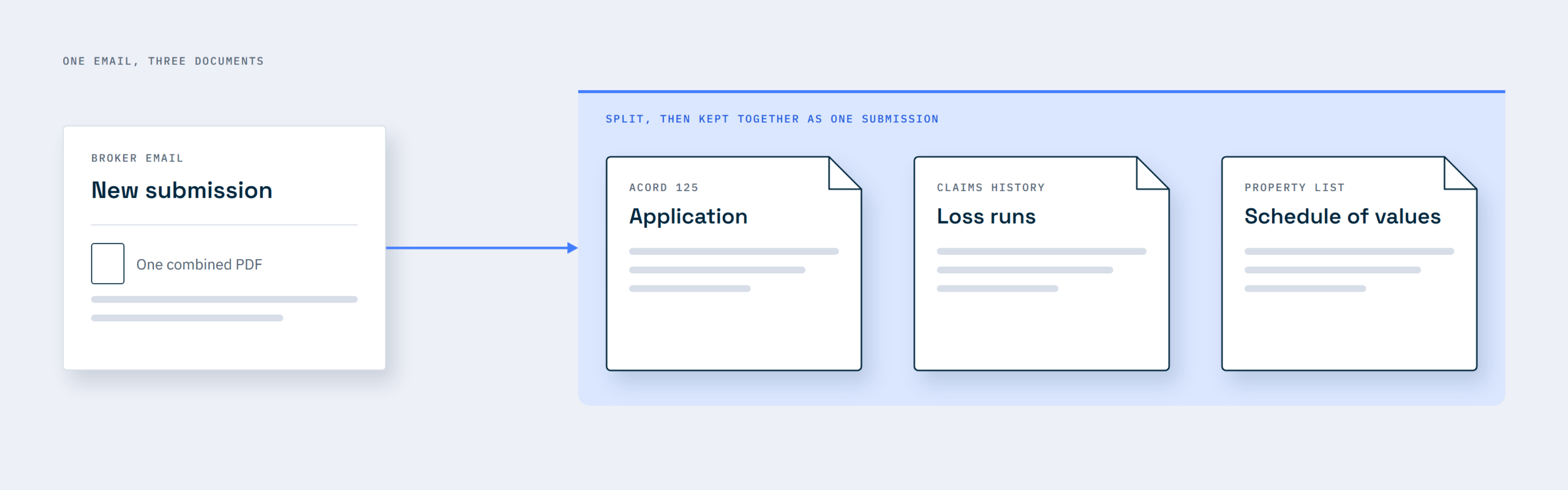
The challenge with insurance document processing isn’t just extracting information from each document; it’s knowing which documents belong together. A model might correctly extract every field from a loss run without knowing which insurance submission it belongs to, risking the information being attached to the wrong application.
That’s why intelligent document processing for insurance starts with getting submissions into the system correctly and keeping related documents together. This article explains how to build that intake process, set up the wider document processing workflow, and measure its success.
After partnering with DataBank, Central States Health & Life Co. of Omaha (CSO) moved its incoming mail off paper and into a digital workflow. As a result, pending cases and document backlogs fell, staff could work remotely without sacrificing efficiency, and workflow management became more streamlined, reducing the time and steps they needed to process insurance documents.
On the claims side, a major healthcare payer’s fraud prevention and claims integrity division uses DataBank to standardize intake across paper, fax, CD, and portal uploads, with subject matter experts validating key fields. The program now serves 16 payer clients on one framework, with 100% SLA adherence on fraud-related and claims integrity communications.
We have been in the data operations business since 1991, and we process more than a billion records a year. We have helped insurance companies successfully get mixed submission packets into their underwriting and claims systems, and that experience informs the approach outlined in this article.
Intelligent document processing (IDP) is software that sorts your documents, pulls out the data inside them, checks that it is accurate, then routes it onward. OCR only copies the words off a scanned page but can’t tell what it means.
Here’s how they differ:
| Processing stage | What OCR does | What IDP does |
|---|---|---|
| Classification | Turns a broker’s submission packet into one long run of text | Labels each document inside a broker’s submission |
| Extraction | Gives you the words “Total Incurred” and a dollar amount nearby. | Pairs the label with its value and returns total incurred as a field you can load. |
| Validation | Can copy a wrong date as faithfully as a right one | Catches wrong data, flagging values that don’t add up, like an expiration date before the effective date. Then routes any field it isn’t sure of to a person to confirm. |
| Routing | Someone has to read every page and decide where it goes. | Sends each document and its data to the right team. For example, a first notice of loss goes to claims, and an endorsement request goes to underwriting. |
Insurance IDP typically handles seven core document types, each with its own format and way of arriving. Here’s where each document comes from, which key fields it contains, and why template-based processing often falls short.
| Document | Where it arrives | Key fields | Why templates fail |
|---|---|---|---|
| ACORD applications (125, 126, 140) | Broker email, portal, mail | Named insured, FEIN, NAICS code, lines of business, effective date | The supplements behind the 125 change with each line quoted |
| Loss runs | Emailed PDF from the prior carrier | Valuation date, date of loss, paid, reserved, total incurred, status | There’s no standard format, so every carrier’s layout differs |
| Schedules of values (SOVs) | Spreadsheet in the broker’s submission | Address, construction, year built, occupancy, sprinklers, insured values | Carriers and lenders can request their own workbook, so columns move |
| Submissions and broker emails | Underwriting inbox | Broker, named insured, lines requested, effective date, quote deadline | Key facts sit in an email body that doesn’t have a layout |
| Claims files and FNOL | Portal or phone, then mail, email, and fax | Policy number, date of loss, location, description, police report number | The ACORD 3 description is free text, and attachments vary by claim |
| Endorsements and change requests | Agent email or carrier portal | Policy number, change date, item added or removed | Agents can use an ACORD 175 or just email the change, so there isn’t always a form |
| Certificates of insurance (COIs) | Emailed PDFs or portal uploads | Insurers, policy numbers, dates, limits, additional insured, certificate holder | ACORD replaced the 2016/03 ACORD 25 with a 2025/12 edition, so you’ll see both layouts for a while |
Sorting has to come first, because every fax, scan, email, and upload needs to reach the same queue before extraction. That’s what an insurance digital mailroom is for.
Underwriting and claims need different IDP pipelines because they handle documents differently. Underwriting starts with a broker’s submission packet, which needs to be assembled and checked for completeness before the insurer can quote. Claims start with a first notice of loss (FNOL), followed by more documents over days or weeks, with each new document needing to be matched to the correct open claim.
Here’s what each pipeline extracts, the deadline that drives it, and the downstream system its data feeds.
| Underwriting | Claims | |
|---|---|---|
| Key fields | Named insured, locations, values, limits, and loss history | Policy and claim numbers, date and cause of loss, amounts |
| Deadline driver | Quote turnaround for the broker | State claims-handling rules |
| Where data goes | Policy admin, rating or agency management system | Claims system, on the open claim |
| Cost of an exception | A slower quote | Days off a legal deadline |
In underwriting, a missing loss run means another request to the broker, and each round trip adds time. That back-and-forth further delays a quote cycle that 55% of commercial agents say already takes four to seven days. Check each submission packet for required documents at intake. If a loss run or another supporting document is missing, flag the gap early so the broker can provide it before it delays the quote.
For claims, legal deadlines vary by state. The NAIC model regulation gives a P&C insurer 21 days after proof of loss to decide a claim or explain the delay. Every day a proof of loss waits unmatched in a queue counts against you. Assign someone to resolve claims exceptions the same day.
From there, both claims and underwriting can carry on into claims processing automation and insurance process automation.
An insurance document workflow runs in seven steps, starting when a packet arrives and ending when its record is retired.
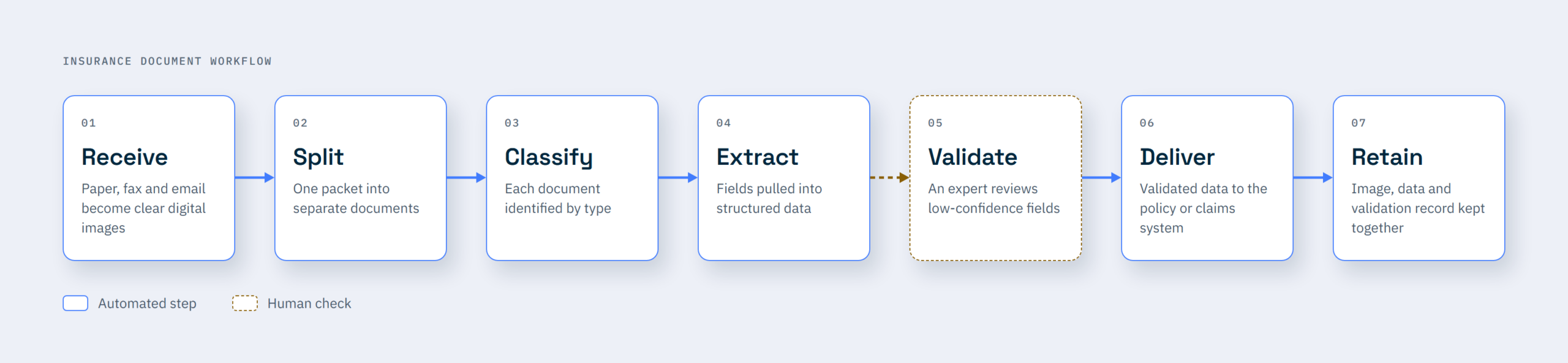
Every document needs to become a clear, readable digital image before processing. For paper, that means pulling staples, flattening folds, and keeping pages in the order they arrived. At DataBank, prep also covers removing clips and binding, repairing torn pages, and finding page breaks by eye where needed.
Fax needs extra care because standard fax resolution can be as low as 204 × 98 dpi, below the 300 dpi recommended in OCR guidance. If a broker can email the file, ask them to. With email, capture the message body too, since a broker may type the requested limits right into it.
One broker email may combine an application, loss runs, and a schedule of values (SOV) into a single PDF. Split the file into separate documents before classification, since the model needs to identify each document type individually. To check that no pages were lost or duplicated, make sure the page counts add up to the original.
Once the packet is split, identify each document by type so the system knows how to process it. ACORD forms are easier to identify because each has a form number and edition date, like the ACORD 25 Certificate of Liability Insurance. Loss runs have no standard form number, so the system has to classify them by their content and layout.
Once documents are classified, extract the relevant fields into structured data. Loss runs and schedules of values (SOVs) often contain tables, so rows must stay intact across page breaks to keep each claim or property record accurate. If an SOV arrives as a spreadsheet, extract the data directly from its cells rather than converting it to an image first.
Send any field below your confidence threshold to a subject matter expert for review. Add business rules too, like flagging a loss date outside the policy period. These checks can catch errors even when the model is confident in its extraction.

Send validated data to the policy or claims system through an integration, keeping the source image attached to its record for reference. Then, route rejected records to an exception queue for review and resolution.
Assign each document a retention class during classification, then keep its image, extracted data, and validation record together so auditors can trace each field back to its source page. Place litigated claims on legal hold and also keep paper originals until the scanned images pass quality control, so you can rescan any pages that fail.
Insurance IDP projects commonly stall when:
Regulators expect you to keep insurance documents for a set period and protect the personal data inside them. You also need to trace each document from the day it arrived. These obligations continue after IDP converts a submission packet into structured data.
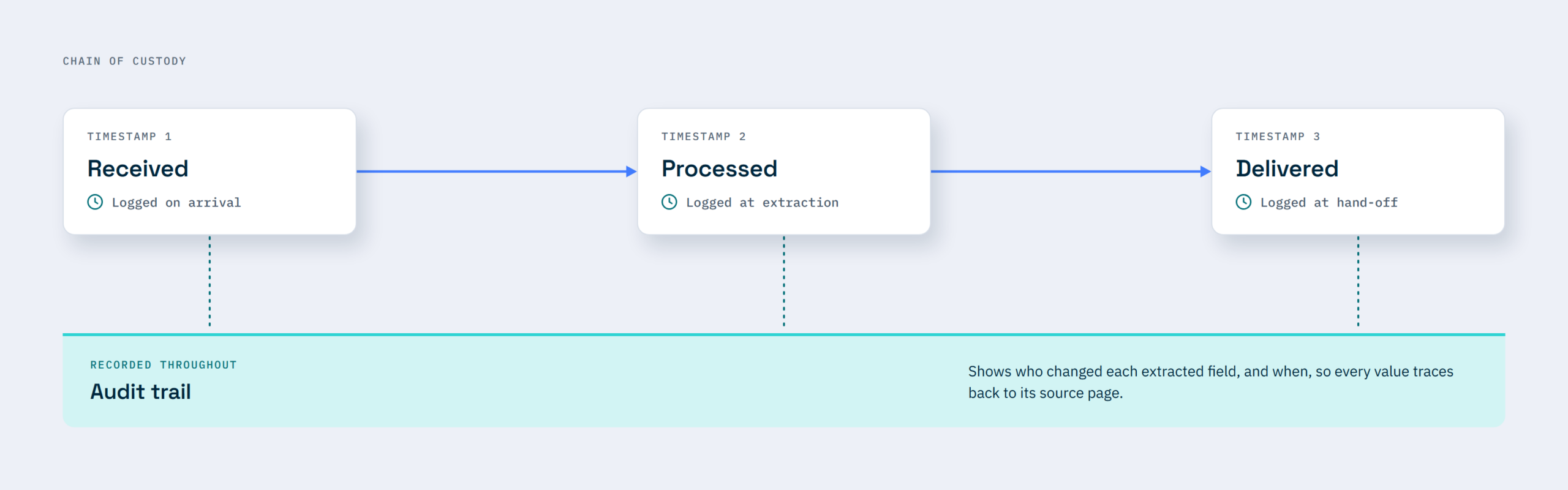
Often, retention periods are set state by state. For example, California requires insurers to keep claim files for the current year and the preceding four years. Each file must also record when every material document was received, processed, and sent.
For data security, the NAIC’s Insurance Data Security Model Law sets the standard. As of October 2026, 27 states plus Puerto Rico had adopted it. It enforces the protection of nonpublic information like Social Security numbers, driver’s license numbers, and account numbers that insurers collect throughout underwriting and claims. It also requires you to vet any vendor that holds that data, including anyone who scans your mail.
To meet these compliance obligations, ensure the workflow you want to sign off on maintains an unbroken chain of custody. Check to see that:
See how DataBank maintains data security.
To measure IDP success in insurance, track your touchless rate, processing time, exception rate, and cost per document. Record each metric before go-live to establish a baseline, then measure it regularly to see whether the new workflow is improving performance.
Report underwriting and claims metrics separately, since a blended number hides the pipeline that is falling behind. Don’t inflate the touchless rate by lowering confidence thresholds. Otherwise, an incorrectly extracted loss total could bypass human review and end up in an insurance quote.
You can run your insurance IDP projects in-house using software, outsource to a service provider, or combine both. Here are the factors that determine your options:
| Factor | Software | Managed service | Hybrid |
|---|---|---|---|
| Volume | Steady and predictable | High or seasonal | Steady base, peaks sent out |
| Paper share | Low, mostly digital | High mail and fax | Paper sent out, digital managed in-house |
| Document variety | Few consistent types | Many broker layouts | Common forms kept in-house |
| In-house IT capacity | A team to maintain models | Little to spare | Enough for integrations |
| Timeline | Time to build and tune | Live without new hires | Phased, one line of business first |
To decide, first consider the document forms you get. If much of your claims paperwork arrives by mail, software alone leaves the prep and scanning to your staff.
Be honest about your IT capacity, too. Technology roles are among the hardest for US carriers to fill, according to The Jacobson Group and Aon. So a plan that depends on new hires can stall early. If your current team lacks the capacity to maintain models and integrations, a managed service can provide staff for scanning and validation.
Ultimately, choose a model that assigns a clear owner to every step, from receiving documents to delivering usable data to your claims or policy system.
DataBank IMX runs document intake and data operations for insurers and other regulated US organizations.
We take in mail, fax, and email, scan the paper, run IDP over it, and validate the output with subject matter experts before it reaches your systems. For insurers, that means we run intake and IDP as one operation, keeping related documents linked to the correct submission or claim from arrival through delivery to the core system. Our intelligent claims operations work for commercial insurers is built on the same intake.
Our outsourced mailroom processing brings your mail, fax, and email into one managed process. Paper records are scanned either at your premises or at our facilities in Pennsylvania, Indiana, Texas, and Massachusetts through our insurance document scanning service.
AI then classifies each scanned document and extracts key fields, which our subject matter experts validate before the data reaches your claims or policy system.
With DataBank, you can choose the engagement model that fits your needs: Project-Based, Managed Services, Hybrid, or Optimization & Training. For clients on Managed Services, we run daily mail intake and processing so claims files stay current without them needing to increase headcount.
Schedule a consultation to discuss what comes into your mailroom and how to get those documents into the right workflows.
Does IDP work on handwritten loss runs?
Yes, IDP can read handwriting on a loss run, though less reliably than typed text. A loss run is a report the carrier generates, so the handwriting on one is usually a note added later. Because handwriting varies far more than print, have a person check any handwritten field the model isn’t sure of.
Can it read ACORD forms from different brokers?
Yes. The same ACORD form follows a standard layout regardless of who completes it. However, brokers may submit different editions or attach extra pages. Some agencies still use the 2011/09 ACORD 125, while the ACORD 25 directs users to an ACORD 101 Additional Remarks Schedule when they need more space. Test the editions and attachments your brokers actually submit to ensure your IDP workflow handles them correctly.
How long does implementation take?
A phased rollout can get IDP live sooner by starting with one line of business and its most common document type. The timeline depends on how much testing is needed to confirm the model handles your brokers’ submission packets accurately and how complex the integration with your claims or policy system is. Assess both before setting a go-live date.
What happens to the paper originals?
You may be able to securely shred paper originals once the scanned images pass quality control, but check your state’s requirements first. The NAIC’s model regulation on record retention allows accurate image reproductions to serve as originals if they are equally legible, preserve signatures, and are stored in a way that prevents alteration. State rules determine whether this applies to your records.