No quick matches. Press enter to see full results.

No quick matches. Press enter to see full results.
Government process automation replaces manual paper routing and data entry with software that moves work through approval chains, while keeping audit trails intact. Your tested approach is to:
DataBank can help you easily put these steps into practice, from digitizing incoming records to connecting the information they contain to the systems your agency relies on.
If you work at a government agency, you’ve probably experienced this scenario many times.
Someone submits a public records request, but the required documents are buried in filing cabinets or scattered across systems that don’t talk to each other. Your staff then spends hours tracking them down, even as other requests keep piling up.
The scale of this problem is clear from the federal FOIA backlog, which reached 339,000 cases in fiscal 2025, up from 267,000 the year before, a 27% jump in unfulfilled public records requests.
And if you think hiring more staff is the easy fix, think again. Because federal civilian employment dropped by roughly 348,000 positions between October 2024 and April 2026.
The better solution is to automate repetitive processes and take manual document sorting and routing off your staff’s plate. This article teaches you how to do that without breaking compliance rules.
DataBank IMX has scanned, digitized, and built workflows that automatically route government records through approval chains for 30+ years.
This article draws on our government document processing operations, which include secure transport, a documented chain of custody, quality validation, and delivery into the systems your agency already uses.
We do all of that from three owned scanning facilities, and we are SOC 2 Type II certified.
Government process automation uses software to handle the repetitive, rule-based work that staff still handle manually. It routes documents and decisions through government approval chains without manual handoffs.
Without automation, a single permit application at a county planning office might look like this.
A clerk keys the information into the permitting system, photocopies the application, and walks it down the hall to the zoning reviewer. If zoning approves it, someone routes it to the building department, and eventually the whole thing gets scanned and filed.
In this unautomated setup, every handoff is manual, and the paper is the only record until someone gets around to scanning it.
But if that same application were automated, the paper chase would be eliminated, nobody would have to rekey anything, and the audit log would stay complete on its own.
The process would become a digital workflow whereby the resident submits the application, and intelligent document processing extracts the relevant information and flags anything missing.
From there, the system routes the application to the right reviewer and records each action. Once the permit is approved, the system automatically files and indexes it, then stores it according to the applicable retention schedule.
With automation, you can eliminate the manual routing and data entry that eat your staff’s time so they can focus on work that actually needs judgment.
Five pressures are pushing government agencies toward automation, and they all reinforce each other:
Federal civilian employment shrank by roughly 11.5% from October 2024 through April 2026. Retirements and hiring freezes continue to shrink the workforce, and private-sector competition makes backfilling even harder.
As staffing constraints persist, agencies are struggling to keep up with growing workloads and backlogs. Automation can help by handling repetitive intake, routing, and review tasks that would otherwise consume staff time. For example, the VA reported that AI-assisted review helped reduce average claims-processing time by 42%, from 141 days in January 2025 to 81 days by March 2026,
People increasingly expect to complete everyday tasks online, from filing taxes to applying for permits. When government services still depend on paper forms, manual handoffs, or in-person visits, the experience feels slow and unnecessarily difficult. Automating routine processes can make services faster and easier to access without requiring agencies to add staff for every increase in demand.
Federal agencies also face growing pressure to modernize their technology and data practices. Executive Order 14179 directed agencies to remove barriers to AI adoption, while subsequent OMB guidance requires agencies to update policies around IT infrastructure, data, cybersecurity, and privacy to support responsible AI use.
Records management adds another requirement: federal records must be assigned retention periods and ultimately destroyed or transferred to the National Archives according to approved schedules.
State and local agencies received roughly $350 billion in ARPA funds, with a spending deadline of December 2026. If you haven’t committed those dollars yet, the spending window’s narrowing fast.
Across all your government processes, here’s where automation can be applied:
| Process | What can be automated? | Why it automates well |
|---|---|---|
| Permitting and licensing | Building permits, business licenses | Standardized forms, clear approval criteria |
| Benefits administration | Claims intake, eligibility verification | Repetitive data entry, rule-based decisions |
| Records management | FOIA responses, retention scheduling | Paper records create risk at scale |
| Procurement | Invoice matching, vendor onboarding | High rekeying volume, clear matching rules |
| Case management | Constituent complaints, inspections | Multiple handoffs, long cycle times |
| HR and onboarding | Benefits enrollment, credential checks | Document-heavy, deadline-driven |
The processes that are easiest to automate tend to follow a clear pattern: they involve manual data entry, paper or digital documents, and need routing through multiple approvers. If a process also requires you to retain records on a set schedule, that’s another strong reason to consider automation.
The automation principles are the same at every agency level, but the compliance rules aren’t. Here’s what changes:
| Requirement | Federal | State and local |
|---|---|---|
| Records retention | NARA General Records Schedule | State-specific schedules (vary widely) |
| Cloud authorization | FedRAMP required | StateRAMP or GovRAMP (where adopted) |
| Criminal justice data | CJIS Security Policy | Same CJIS Security Policy |
| Procurement path | GSA MAS contracts | State purchasing cooperatives, local RFPs |
| Data residency | May require US-only hosting | Often requires in-state or US-only hosting |
The automation tools your agency adopts have to meet the compliance requirements for your specific jurisdiction, data, and use case. A platform that’s FedRAMP-authorized, for example, doesn’t automatically satisfy CJIS requirements, and CJIS compliance doesn’t make a platform FedRAMP-authorized.
That’s why compliance should be part of your tool evaluation from the start, rather than something you check after selecting a platform. Identify the requirements that apply to the process, then confirm that each tool and its hosting, security, records management, and procurement model can meet them.
Government process automation often involves stacking technology layers on top of the systems your agency already uses. Here are the common layers and some examples of tools in each:
| Layer | What it does | Common tools |
|---|---|---|
| Capture and extraction | Converts paper into searchable data | ABBYY FlexiCapture, Kofax, IDP platforms |
| Content management | Stores and indexes documents with retention rules | Hyland OnBase, Box, SharePoint, Laserfiche |
| Workflow automation | Routes documents through approval chains | OnBase Workflow, Power Automate |
| System integrations | Connects automation to line-of-business systems | APIs, middleware, orchestration tools |
| Security and compliance | Encrypts data, controls access, logs actions | SSO, role-based access, audit logging |
| Cloud hosting | Hosts the content and automation layer | FedRAMP/StateRAMP cloud, ECM hosting |
When setting up your stack, either internally or with a technology partner, lean toward a platform-agnostic approach. That gives you flexibility to work with the systems already in place instead of locking your automation to one vendor.
If your agency already runs OnBase, for example, you can build automation around it. If you’re using Box or SharePoint, you can connect those systems through different integrations. The winning stack makes the systems you already have work together, not replace them just to automate a process.
You can’t automate all your government processes at once, so start with the ones where automation can deliver a clear operational win. To identify them, score each process on four factors:
Processes that score high on the first three and low on complexity are your best starting points. Permit applications, benefits intake, invoice processing, and records requests tend to fit this profile.
Sea Girt, New Jersey, gives a useful example. The borough automated its zoning permit application and issuance process and achieved an 80% faster entry into its system, reducing entry time from five minutes to one.
That’s a high-volume, self-contained process with a clear before-and-after, and it’s the kind of win that builds support for the next automation phase.
One important rule for this step: Don’t start with processes that cross multiple agencies or require statutory changes. Those are worth automating eventually, but trying to prove the automation concept on a multi-agency workflow is a recipe for a stalled pilot.
Automation breaks down if you don’t fix the messiest part of your operation: the intake point where paper, email, fax, and digital submissions all arrive.
Whatever information you capture at intake is what moves through the rest of the workflow. So if that info is wrong, incomplete, or outdated, automation just moves bad information downstream faster.
So, implement high-volume document scanning to convert paper documents into structured digital data, and outsourced mailroom processing to handle sorting and routing. From there, use intelligent document processing to extract key fields from PDFs and scanned images so nothing needs rekeying.
The goal here is simple. Get every incoming document into the same structured digital pipeline within hours. Everything downstream depends on this step being accurate.
You probably can’t replace your core systems overnight, and you shouldn’t have to. Legacy ERP and permitting systems hold years of data and institutional knowledge, and replacing financial systems can be costly and disruptive.
The better approach is to build an integration layer between your legacy systems and new automation tools. This layer pulls data from your existing systems, feeds it into automated workflows, and pushes the results back so those systems stay up to date.
If you already run a platform like OnBase, you may be using only a fraction of its capabilities. Find a technology partner like DataBank that can configure what you already have, set up the necessary integrations, and make your existing systems work harder without replacing them.

Every automated government process has to produce a complete audit trail and follow a retention schedule.
For audits, your system should log key actions on each document so you can trace who accessed, changed, approved, or routed it and when. That gives you a clear record of what happened if a decision is challenged or you need to demonstrate compliance.
For retention mandates, NARA’s General Records Schedule sets minimum retention periods for broad record categories at the federal level. You can set your own schedules for records the GRS doesn’t cover. For your federal agency records, attach an approved disposition authority to each series so your automation system knows what to keep, for how long, and what happens when that period ends.
State and local retention rules vary widely. Some states mandate seven-year retention for financial records, while others require permanent retention for certain land records. If you are a state or local agency, your automation system must enforce those rules automatically, flagging records for review or destruction when their retention period expires.
Compliance and records management is where automation pays for itself, because the manual alternative is slower and more expensive, and mistakes are much harder to catch.
Government automation projects often start with a paper backlog that needs to go digital, and that’s where DataBank starts too.
We handle high-volume scanning and intake, then implement platforms like OnBase and Box for content management. From there, we build the automated workflows that connect intake to disposition, with audit trails and retention rules built in from day one.
Because our entire workforce is US-based, we can meet CJIS data-residency requirements without subcontracting. We’re also platform-agnostic, so if your agency already has a system in place, we’ll build on it rather than have you replace it.
If you’d like to talk through what automation could look like for your government agency, get in touch with our team.
Government process automation is a large program, so don’t try to do it all at once.
The best way to start is by picking one high-volume, document-heavy process that’s causing visible pain. Audit it, fix the data intake, automate it, and measure the difference compared to your pre-automation baseline. Then use that win to establish the next automation project.
And you don’t have to do it alone. Our team can help you assess your current processes, digitize and organize incoming documents, integrate your existing systems, and build workflows that fit how your agency already operates. Talk to our automation experts to identify your first automation opportunity.
Robotic process automation handles repetitive digital tasks like copying data between screens and generating reports. Intelligent document processing reads unstructured documents, like scanned forms and PDFs, and converts them into structured data your systems can use. Government automation programs often need both because the workflows mostly start with paper or other unstructured documents before moving into digital systems.
Federal agencies need FedRAMP-authorized cloud services for systems that store or process federal data. State and local agencies follow their own standards, which may include StateRAMP or GovRAMP. Not every tool needs its own authorization, but the hosting environment and any system that touches regulated data does.
A single-process pilot can go live in 8 to 12 weeks if the data’s clean and the scope’s tight. Broader programs that span multiple departments tend to take 6 to 18 months with phased rollouts. The biggest variables are the data preparation and buy-in, not the technology.
Yes. You can automate the data gathering, routing, and documentation around a discretionary decision without automating the decision itself. A building inspector can still decide whether to approve a variance, while the system automatically gathers the application and supporting documents, routes them to the right reviewer, and presents the relevant case history.
Claims processing automation removes the manual re-keying, system-switching, and routing that slow down claims before they even reach an adjudication engine. To do it the right way:
DataBank can help you easily put these steps into practice, from capturing and processing incoming claims documents to validating the data and routing it into your existing systems.
Before even a single health plan claim can be manually processed and paid, your claims team has to reconcile information across eligibility data, medical codes, supporting documentation, and payer-specific rules.
Multiply that across the thousands of claims you receive each day, and the administrative workload adds up fast. And so does the cost of the staff time required to keep those claims moving.
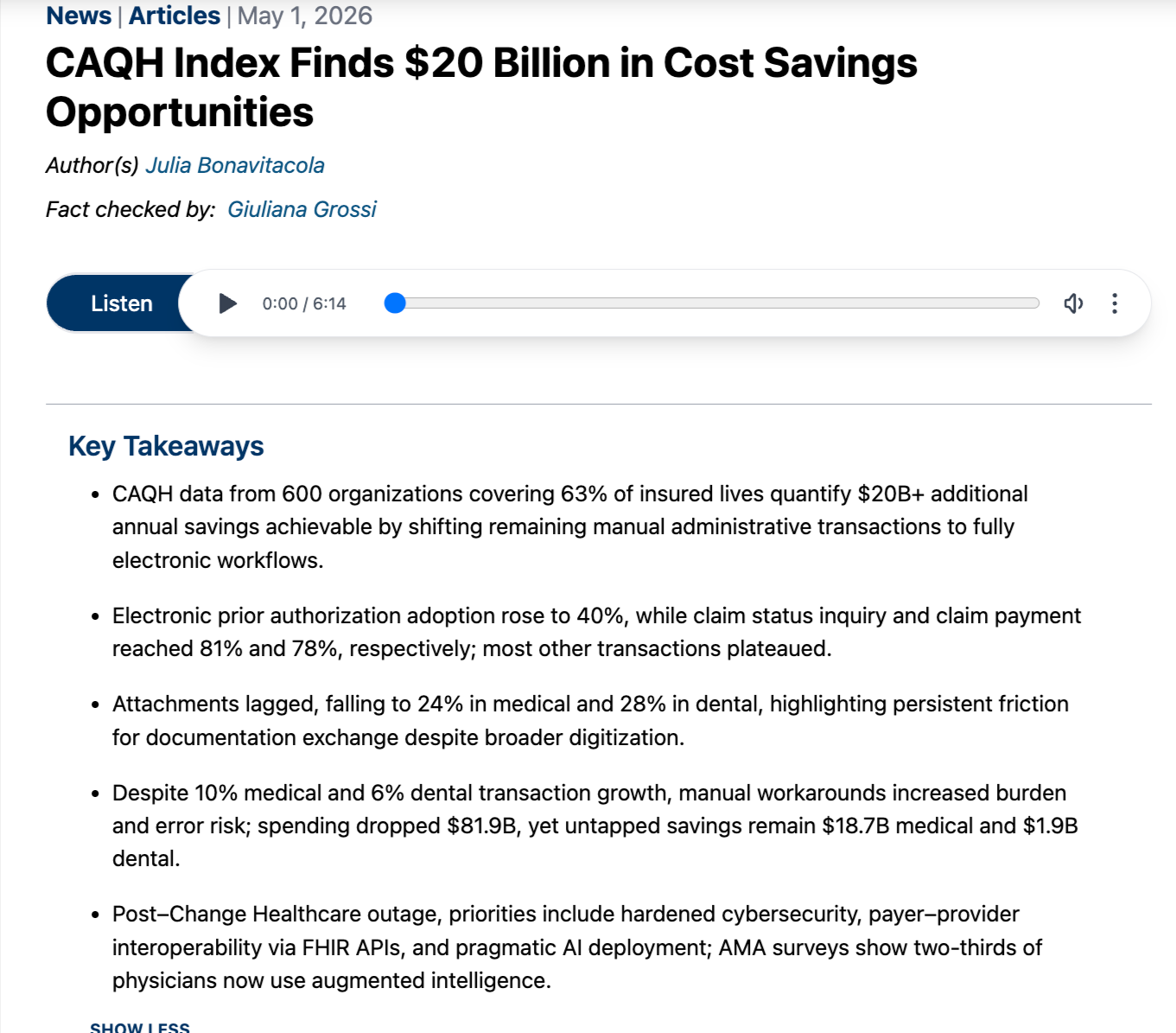
In fact, the 2024 CAQH Index found that U.S. healthcare still spends roughly $90 billion a year on routine administrative transactions. An estimated $20 billion in savings is also available just by switching from manual workflows to electronic ones.
And that’s only the financial cost.
Operationally, manual claims processing involves handoffs between multiple people and teams. Each handoff creates another opportunity for errors to compound, denials to increase, and processing times to stretch. And when claims processing slows down, providers wait longer to get paid, and members wait longer for answers.
The obvious fix is to automate your claims processing. But that doesn’t mean ripping out your core administration system and plugging in another piece of software. It means building automation around the system you already use, so routine work moves faster while your claims professionals stay in the loop where human judgment is needed. This article teaches you how to do exactly that.
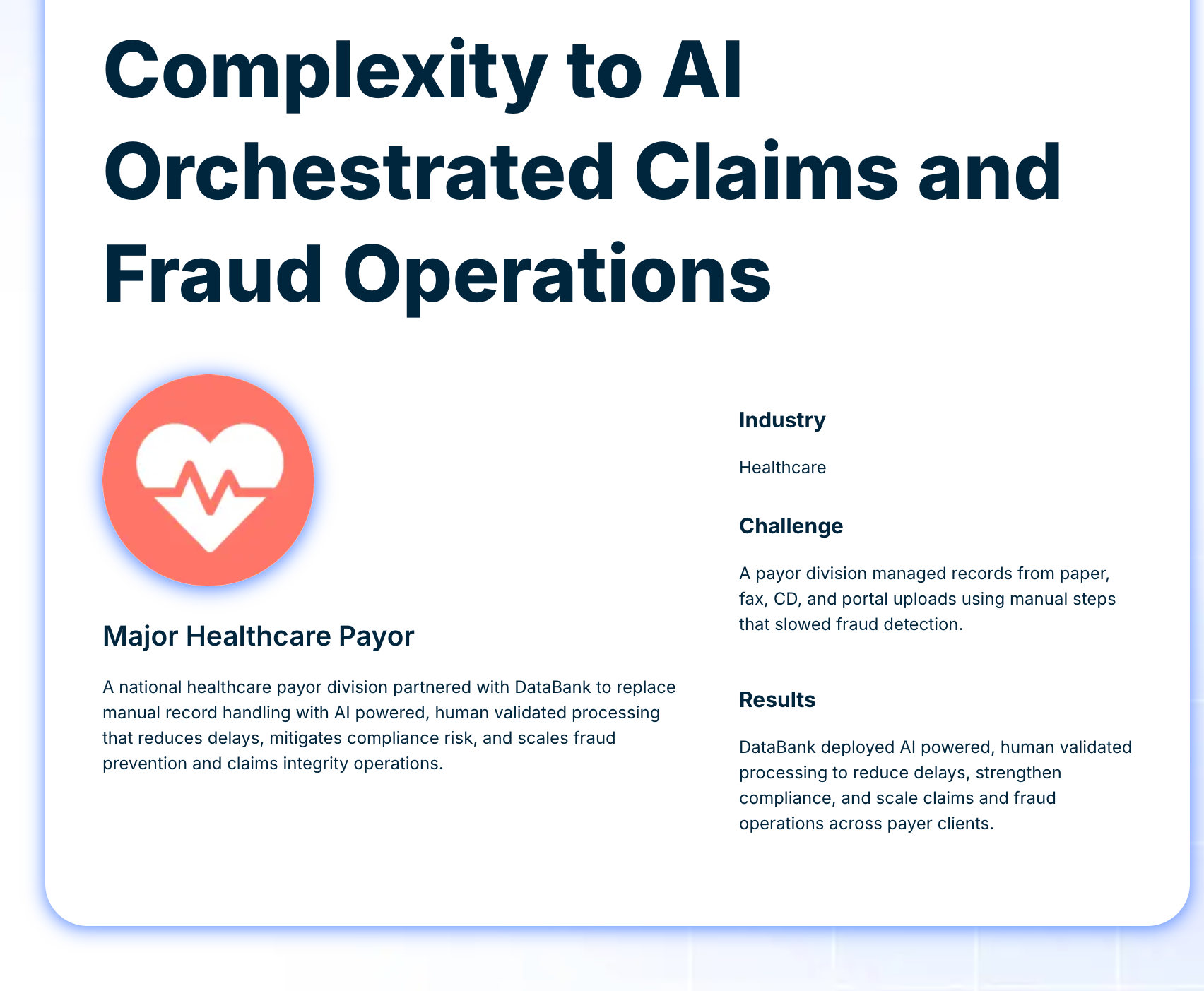
DataBank has processed claims-related documents for healthcare payers for over 30 years. For one national healthcare payor division, we processed 3.5 million images in one month across 16 payer clients, with 100% SLA adherence on fraud and claims integrity communications.
Our experience combining AI-powered processing with human validation for claims processing automation is what informs this article.
Claims processing automation uses technology to handle repetitive, rule-based steps in the claims lifecycle so staff can focus on the steps that actually require human judgment.
Once in place, it flows something like this.
A member visits an orthopedic specialist. The provider submits an 837 Professional transaction through a clearinghouse. If the claim is clean, it flows straight into the payer’s adjudication engine and gets matched against the member’s plan. An 835 remittance goes back to the provider. The entire routine processing happens automatically, without a person having to move the claim between systems.
But without automation, multiple people, systems, and handoffs would be involved.
Someone would download the 837 and re-key the procedure codes into a separate system. They’d pull up the member’s eligibility in another screen, check the benefit limits in a third, and flag a question about a modifier. They’d email a colleague, wait for a response, and finally enter the payment once it comes in. That’s three systems, two handoffs, and at least a day of lag for a straightforward claim.
Automation helps you avoid this time waste without replacing clinical judgment.
It removes the re-keying, system-switching, and manual routing that slow claims that never needed a human decision, letting your team focus on exceptions, complex claims, and decisions that require expertise.
Claims processing automation matters because:
Health plan enrollment has climbed steadily since 2020, and every new member means more claims, more correspondence, and more exceptions. But hiring hasn’t matched that growth. Automation can fill that capacity gap.
Two adjusters reviewing the same claim may reach different conclusions.
But if that process is automated, the same rules are applied the same way every time. This keeps decisions consistent, especially for routine checks like eligibility checks, benefit limit lookups, duplicate validation and coding validation, which shouldn’t need a judgment call in the first place.
When multiplied across your entire claims volume, manual processing costs add up quickly. Automation can reduce those costs by cutting the time your team spends on each claim. For example, in May 2026, Aetna, a payer with 37 million members, reported that its Claims Assist Manager cut processing time by over 20% on complex claims requiring manual review.
Vendors use a lot of overlapping terminology when they talk about claims processing automation. Here are the main ones you’ll come across and what they mean:
OCR converts text in an image into machine-readable characters. For example, it can take a scanned CMS-1500 and turn the form’s text into digital text. But OCR doesn’t understand the meaning or context of the text it extracts. It can pull out a string of numbers from an image, but can’t tell whether they represent a procedure code, date, or member ID.
OCR works best on clear, typed documents. Handwriting, poor scans, and inconsistent layouts can reduce accuracy.
IDP goes a step further by turning document content into usable data.
An IDP system doesn’t just read the text. It identifies the document type, locates relevant fields, extracts their values, and validates them against expected formats. For claims processing, that might mean recognizing a CMS-1500, finding the member ID and procedure codes, and passing those values into the next step of the workflow.
Modern IDP platforms use AI and machine learning to handle different document layouts and formats and can achieve a field-extraction accuracy of 95 to 99%.
RPA automates repetitive actions that a person would normally perform across applications. It can log into a legacy portal, check eligibility, copy the result, and enter it into another system.
That makes RPA useful when systems don’t have APIs or other ways to exchange data directly. But RPA follows predefined instructions, so it can struggle when a screen changes or an unexpected situation requires a different action.
Workflow orchestration is the routing layer. It controls what happens next as a claim moves through the process. It uses rules, data, and claim information to route claims to the appropriate system, queue, or person.
For example, a clean claim might move to adjudication, while one that fails a validation check goes to a review queue. A claim that has been waiting too long can also be escalated.
Orchestration doesn’t process the claim itself or make clinical decisions. It just coordinates the different steps so claims get to the right place at the right time.
Agentic AI is a newer automation layer, and unlike RPA, which follows scripted steps, agentic AI can reason through a claim. It can gather information from multiple sources, assess findings, and decide what to do next
Aetna’s Claims Assist Manager is an example. It uses AI agents to pull eligibility, coverage, member, and provider data together and recommend next actions.
But while Agentic AI systems can handle exceptions that don’t neatly fit predefined rules, they still need human oversight for clinical and coverage decisions.
N.B.: Most automation setups combine several of these technologies rather than rely on just one. The right combination depends on where the manual work is in your claims process.
The claims best suited for automation are those that can be solved efficiently, even if they move from intake to payment, without a single human reviewing them. Those kinds of claims often meet these 4 criteria:
They arrive electronically, so they can be processed without manual data capture. For example, EDI 837 forms.
They include the correct info across all relevant fields, and so can pass all validation checks on the first submission.
They involve routine services with clear plan rules, so there’s little or no need for a clinician’s interpretation.
They don’t require supporting documentation, so there’s no need to route them for a manual review.
Claims that meet these criteria are relatively straightforward, so having your team spend time reviewing them is a huge time drain.
Instead, automate them and let your adjusters focus on the claims that actually need their attention: the ones that arrive by paper or fax, contain missing or inconsistent information, involve non-routine services, or require supporting medical or operative reports.
Once you decide which claims you want to automate their processing, here’s how to layer your automation workflow step by step.
Your automation workflow should first capture claims from the channels you receive them through. That could be an EDI 837 transaction through a clearinghouse, a paper CMS-1500 form in the mail, a fax, a portal submission, or a mix of all of the above. The information you receive is mostly the same across these channels, just in different formats.
Next, your workflow should turn incoming claim information into a structured format your claim systems can use.
EDI transactions are already structured, so they can move through with minimal processing. But paper forms, faxes, and other documents need to be digitized and processed to extract fields like the member ID, date of service, procedure and diagnosis codes, provider NPI, and billed charges.
This is where OCR or IDP can replace much of the manual data entry involved in processing unstructured claims and prevent potential errors from creeping in.
Once the claim data is structured, your workflow should check it against your eligibility and coverage data. It should verify whether the member was covered on the date of service, whether the provider is in network, whether the service required prior authorization, and whether the benefit plan covers the service.
Claims that pass these checks should continue to adjudication. Claims that fail, though, should be routed to a queue for further review.
Now comes the actual payment decision. Your system should apply the plan’s payment rules, fee schedules, and coordination-of-benefits logic to determine whether the claim gets paid and at what rate.
Routine claims should usually move through adjudication automatically. But claims with medical-necessity questions or coordination across multiple plans should go to an adjuster to cross-check.
Finally, your automation system should issue the payment or denial and generate the explanation of benefits for the member. It should also send an 835 remittance advice to the provider showing how the claim was processed.
If a provider appeals a denial, the claim should move into a separate workflow with its own documentation and review requirements.
Healthcare payers face distinct data formats, regulatory requirements, and documentation rules that make their claims automation different. If you’re running health plan claims, here are the specifics that matter:
The HIPAA-mandated 837 transaction is the standard format for submitting health claims electronically. It comes in Professional, Institutional, and Dental versions. The 835 is the electronic remittance advice sent back to the provider after you process the claim.
Together, these transactions form the backbone of electronic claims exchange. Before an 837 reaches you, the clearinghouse will typically validate it to catch formatting errors, missing fields, and code-set violations.
Industry benchmarks from HFMA and MGMA define a clean claim as one that passes all validation checks on first submission. That means the member ID is correct, the provider NPI is valid, the coding is accurate, and any required authorization is on file. These claims are good candidates for efficient, high-volume automation because there’s little reason to stop them for manual review.
A dirty claim is the opposite: it has an issue that needs to be resolved before it can move forward. That might be an invalid member ID, a procedure code that doesn’t match the diagnosis, a missing referral, or an expired authorization.
Treating clean and dirty claims the same, especially by sending dirty claims straight through the same automated workflow for clean claims, is where you can start running into problems.
Dirty claims should first be flagged and routed to the appropriate team for correction or review. Otherwise, an issue that could have been caught early can move further into the claims process and result in an incorrect payment or denial.
The KFF analysis of 2024 marketplace plans illustrates why this matters. Insurers denied 19% of in-network claims, with reported reasons including administrative errors (25%), excluded services (13%), and missing prior authorization (9%). Some of these issues could have been identified and resolved earlier if dirty claims had been flagged and routed for review before processing.
Some health claims require supporting documentation that doesn’t typically arrive with the 837 transaction. These might include operative reports, pathology results, discharge summaries, prior authorization letters, or documentation from another payer for coordination of benefits.
These records often arrive separately by fax, mail, or portal upload. Because they’re usually unstructured, capturing the information, extracting the relevant data, and linking it to the right claim can be one of the more difficult parts of health claims automation.
When a health claim is denied, the provider or member can appeal. That appeal creates additional documentation requirements, review timelines, and correspondence beyond the original claims workflow.
And the appeal workflow is harder to automate because most appealed cases are complex and require thorough clinician or coverage review.
This creates a situation in your health claims automation whereby the most complex cases end up getting the least technological support.
Here are some challenges you might run into as you try to automate your claims processing:
OCR accuracy drops significantly when forms are handwritten or scans are low quality. A CMS-1500 that has been faxed and copied multiple times, for example, may not extract cleanly, and those errors can cascade into downstream processing.
IDP can improve extraction, but the lasting fix is a validation layer that catches errors before they enter the adjudication workflow. That’s where subject matter expert validation comes in. Trained reviewers can check fields that IDP flags as low-confidence before the data moves forward.
You can read more about the practical limits of IDP and where human oversight fits in this DataBank guide.
A single claim can come with several supporting documents: an operative report, lab results, a prior authorization letter, or a coordination-of-benefits explanation. These documents may arrive together, or they may show up days apart through different channels.
Your automation needs to be able to match all these documents into a single claim package and flag missing fields before adjudication. Otherwise, someone would have to track down missing documents and manually piece the claim together.
When a member ID doesn’t match the eligibility system, everything downstream stops. The claim can’t be validated, can’t be adjudicated, and sits in a queue until someone resolves the mismatch.
And the cause might be as simple as a transposed digit or outdated member information. It could also be a name change or a retroactive enrollment or termination. Automated validation can catch these issues at intake and flag them for correction before they become a bigger problem.
Most payers don’t run a single claims system. They run several, often from different eras, with different data models and different interfaces.
Connecting a new automation layer to this kind of legacy core admin system is usually the hardest part of the project. The data mapping, testing, and parallel-run requirements can easily take much longer than estimated.
Every claims operation has exception queues for claims that failed a rule, need additional documentation, or require a manual decision. But when no one owns those exception queues, claims sit, age, and eventually get worked in batches, often by whoever has capacity rather than whoever is best equipped to resolve them.
If you automate the straightforward claims without fixing your exception handling, you haven’t really removed the bottleneck. You’ve just left the hardest-to-process claims in a queue where they’re more likely to be delayed or mishandled.
When it comes to automating your health claims processing, the success of everything downstream depends on the quality of your intake.
While structured EDI 837 transactions, which are already automation-ready, make up the majority of claims volume for most payers, other formats still come in, too.
Paper claims still arrive, especially from smaller provider offices, out-of-network providers, and member-submitted claims. Fax also remains common for attachments, medical records, and additional correspondence, even when the claim itself arrived electronically. And email and portal submissions are still part of the mix, often combining structured fields with attachments in different formats.
These claim formats range from semi-structured to completely unstructured, so you need to capture, digitize, classify, and convert them into usable data before your automation can act on them.
Without this processing layer, your automation workflows get only some, not all, of the available information, leaving claims incomplete and creating gaps that still require manual intervention.
So, unify your intake across all channels. Bring all structured and unstructured documents into one workflow, so your automation can process complete, connected information from the start.
DataBank’s work with payers starts with that most important step: quality data intake across all channels. That means high-volume document scanning across paper, fax, email, and portal submissions.

From there, our intelligent document processing classifies and extracts your claim data with built-in human validation. We then build workflow automation that routes everything into your downstream systems.
One national payor division moved its fraud and claims integrity operation to DataBank, and we helped them scan 3.5 million record images in one month from paper, fax, CD, and portal sources. Their documents were then matched and merged with human expert review on edge cases. The result was a 100% SLA adherence across 16 payer clients.
DataBank’s approach runs through three connected layers. Document Intake and Data Capture handles the physical and digital conversion. Content management governs the records over time. And workflow automation connects the pieces so claims move through your operation instead of sitting in disconnected queues.
All of that processing happens in DataBank’s 3 U.S.-based, SOC 2 Type II-certified facilities. If you are a payer handling PHI under HIPAA or an organization with data residency requirements, DataBank can provide the secure processing infrastructure to support your claims workflow.
Ready to take the manual work out of claims intake? Talk to DataBank about how we can help your claims and benefits processing.
Most claims automation conversations start at the wrong end, with the adjudication engine. But your adjudication engine is only as good as the data it receives.
For most payers, the real bottleneck is further upstream. It’s the paper that hasn’t been scanned, the fax that hasn’t been matched, and the portal submission that hasn’t been validated.
If you’re a payer starting out with claims automation, map every channel through which data enters your operations and work forward from there. Unify your intake first, then automate the downstream steps that are repetitive, rule-based, and don’t require manual judgment.
That gives your automation a complete, reliable stream of information to work with, and your team a clearer path to handling the claims that actually need their attention.
Need help identifying where to start? DataBank’s team can assess your current claims processing operation and help you identify the operational challenges that are good candidates for automation.
Reach out today to see what that could look like for your organization.
Claims automation covers the broader claims lifecycle, from intake and data capture through validation, routing, adjudication, and settlement. Auto-adjudication is just one part of that process. It uses predefined rules to determine how a clean claim should be processed and paid without manual review.
You can automate your adjudication process, but if the data entering the engine is incomplete or incorrect because intake is still manual, the output will be wrong too.
Costs vary by organization, but the CAQH Index consistently shows a substantial gap. The industry collectively spends roughly $90 billion a year on routine administrative transactions, with an estimated $20 billion in savings available from further automation. The specific cost difference per claim depends on your volume, your payer mix, and how many channels your claims arrive through.
It depends entirely on your claim mix and your clean claim rate. Organizations with clean claim rates above 95% can auto-adjudicate a large share of routine claims. But claims requiring medical necessity review or coordination of benefits across multiple payers will still need human involvement. The goal isn’t to automate every claim. It’s to automate as much of the routine volume as possible so your team can focus on the claims that actually need their expertise.
Yes, by catching the errors that cause denials earlier in the process. That means validating member eligibility at intake, checking coding accuracy before submission, and flagging missing authorizations before the claim reaches adjudication. The Experian 2025 State of Claims survey found that 69% of organizations using AI for claims reported reduced denials or more successful resubmissions.
No. Most claims automation sits alongside your existing systems rather than replacing them. IDP handles document intake, RPA bridges legacy systems that lack APIs, and orchestration layers route work between systems.
The end result is clean, structured data flowing into the systems you already have. You don’t need to rip out your core admin system and start over.
Insurance operations run on paperwork that arrives faster than teams can process it manually. To automate the right way:
And if you don’t want to handle the entire process alone, DataBank’s team of experts can help you manage it end to end, from document intake and data capture through compliance controls and system integration.
Across most insurance carriers, submission volume keeps climbing. If your organization’s answer so far has been to hire more underwriters, that may not be sustainable. You’d have to keep increasing headcount at roughly the same pace as submissions, and that will quickly become difficult to maintain.
Automating your insurance process is a better solution. And it has been proven to work tremendously. According to Perceptive Analytics, pairing automation with workflow redesigns and analytics lets carriers increase submissions handled per underwriter by 30–50%.
With this additional capacity, you can easily handle rising submission volumes without adding staff.
This article teaches you how to automate across the entire insurance lifecycle, plus how to tell which of your own processes are most ready for automation. We’ll also touch on what needs to be in place before you automate.
DataBank processes more than a billion records annually for organizations across regulated industries, including document-heavy insurance companies.
We know how much regulatory weight claims files, ACORD forms, and policy records carry, and we wrote this guide based on our experience processing them without any mishandling.
Insurance process automation combines document capture, data extraction, and workflow tools to move policy and claims documents through your systems faster and with less manual handling at each step.
Without automation, even a straightforward insurance process might involve a long chain of manual steps, each of which not only prolongs the process but also moves information across people and systems, increasing the risk of errors and inconsistencies.
Take, for example, a typical new-business application handled manually.
An agent submits a new commercial property application. It arrives as an ACORD 125 form, PDF-attached to an email. Someone on the intake team opens it and confirms that it’s the right form for the line of business. Then they manually key the applicant’s details, the coverage limits, and the loss history into the policy admin system. An underwriting assistant then pulls a separate loss-run report and cross-checks it against what was entered.
If a required field is missing, someone emails the agent, waits, and restarts the process when the right reply is received. Once the file is complete, an underwriter reviews it and makes a decision. A different person then types that decision into the system to trigger the policy issue.
Every step of this multi-step process adds unnecessary delay, and every time information is checked, entered or moved to a new platform, there’s a chance a record will be misinterpreted.
Automated, the same application looks very different.
Intelligent document processing reads the ACORD form as soon as it lands. It then pulls the applicant, coverage, and loss-history fields, and checks the form type on its own. If any fields are missing, it flags the gap and routes the request back to the agent before anyone touches the file.
The extracted data then flows into the policy administration system, already matched against the loss-run report. So, the underwriter opens a file that’s already been checked for completeness, and nobody has to build anything from scratch. And when the underwriter makes a decision, it triggers the policy issue workflow downstream.
With insurance policy automation, your human employees still make the underwriting call. The retyping, waiting, and manual cross-checking around that decision just disappear.
Insurance process automation is moving from an emerging technology initiative to a practical way for insurers to handle growing operational demands. In WTW’s 2026 survey of insurers, 14% said they currently use straight-through processing in claims workflow automation, while another 36% plan to introduce it.
Some reasons for that include:
Luckily, organizations that have embraced automation are actually seeing results.
For example, USI cut data entry time in insurance placement by 80 percent and now saves 30,000 hours a year. Hub International automated more than 60 processes and improved data extraction across more than 900,000 documents. And Hiscox went from an idea to a 28 percent automation rate in claims within three to four months, saving nearly 480 working hours in two months on email triage alone.
If you aren’t already automating your insurance process, you will learn how to do that here so you can join the carriers already ahead. And fret not, you don’t need to have a huge automation budget. You just need to automate the most important processes first, based on where the volume and pain call for it.
The insurance process automation landscape is full of overlapping terms. Here is what each one means and where it fits into the insurance process lifecycle:
| Category | What it does | Where it fits |
|---|---|---|
| OCR (Optical Character Recognition) | Reads text off a scanned image or PDF | The first pass on any paper or scanned document |
| IDP (Intelligent Document Processing) | Classifies document types and extracts specific fields, using AI trained on document structure | ACORD forms, loss runs, claim attachments |
| RPA (Robotic Process Automation) | Repeats a defined sequence of clicks and data entry across systems that don’t talk to each other | Moving extracted data into a policy admin or claims system |
| Workflow orchestration | Routes a file or task to the right person or system based on rules | Claims triage, endorsement approvals, exception queues |
| Agentic AI | Makes a decision or takes a multi-step action within defined guardrails, using judgment beyond a single fixed script | Early-stage; still mostly paired with a human checkpoint in insurance |
| Human validation | A person reviews and confirms extracted data or a routing decision before it moves forward | Every layer above it, especially anything tied to a coverage or payment decision |
The last row, human validation, matters more than all the capabilities described above it. Automated processes still need a person to review the output before an action with financial or regulatory implications is finalized.
That means checking the data, flagging exceptions, and confirming that the automated result makes sense in context, not simply reviewing the process after something has already gone wrong.
When evaluating automation tools or implementation partners, make sure their processes include human validation.
Not every insurance process is equally suited to automation. The best fits are usually the repetitive, document-heavy tasks that involve moving information between people and systems.
The table below shows where the biggest manual bottlenecks sit across the policy lifecycle and what insurers can automate at each stage.
| Process | The manual pain | What insurers can automate | Systems it touches |
|---|---|---|---|
| New business and underwriting | Rekeying ACORD forms, chasing missing fields, manually cross-checking loss runs | Form classification, data extraction, completeness checks | Policy admin, agency management systems |
| Policy administration and endorsements | Manually applying mid-term changes and updating every affected document | Endorsement request intake, document generation, system updates | Policy admin, document management |
| Billing and premium | Manual invoice matching, payment posting, following up on lapses | Payment matching, lapse notice triggers, reconciliation | Billing systems, general ledger |
| Claims | Sorting incoming claim documents, chasing supporting paperwork, manual routing | Intake triage, document classification, routing to the right adjuster | Claims management, document management |
| Renewals | Manually re-pulling exposure data and re-running eligibility checks | Data refresh, eligibility pre-checks, renewal document generation | Policy admin, underwriting systems |
| Compliance reporting | Manually assembling data for DOI filings and NAIC data calls | Report data aggregation, audit trail generation | Compliance systems, data warehouses |
| Customer correspondence | Manually drafting and tracking routine policyholder letters | Templated correspondence generation, delivery tracking | CRM, policy admin |
Not every process belongs in your first automation project. Before committing budget, score each process against five factors to determine whether it is a strong choice:
| Factor | Ask this | High readiness looks like |
|---|---|---|
| Volume | How many of these come through per month? | Hundreds or thousands, not a handful |
| Rules vs. judgment | Is the process governed by clear rules, or does it require human judgment? | Clear, well-defined rules, like form type or field presence |
| Input quality | How consistent is the information coming in? | Structured or semi-structured forms |
| System access | Can the tool actually reach the systems involved? | API or integration access already exists |
| Regulatory exposure | How much scrutiny does this process get from a regulator? | Lower-risk processes to start, so a rough first automation trial doesn’t create compliance risk |
New-business intake and ACORD form processing tend to score high across the board, which is why they’re the common starting point.
A claims coverage determination scores low on rules-vs-judgment, regardless of how much volume runs through it. So, leave the coverage decision with your adjuster, and automate the document handling around it instead.
Every insurance process starts with information coming in from somewhere. A fax lands, a PDF gets emailed, or a paper ACORD form arrives from an agent who still prints everything.
This makes intake very important. You can buy a sophisticated workflow tool or an RPA platform, but those work with the information they receive.
If incoming documents are inconsistent, fields are missing, or critical data is trapped in an unindexed scanned image, the automation doesn’t solve the underlying problem. It simply moves the same bad or incomplete information through the process faster.
A reliable intake layer addresses this problem before the information reaches your automation systems. To set up one, pair outsourced mailroom processing with intelligent document processing.
These involve capturing incoming documents from different channels, classifying them, extracting relevant information, then having a subject matter expert validate the extracted data before it moves downstream. Those combinations of steps turn a fax, a scanned form, or an email attachment into clean, structured data your downstream automation can actually use.
Get this intake right, and your automation gains a much stronger foundation.
Insurance automation carries regulatory weight that many other industries don’t have to contend with. State DOI oversight applies, and increasingly, so do rules specifically about AI.
The NAIC’s Model Bulletin on the Use of Artificial Intelligence Systems by Insurers, adopted in December 2023, is an important one to note. So far, more than 20 states have adopted it. It requires insurers to maintain a written program when they use AI in decisions tied to regulated practices. And the program must address governance, risk management, and how the AI’s outcomes are audited.
The bulletin applies to AI used in underwriting or claims decisioning. It could also apply to certain document processing tools, especially if they classify documents, extract fields, flag exceptions, or influence what information reaches the person making the decision. So, check with your legal and compliance teams about where those tools fall within your regulatory obligations.
In practice, these regulations mean every automated process needs a clear record of what happened and why. The end result alone isn’t enough.
If an IDP tool extracts a field and a human corrects it, for example, you should preserve both the original extraction and the correction. Don’t let the corrected value silently overwrite the history. You want to be able to see what the system produced, what a person changed, and what ultimately moved downstream.
Also, retention schedules still apply to automated records exactly as they do to paper ones. And when a regulator asks for a specific file’s history during an audit, your team should be able to retrieve it without spending hours reconstructing how it was built.
To make this compliance work easier, when evaluating automation vendors, look for strong audit trails, access controls, retention capabilities, and evidence of independent controls like SOC 2 Type II.
These ensure you choose a vendor that can support the compliance, audit, and governance requirements that come with automating your insurance processes.
For automation to deliver real business results, the automated data needs to inform the systems your teams already use.
This integration step matters as much as the automation itself. After all, a tool that perfectly extracts data but drops it into a CSV someone has to manually upload hasn’t removed the manual step. It just moved it.
For policy admin and claims, most carriers still run on Guidewire or Duck Creek. If your organization is one of them, look for a direct system integration, an API connection into Guidewire or Duck Creek.
But if you still use an older mainframe system for your policy admin and claims, you generally have three options:
Adding a modern interface is often the fastest path when the legacy system still works reliably, and the main problem is getting data in and out of it. It lets you connect the system to your automation tools without replacing the underlying system.
DataBank IMX is a document and data operations firm for regulated US organizations, and insurance is one of the industries we cater to.
If you want to automate your insurance processes, we can help you manage the lifecycle from document intake and data capture through validation, system integration and compliance controls.
Our Outsourced Mailroom Processing handles the fax, paper, and email intake that most automation projects skip. From there, our intelligent document processing extracts the data with AI. Then a subject matter expert checks it before it reaches your policy admin or claims system.
We then integrate your validated data with whatever system you use. DataBank is platform agnostic, so we can work with Guidewire, Duck Creek, and whatever legacy system you’re already running.
For security and compliance, we operate three owned scanning facilities and apply SOC 2 Type II controls to every project. And if you are a carrier with data residency requirements, our delivery is US-only, so your document processing stays within the US.
If you’re staring at a stack of unread submissions or a growing claims backlog, connect with our team. We’ll help you identify which process you can automate today.
New to insurance document automation? Then it might be wise to not try to automate your whole policy lifecycle at once.
Instead, score your processes by volume, rules versus judgment, input quality, system access, and regulatory exposure, and start with whichever scores highest. Get that one process working end to end, with the audit trail built in from the start. Then expand to the next process of the lifecycle.
And if you need an expert to help you identify where to start, talk to our team. We’ll help you find the automation opportunities that make the most sense for your current insurance operations.
Start with intake triage. Classify incoming claim documents automatically, and route them to the right adjuster based on claim type and severity. That alone removes much of the manual sorting. From there, automate data extraction from supporting documents like medical records, repair estimates, and police reports. That way, the adjuster downstream opens a file that’s already organized. They don’t have to assemble it first.
Most insurance automation falls into two types: rule-based and AI-based.
Rule-based automation covers RPA and workflow tools that follow a fixed sequence of steps, like moving extracted data between systems. AI-based automation covers IDP and, increasingly, agentic AI, which classifies documents or makes limited decisions by recognizing patterns in data.
Most insurance operations programs use both, with rule-based tools handling repetitive movement and AI handling classification and extraction.
It depends heavily on scope. A single, well-scoped pilot, like automating ACORD form intake for one line of business, can show measurable results in three to four months. A broader, lifecycle-wide program takes longer, usually 12 to 18 months to mature. The duration depends as much on system integrations and change management across multiple teams as it does on the technology itself.
Not necessarily. But you do need to confirm you have integration access into the legacy system, whether through an API or another connection point. If that access exists, you can often automate around the legacy system without replacing it first. If it doesn’t exist, solve the integration issue before you commit to a broader automation project.
It can be, as long as the vendor meets the same compliance bar you’d hold an internal team to. Look for SOC 2 Type II controls and a documented chain of custody for every document that comes through. If data residency matters for your regulatory footprint, look for US-based delivery too. The most important thing is to make sure outsourcing the work doesn’t translate to outsourcing your control over the documents or the data they contain.
The digital age has completely changed how we manage documents.
Gone are the days of overflowing file cabinets and chasing paper trails across departments.
Now, automation is stepping in — offering a faster, smarter way to move documents through your business. It’s already helping teams save time, reduce errors, and cut costs. But that leads to the real question:
How close are we to fully automating document workflows?
Let’s walk through what’s happening right now, the challenges we still need to overcome, and what it takes to truly make automation work — not just in theory, but in your organization.

Automation is picking up speed across nearly every industry — and for good reason.
Teams are under pressure to do more with less, and manual document workflows just can’t keep up.
By automating repetitive tasks like routing, filing, and data entry, organizations gain:
That said, some industries (like finance and healthcare) have pushed ahead more quickly than others. But with AI and machine learning making automation more accessible than ever, even sectors with legacy systems are finding their footing.
The opportunity is real — and growing. The only question is how ready your organization is to act on it.
At its core, document workflow automation means replacing the manual shuffle with smart, rules-based systems that do the work for you.
Instead of:
Automation:
It’s about taking back control, improving visibility, and freeing your teams from the kind of busywork that holds them back.
Today’s automation tools do more than follow rules — they learn.
With AI and machine learning, you can:
What once required human review can now happen faster — and in some cases, more reliably — with automation. But that doesn’t mean we remove humans from the loop. It means your team can focus where they’re needed most.
At DataBank, we see this shift every day. Our clients don’t just want to eliminate manual work — they want to build intelligent workflows that can adapt, scale, and grow with them.

Industries that handle high document volume and tight regulations have been the first to adopt workflow automation at scale:
But regardless of industry, the benefits are consistent — fewer bottlenecks, lower costs, and better outcomes.
When you reduce manual effort, the payoff is immediate:
– Efficiency Gains
Workflows move faster. Deadlines are easier to meet.
– Cost Savings
Less manual work means fewer errors, less rework, and lower labor costs.
– Stronger Compliance
Built-in controls and audit trails make it easier to stay aligned with industry standards.
– More Satisfied Teams
Your employees didn’t sign up to push paper all day. Automation frees them to focus on work that matters.
– Better Accuracy
No more transposing numbers or losing track of versions. Automation delivers consistent, reliable results.
These are the kinds of outcomes we’ve helped clients like Infirmary Health and Maricopa County achieve — and they’re proof that automation isn’t just about tech. It’s about transforming how people work.
Let’s be honest — automation doesn’t magically fix broken processes.
Organizations still struggle with:
That’s why who you partner with matters. You need someone who can guide you through the complexity — not just install software and walk away.
At DataBank, we’ve helped hundreds of organizations navigate the messy middle — building smarter workflows without overwhelming their teams.
If you’re thinking about workflow automation, here’s what makes it successful:
Show your team how automation helps — not replaces — them.
Give employees the tools to feel confident and capable.
Don’t force change. Fit automation into systems your teams already use.
Automation isn’t a one-time project. It evolves with your business — and your partner should evolve with you.
Finance:
One global financial firm replaced its manual document processing with automation and saw a 30% increase in speed and a dramatic drop in errors. Teams could finally spend more time advising clients — not chasing paperwork.
Healthcare:
A large healthcare provider introduced RPA to automate patient record workflows. The result? Faster service, fewer errors, and better patient care.
And in both cases? DataBank helped design, implement, and support those solutions end to end.

As automation matures, we’ll see:
If you want to get ahead, the time to start is now — not when your competitors are already there.
Getting started with automation doesn’t have to be overwhelming. Here’s a quick roadmap:
You don’t have to imagine a world where documents flow automatically, tasks are triggered in real time, and your teams are focused on what really matters.
That world is already here.
But making the leap — and making it stick — requires more than good software. It requires:
That’s what we do at DataBank. And we’d love to help you get there.
Get in touch – we're here to help.
Document automation is transforming how organizations manage information. From accelerating contract generation to eliminating manual data entry, it’s quickly becoming the standard for businesses trying to scale, reduce risk, and refocus their workforce on high-impact work.
But automation isn’t magic. Without human input, automated workflows can easily go off course — fast.
Striking the right balance between automation and human oversight is the key to real results. And it starts with choosing the right partner.

There’s no question automation is a game-changer:
But automation doesn’t replace judgment, context, or communication. The most effective solutions still need real people to:
The goal isn’t to automate everything — it’s to automate the right things. That’s where DataBank makes the difference.
At DataBank, we’ve spent decades helping organizations find the sweet spot between automation and control. Here’s how:
Before we implement anything, we take the time to understand how work flows across your organization. That means uncovering bottlenecks, silos, and manual touchpoints that can be optimized — and where human judgment still matters.
Example:
When a leading healthcare company came to us, they needed to digitize and streamline how medical records were accessed and routed across departments. By combining automation with thoughtful routing and human checkpoints, we reduced turnaround time significantly without sacrificing patient safety or data accuracy.
We don’t believe in black-box automation. Our workflows include layered controls, automated validation, and configurable exception handling — so your team can step in where it matters most.
Example:
A county clerks office digitized more than 55 million records with us — but just as importantly, they maintained full visibility and audit control across the process. Human oversight was baked in at every step, ensuring legal compliance without slowing down efficiency.
Automation isn’t “set it and forget it.” Your organization evolves — and your workflows should too. Our teams provide ongoing support, training, and optimization, helping you iterate as needs change.
Example:
With a mid-western clinic, our partnership went beyond scanning and classification. We helped build long-term automation strategies that could evolve with their operations — and scale across departments as demand grew.

You can buy automation software from a dozen different places. But if it’s not grounded in real process improvement — and designed with humans in mind — you’re likely to end up with:
DataBank helps you avoid those pitfalls by bringing together:
We believe the most powerful automation is the kind that empowers your people — not sidelines them.
That’s why every solution we design:
You don’t just get a workflow. You get a partner that helps your teams do more with less — and do it better.

The future of document management isn’t fully hands-off. It’s intelligently automated and strategically overseen.
If you’re looking for a partner that understands both sides of that equation — the tech and the human — DataBank is ready.
We’ll help you design the right workflows, apply automation with purpose, and make sure the humans behind the process are always empowered to lead, review, and improve.
Get in touch – we're here to help.
Managing documents used to be a necessary evil — slow, error-prone, and draining valuable time from employees.
Document automation has changed that. It’s reshaping how organizations create, manage, and route documents — making processes more intelligent, scalable, and consistent.
But here’s the real question:
Is document automation the future of all documents? And who’s best equipped to help you get there?
Let’s explore what automation looks like today, how leading organizations are using it, and why partnering with a solution expert like DataBank can make all the difference.
Document automation isn’t about eliminating paper for the sake of it. It’s about building smarter, digital-first processes that reduce human error, ensure consistency, and give employees time back for high-value work.
Think:
It’s already driving results in the real world.
One of the largest healthcare systems in Alabama partnered with DataBank to digitize and automate medical record workflows. By streamlining their documentation processes, they improved record accessibility and significantly reduced turnaround times — helping clinical teams get the information they needed, faster.
Faced with a massive backlog of paper and inefficiencies across departments, Maricopa County turned to DataBank for document workflow automation. The results:
To support one of the nation’s top-ranked health systems, DataBank implemented secure scanning, indexing, and automation workflows across multiple departments — ensuring critical records were digitized, properly classified, and instantly accessible from any location. The project helped support faster decision-making and better patient outcomes.

Industries that manage high volumes of complex documents — like healthcare, government, and education — are leading the way in automation adoption. And it’s not hard to see why:
But automation’s true power is unlocked when it’s aligned to people, process, and goals — not just installed like another software platform.
Technology alone won’t solve operational inefficiencies. The success of any document automation effort depends on having the right partner — one who understands your systems, your people, and your desired outcomes.
Here’s what sets DataBank apart:
We don’t throw tools at a problem. We guide your teams through discovery, define what “better” looks like, and build automation strategies that align with real business objectives.
We’ve delivered measurable transformation to clients like:
These aren’t one-time fixes — they’re scalable solutions backed by long-term support.
Whether you’re using OnBase, SAP, EPIC, or Microsoft platforms, we make automation work across systems. No silos. No rework. Just clean, connected workflows.
From business analysts to solution architects, our team partners with yours from discovery through implementation — and beyond. We’re not a vendor. We’re an extension of your success team.
Document automation isn’t a trend. It’s the new foundation for operational efficiency, data quality, and better business outcomes.
But unlocking its full potential requires more than good software — it takes the right strategy, the right systems, and the right partner.
If you’re ready to move faster, reduce complexity, and give your teams time to focus on what really matters — DataBank is ready to help you get there.
Get in touch – we're here to help.
Originally published by Hyland Software
Over the last two decades, the number of natural disasters has increased, according to the National Oceanic and Atmospheric Administration (NOAA). It is devastating to witness earthquakes that demolish whole cities, wildfires that burn thousands of acres, cyclones, and typhoons that cause mass flooding and property damage.
The number of billion-dollar disasters is rising, as well. The U.S. averaged 2.7 billion-dollar disasters a year in the 1980s, according to an economic analysis by TheConversation.com. In the 1990s that number climbed to 4.6 per year. In the 2000s, it jumped to 5.4 billion a year.
We witnessed several global catastrophic events in 2018, including:
Much like 2017, 2018 was a historic year for natural catastrophes. Combined, the two are now the costliest back-to-back years on record, totaling $653 billion in global economic losses, according to Aon’s Weather, Climate & Catastrophe Insight Report. – nearly 4 times higher than the 30-year average. At no other time in human history has insurance played such a significant role. As natural disasters around the world continue to rise, that importance will only grow.
Amidst the storm, insurers are also navigating some of the most significant changes the industry has ever had. “The digital revolution is felt to be a threat by many in the insurance industry, especially following the increase of innovative new entrants and the rapid rise of comparison websites,” reports Deloitte, a multinational professional services organization.
Even while undergoing unprecedented change, isn’t the real threat to insurers the inability to respond to customers in their greatest time of need? With increased events comes increased transactions. Now is the time for insurers to have the right technology platforms in place to meet the greatest demands for transactional processing they may ever see.
Recent natural catastrophes have emphasized the critical role that the property and casualty insurance industry plays in society. It also highlights the necessary technologies and actions insurers needed to ensure the Property & Casualty industry is as efficient as possible.
When vetting out possible vendors to help you build out these solutions you should look for:
Learn more about the products and services we offer that enable insurers to provide exceptional services especially in the wake of disasters.
In 2018, the term RPA (robotic process automation) blew up and everyone wanted to know how it worked and what they could use it for. Today, RPA is a vital part of most business process solutions, whether we actively built it for that or not.
RPA isn’t just another technical buzzword. It brings real, tangible value to organizations. If this season of business has taught us anything, it’s that having a strong IT structure is vital to supporting agile business initiatives.
So how does RPA work and how can it be used across different industries?
Robotic Process Automation is the technology that allows users to configure software, or a “bot” to emulate the actions of a human interacting within digital systems to execute a business process.
RPA robots utilize the user interface to capture data and manipulate applications just like humans do. Bots can interpret, trigger responses, and communicate with other systems in order to perform a vast variety of repetitive tasks. When trained correctly, RPA software bots make zero mistakes and can free up an employee from doing repetitive tasks, allowing them to work on items with a higher impact on the company.
In contrast to other, costly IT solutions, RPA allows organizations to automate their processes at a fraction of the cost and time previously needed to accomplish the same solutions.
RPA is non-intrusive and will leverage the company’s current infrastructure without causing any interruptions or needing to replace these systems. Using RPA, efficiency and compliance are no longer an issue but simply a part of the automation process.
One of the most compelling benefits of RPA is the flexibility to mold it to fit your needs. Once you identify the use case you are trying to solve, it’s just a matter of designing it.
Here are some of the most common types of RPA you can implement:
Bot flows don’t necessarily have to be created by IT. With some training, Business Analysts and Process Owners can create their own both flows using intuitive drag and drop interfaces. Due to this no-code approach, time to implement is much quicker than other RPA tools. Nintex RPA Central allows for centrally located control and orchestration of the organization’s RPA Bots.
For the first time in, rapid and robotic processes are available with just a few clicks and conversations. Once you understand what you need, getting started is easier than ever.
Learn more about our RPA solutions and connect with an expert today.
The oil and gas industry has always been at the forefront of technological advancements, driving innovation to optimize exploration and production processes. In recent years, automation and artificial intelligence (AI) have emerged as game-changers, revolutionizing data management and transforming the way upstream and midstream companies operate. At DataBank, we’ve seen firsthand how many of our clients are using automation and AI are reshape how they think about their data and operations, unlocking new opportunities and driving efficiencies in exploration and production.
Upstream and midstream oil and gas operations generate enormous amounts of data from various sources, including lease and right of way documents, seismic surveys, drilling data, reservoir monitoring, and pipeline infrastructure. The sheer volume and complexity of this data have posed significant challenges in the past, hindering timely decision-making.
Automation and AI have stepped in to streamline data acquisition and analysis processes. Machine learning algorithms can process vast datasets in real-time, detecting patterns, anomalies, and trends that humans might overlook. This allows companies to make data-driven decisions faster, optimizing exploration efforts and minimizing downtime during production.
Maintaining oil and gas assets, whether offshore rigs or onshore pipelines, is crucial for ensuring efficient production and reducing costly downtime. Traditional maintenance strategies have relied on scheduled inspections and reactive repairs. However, with the implementation of AI-driven predictive maintenance, companies can transition to a more proactive and cost-effective approach.
By continuously monitoring equipment and utilizing historical data, AI algorithms can predict potential failures and issues, allowing for timely maintenance and replacement. This not only enhances safety and reliability but also extends the lifespan of assets, ultimately leading to increased production efficiency and reduced operational costs.
Reservoir management is at the heart of upstream operations, and accurate reservoir models are essential for maximizing hydrocarbon recovery. With automation and AI, companies can enhance reservoir characterization, modeling, and simulation, leading to improved production outcomes.
AI algorithms can integrate various data sources, such as seismic data, well logs, and production history, to create more precise reservoir models. Moreover, machine learning can predict reservoir behavior under different scenarios, enabling better decision-making regarding well placement, drilling strategies, and production optimization.
In the midstream sector, where transportation and logistics play a pivotal role, automation and AI are playing a larger role in operations. For instance, companies can employ AI algorithms to optimize the routing of oil and gas through complex pipeline networks, considering factors like demand, storage capacity, and transportation costs. This leads to reduced energy consumption, lower emissions, and cost savings.
Furthermore, autonomous vehicles and drones equipped with AI can monitor and inspect pipelines and other infrastructure for potential leaks, corrosion, or damage. The use of such technology enhances safety and mitigates environmental risks, reducing the chances of incidents that could lead to oil spills or other hazardous situations.
The oil and gas industry is increasingly focused on environmental compliance and sustainability. Automation and AI have a role to play in achieving these goals. Advanced monitoring systems empowered by AI can continuously assess emissions and pollution levels, aiding companies in complying with environmental regulations and reducing their ecological footprint.
Moreover, the integration of AI in exploration and production processes can facilitate the identification of more sustainable practices. By optimizing drilling and extraction techniques, companies can reduce the impact on local ecosystems and minimize disturbances to wildlife habitats.
As the oil and gas industry embraces automation and AI, upstream and midstream companies are poised to achieve significant advancements in data management, exploration, and production. From streamlining data analysis to optimizing asset management and promoting environmental sustainability, these technologies are ushering in a new era of efficiency and profitability. As the industry continues to evolve, the synergy between human expertise and cutting-edge technology will remain critical in driving the success of oil and gas operations worldwide.
You’re looking to use automation to become better, faster, and more profitable than your competition. In an oversaturated market, it may be difficult to decipher which technology is the right one to take your organization to the next level.
Robotic Process Automation (RPA) is a technology that interacts with computers in the same way as your team. This software mimics the actions of your employees by using artificial intelligence to understand the content, perform keystrokes, and navigate through your systems, all in a more accurate and efficient way than humans. Learn about the types of RPA.
According to a survey conducted by Deloitte, 92% of the nearly 400 executives who responded, said RPA met or exceeded their expectations. Additionally, 90% reported that adopting RPA improved their quality and accuracy, 86% said it improved productivity and 59% said it increased cost savings.
Determining whether or not you could benefit from RPA begins with examining your internal processes. If you find the following patterns, RPA might be a fit.
Certain processes at your company are:
If you said “yes” to any of these, there’s a way to fit RPA into the way you work.
We all know the saying “time costs money”, but time spent correcting manual errors is even more expensive. By eliminating errors at the source with RPA, you are saving your organization money while reducing additional work for your employees. RPA is a no-code, cost-effective IT solution that leverages your organization’s current infrastructure.
Data entry is time-consuming and often results in a growing backlog, holding up your back-office processes. Using RPA technology to instantly enter and upload accurate data allows you to get back to what matters – serving your customers.
It’s always a risk when humans interact with your sensitive business or customer data. With RPA, this information is handled through a secure software system that reduces the possibility of fraud or compliance issues.
Removing tedious and repetitive tasks from your employees’ job descriptions allows them to focus on more strategic work and feel like a more valuable part of your organization.
A reduction in errors helps you make accurate, strategic decisions that push your organization Further. That’s when you know you’re getting closer to activating and using your data, rather than just managing it.
In the age of digital transformation and delivering more at a faster pace to your customers, process automation is here to stay. Adopting RPA improves your data quality, giving you a broader view of your organization while freeing up your employees to do work that really matters.