No quick matches. Press enter to see full results.

No quick matches. Press enter to see full results.
Payer digital transformation can help you reduce manual work, improve data exchange, and give members and providers better digital experiences. But to get those results, you have to follow a specific sequence:
DataBank supports healthcare payers across this entire transformation sequence, from information readiness assessment and document and data intake through content migration, ECM hosting, and managed services.
When the typical healthcare payer wants to transform its operations, it first spends significant time and money building a modern member portal where members can check benefits, find providers, and track claims online. And that works tremendously well to simplify routine interactions and reduce the work teams have to handle manually.
Until someone files an appeal.
According to the 2024 CAQH Index, 68% of medical claim attachments still arrive non-electronically, through channels like phone, mail, fax, and email.
If this appeal is part of that majority and arrives, for example, as a faxed letter with six pages of medical records, your team has got a lot of manual work to do.
A staff member has to print the fax, walk it to a scanner, and scan it into a shared drive. Then, they have to manually key the member ID, date of service, and appeal category into the claims system. If any of those fields are entered incorrectly, the appeal routes to the wrong queue and sits there until someone discovers the error.
So, even with your shining new digital portal, you still inherit many manual tasks when unstructured information that can’t sync directly with your portal comes in.
This article teaches you how to ensure your digital transformation project actually saves you time by following the right setup sequence.
DataBank IMX has been running document and data operations for regulated US organizations since 1991. We process over one billion records annually across owned mass scanning facilities in Pennsylvania, Indiana, Boston, and Texas, and we’re SOC 2 Type II certified.
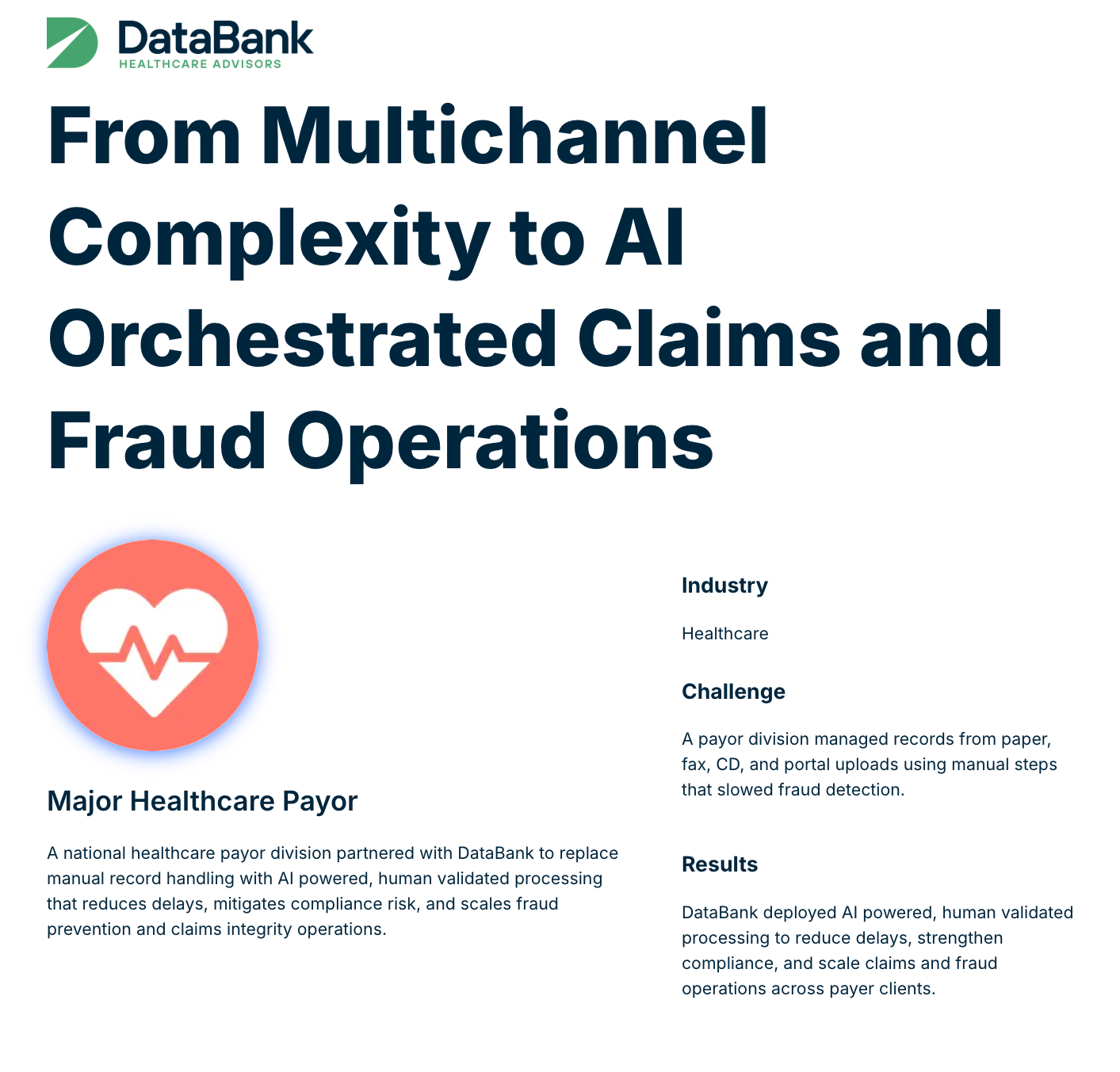
One major national healthcare payor partnered with us to transform multichannel claims and fraud operations through AI-driven document processing, and we helped them process 3.5M images in one month and build a correspondence pipeline capable of 176,550 letters per month, all while maintaining 100% SLA adherence.
This article is based on our experience helping health plans with claims and correspondence intake, content platform migrations, and the document-level work behind every automation initiative.
Healthcare payer digital transformation is a system-wide shift that replaces manual, paper-dependent, and legacy-system-bound operations with connected digital workflows. It covers how claims and prior authorizations enter the organization, how member data flows between systems, and how providers access plan information.
But most organizations tackle just one part of this, especially the parts members and providers interact with, and call that transformation.
But a plan that just builds a new member portal has modernized only one surface.
To capture the full value of digital and AI transformation, payers also need to ensure the transformation work reaches the data, operational core and systems every front-end experience depends on. That can mean digitizing intake, consolidating content platforms, modernizing legacy systems, and improving how data moves between them.
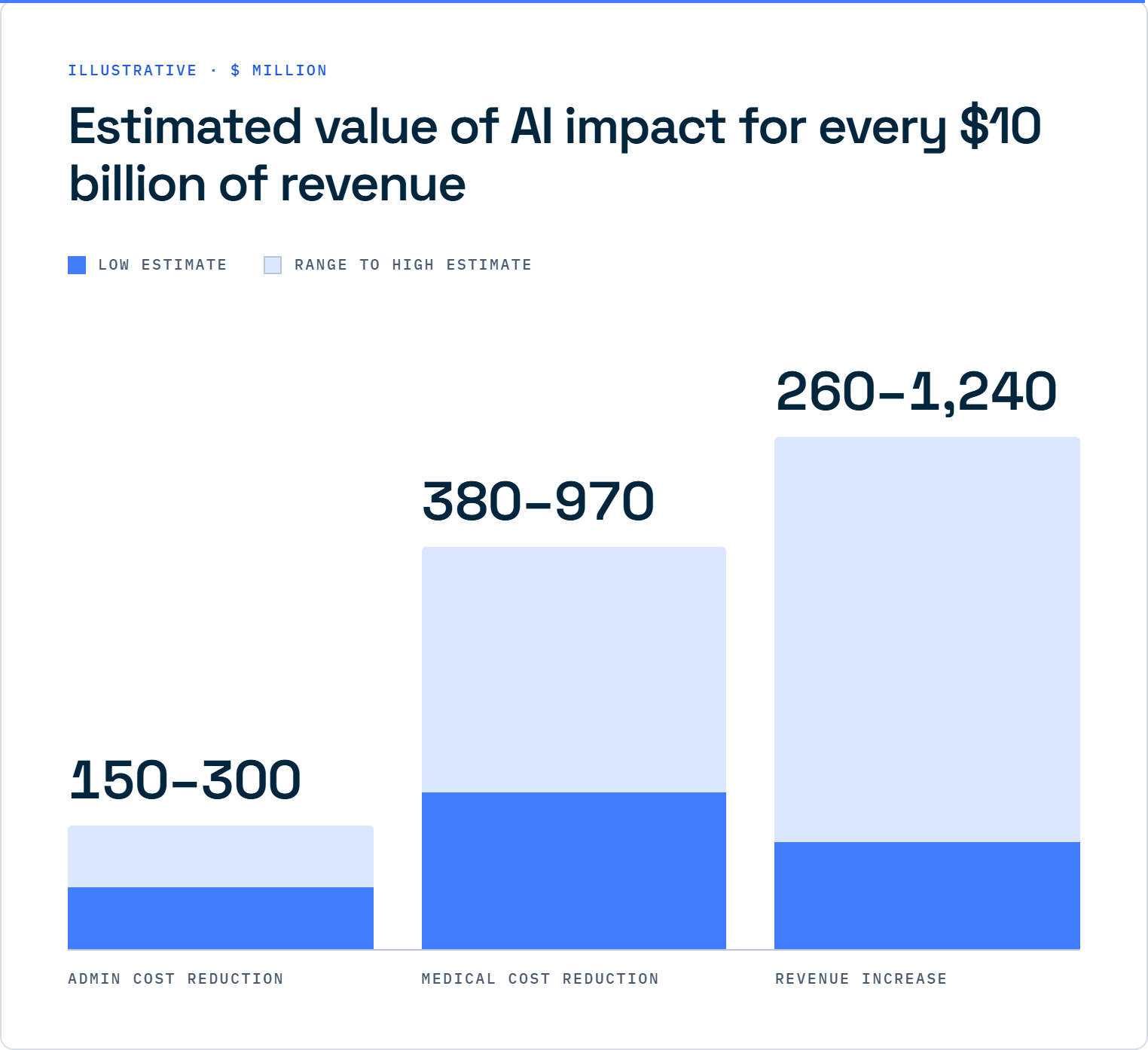
While that might seem like a lot of work, the potential value gain makes it worth it. McKinsey estimates that, for every $10 billion in payer revenue, AI solutions could save $150 million to $300 million in administrative costs, save $380 million to $970 million in medical costs, and increase revenues by $260 million to $1.24 billion.
Here are the four issues that tend to derail payer transformation programs from delivering the expected results:
Payer transformation programs often try to automate processes before all the information flowing through them is structured and fit for the automation system.
For example, a plan buys a workflow engine and connects it to its claims system even though half its incoming documents are unstructured images with no reliable metadata. So, the automation fires on with incomplete or inaccurate data, and exception queues fill up. Then, staff still end up doing the manual work they were trying to bypass with automation.
Claims operations owns one system. IT owns another. Compliance owns the records retention schedule. And none of these systems interact with each other. That creates gaps where documents get lost, and metadata gets entered inconsistently.
When a transformation initiative is launched, connecting these systems can require significant integration work. Without clear ownership of those integrations and the processes that span multiple systems, it becomes harder to coordinate the changes needed to succeed at digital transformation.
Payers know they need to move off legacy platforms. Legacy consolidation and modernization is a common part of payer transformation efforts. But knowing it and doing it are different things.

Legacy systems carry decades of configuration, custom integrations, and institutional knowledge that may not be documented. So most plans decide to keep the old system running alongside the new one for a while. Then, the temporary parallel operation becomes permanent and stalls modernization efforts.
Many payers have already tried a transformation initiative that promised results and delivered only a partial implementation. When the next one comes along, operations teams can be skeptical, and for good reason.
They’ve seen new systems that didn’t integrate with existing workflows. They’ve seen automations that created more exceptions than they resolved. Getting buy-in for a second digital transformation attempt is harder because the organization remembers what happened the last time.
Payer digital transformation doesn’t stop at one project. It touches six operational domains, each with its own systems, stakeholders, and failure modes. Understanding what each one involves makes it easier to sequence the work properly.
This includes the claims adjudication engine, enrollment and eligibility systems, and billing infrastructure.
For many payers, some of these systems still run on platforms that were built or configured decades ago. Modernizing them usually means migrating to a newer platform or adding an integration layer around the existing one. Either way, core administration sits at the center of the payer’s technology environment, so modernization must account for the systems and workflows connected to it.
This is where documents enter the organization. Claims, attachments, prior authorization requests, appeals, grievances, and provider correspondence are some of the document types that typically come in. They can arrive by mail, fax, email, portal, or EDI, and they don’t all come structured or in the same format.
That makes the intake workflow an important part of any payer’s digital transformation. It helps ensure there’s no gap between what payers receive and what reaches their claims systems.
This covers prior authorization, concurrent review, case management, and disease management. These processes rely on clinical and administrative information moving between the plan and its provider network.
The CMS Interoperability and Prior Authorization rule (more on that below) is also pushing payers toward more electronic data exchange, with key API requirements taking effect January 1, 2027.
Payers that still handle prior authorization through fax-based workflows and phone queues face both operational inefficiencies and a looming compliance deadline.
This domain covers provider directories, credentialing, contracting, and network adequacy. Provider data can be difficult to keep accurate when it’s maintained across multiple systems and sources. A digital transformation effort therefore needs a reliable source of provider information that can feed the systems that use it, from the member portal to the prior authorization engine.
This is where members actually see the plan: portals, mobile apps, digital ID cards, telehealth, and communications. EOBs, benefit booklets, SBCs, and plan notices also fall within this domain.
Many payers start their digital transformation here because it’s the most visible part of the operation. But a better member experience still depends on the accuracy of the information behind it. A portal showing incorrect provider data or stale claims status is worse than having no portal at all.
This covers population health analytics, risk adjustment, quality reporting (HEDIS, Stars), fraud detection, and the data warehouse infrastructure that supports them. These capabilities depend on clean, consistent, and timely data. That makes the upstream domains, particularly intake, provider data, and core administration, important sources for the analytics layer.
The right sequence matters for your digital transformation project because each step lays the foundation for the next. Skip a step or do things out of order, and you risk automating bad data, connecting systems with inconsistent information, or building analytics on a foundation that can’t support them. Here’s the right sequence to follow:
Before you buy a platform or launch an initiative, you need to understand your information’s current state. Audit how documents and data enter the organization, where they live, how they’re indexed, and whether they’re accurate enough to automate against.
You’ll want answers to specific questions: How many intake channels do you have? What format does each one deliver? What percentage of incoming documents require manual data entry before reaching a downstream system? How many content platforms hold the same types of documents, and do they use consistent metadata?
This assessment gives you a readiness baseline that you can use to measure progress throughout the transformation. You can also use the maturity model discussed later in this piece to score where you stand.
Once you know where the gaps are, intake is the first thing to fix. You need incoming documents, regardless of channel, flowing into a structured stream with consistent metadata.
For most payers, that means consolidating paper mail, fax, email, and portal submissions into one intelligent document processing pipeline. This pipeline then classifies, extracts, validates, and indexes each document before it reaches a downstream system. And the keyword is “before.” A claims document that reaches the adjudication engine with the wrong member ID creates an exception that costs far more to fix downstream than it would at intake.
This step is also where AI and human validation can work together. Intelligent document processing can classify and extract data from many standard document types, but it can struggle with handwritten notes, poor-quality faxes, and documents that contain multiple record types. Subject matter expert validation catches what the machine misses and creates a feedback loop that can improve extraction accuracy over time.
Most payers have documents spread across multiple platforms. There’s usually a legacy ECM for older records, a newer system for recent claims, and shared drives for correspondence. Each often has its own metadata schema, access controls, and retention rules, making it hard to maintain a consistent view of all the information.
Consolidation means choosing one governed platform or a connected pair) and migrating everything into it. That often involves mapping fields across systems that were never really designed to interoperate, validating that records transferred correctly, and maintaining a chain of custody. Effectively accomplishing those 3 tasks can be hard, and that’s what makes data and content migrations tasking.
But get them done right and the payoff is a single source of truth for every document in the organization.
That means when compliance needs a retention report, they run it from one system. When a claims examiner needs documentation on an appeal, you find it in that same place with the right metadata. And when an auditor asks for a record, you produce it with a full audit trail.
With intake stabilized and content consolidated, you can start retiring legacy systems that the organization has been maintaining alongside newer platforms. That’s the step everyone agrees is necessary, but everyone is reluctant to do. And it’s understandable. Years of configuration, custom integrations, and undocumented dependencies can make shutting down those systems feel like the wrong move.
If that’s how you are feeling, try an incremental migration to reduce the risk of something going wrong. Move one function or document type at a time, validate that the new system handles it correctly, and then decommission the old one once the replacement has been in production long enough to prove itself.
This approach takes longer than simply cutting out the old systems, but it limits the risk of a failed migration disrupting production.
Cloud migration adds another layer to consider. If you’ve got on-premises ECM platforms that need to be moved to the cloud, you need clear answers on where the data lives, who can access it, and how it’s protected before migrating. This is especially important if your plan handles PHI.
Once your data is trustworthy, you can then build APIs and integrations to connect it to the partners and systems that need it. Think your claims system, care management platform, provider directory, and member portal.
That is where the CMS 2027 API requirements (covered below) come into play. The FHIR-based APIs required by the rule aren’t just a compliance checkbox. They’re a signal that the industry is moving toward interoperability.
For payers covered by the rule, building your APIs on clean, well-governed data will make it easier to meet the requirements and support the systems that depend on them.
This is the last step, and for good reason. With clean data, consolidated platforms, and working APIs, you can build workflows that run without constant human intervention. Workflow and process automation at this stage means you are routing claims to the right queue based on reliable metadata, triggering prior auth decisions based on complete clinical data and generating member communications from accurate benefit information.
When you do this automation step last, you’ll see a clear difference in your exception rate. Automation built on clean, well-governed data produces little to no exceptions and less manual rework. That’s the efficiency gain that makes your digital transformation sustainable.
This model gives you a way to score where your organization’s information stands and spot the gaps to close before moving to the next step:
That gap between where you stand and Level 4 is the information-readiness gap, and your ability to close it determines whether your automation investments deliver the expected results.
The CMS Interoperability and Prior Authorization Final Rule (CMS-0057-F) was finalized in January 2024. It requires certain payers to implement and maintain FHIR-based APIs, with the main API requirements taking effect January 1, 2027. CMS estimates the rule will save approximately $15 billion over ten years by reducing friction in the prior authorization process.
Medicare Advantage organizations, Medicaid managed care plans, CHIP managed care entities, and Qualified Health Plan issuers on the Federally Facilitated Exchanges. State Medicaid and CHIP fee-for-service programs have until January 1, 2027, to comply.
The rule mandates three new FHIR-based APIs: the Provider Access API, which gives in-network providers access to specified patient claims, encounter data and clinical information; the Payer-to-Payer API, which lets plans exchange data when a member switches coverage; and the Prior Authorization Requirements, Documentation, and Decision (PARDD) API, which lets providers submit, track, and receive decisions on prior auth requests electronically.
It also expands the existing Patient Access API to include certain prior authorization information.
Urgent prior auth requests must receive a decision within 72 hours, and standard requests must receive a decision within 7 calendar days, down from the previous 14-day window. These requirements already took effect on January 1, 2026.
Payers must publicly report approval and denial rates, processing times, and denial reasons annually. They must also disclose specific denial reasons to providers at the time of denial.
P.S.: If you’ve followed the sequencing above, you’ve already done much of the foundational work that ensures these APIs connect to clean data. So compliance becomes a natural extension of your previous digital transformation efforts.
But if you haven’t and still have data quality and interoperability problems, for example, an information-readiness gap, the APIs will only expose those problems to the members and providers relying on the data they return.
Every department that handles documents tends to develop its own method of storing and indexing them. And those methods rarely match. Claims might use one system with one set of index fields, Appeals another, while Provider Relations relies on a shared drive.
That means locating a document can become a completely different process, depending on which department you need to pull it from. This makes it difficult to set up consistent automation workflows for processes that cross departmental lines.
Inconsistent provider data is a well-known industry challenge, but member data can have similar problems. A member’s demographics might differ between the enrollment system, claims system, and member portal, and the same can happen with provider information across credentialing, contracting, directory, and claims systems.
Without a reliable source of truth, downstream systems can inherit inconsistent information from the systems feeding them. That can affect everything from claims processing to what members and providers see through digital channels.
Health plans must comply with federal and state retention requirements, which vary by document type, line of business, and jurisdiction.
Add legal holds to those retention mandates, and you’ve got another layer of complexity around how you must handle information and documents. For example, a document that would otherwise be eligible for destruction has to be preserved if it’s subject to litigation or a regulatory inquiry.
Managing all those requirements across multiple platforms can make it difficult to apply and monitor retention policies consistently. That’s why most payers consolidate their information onto a single governed platform to simplify records management and easily meet regulatory obligations.
Organizational leaders may hesitate to approve a transformation initiative when they’re not convinced the time, cost, and disruption will be worth it.
To get past that resistance, start with a smaller, measurable project and show early wins before asking the organization to commit to the full roadmap. A measurable improvement in intake accuracy or a claims queue that actually clears will do more for buy-in than any executive presentation.
DataBank IMX is a document and data operations firm for regulated U.S. organizations. We handle much of the foundational work behind payer digital transformation, including intake, content management, and legacy migration steps that often stall programs.
Our approach maps directly to the sequence above. We start with your information readiness, assessing how documents and data enter your organization and where data inconsistencies start.

We then stabilize intake through high-volume document scanning, intelligent document processing, and subject matter expert data validation. Your claims, correspondence, and attachments reach downstream systems clean and indexed.
Next, we consolidate your content platforms through data and content migrations, mapping metadata across legacy and modern systems and maintaining chain of custody. We then host and manage the resulting environment through ECM cloud hosting and managed services.
Our entire operation is US-based, so we can handle your protected health information that has data-residency requirements. We also support HIPAA compliance through SOC 2 Type II certified operations.
If your transformation program has stalled because the underlying information isn’t ready, we can solve that. Connect with our team to start your information readiness assessment and see the gap you have to close.
If your plan has already invested in a digital transformation initiative but the result hasn’t been promising, take a closer look at how your current intake process is set up.
Healthcare payer digital transformation is a sequenced set of operational changes that starts and depends heavily on the underlying information before working outward toward automation, analytics, and interoperability.
Audit how documents and data enter the organization, where they live, and whether they’re accurate enough to automate against. Only when that intake process has been unified across all channels, document types, and formats should you move on to the next step in the sequence.
Don’t want to handle all this alone? DataBank’s transformation experts can help you assess your information readiness and build the foundation for the next stage of your digital transformation.
Start with an information readiness assessment. Check where documents and data enter your organization, where they are stored, and whether they’re accurate enough to automate against. That assessment tells you which of the six domains needs attention first and keeps you from automating on top of bad data.
They can fail when payers automate on top of poor-quality information. If incoming documents aren’t consistently classified, extracted, and validated before reaching downstream systems, the automation produces more exceptions and manual work. Siloed ownership, legacy dependency, and change fatigue can also cause program failures.
The CMS Interoperability and Prior Authorization Final Rule (CMS-0057-F) requires affected payers to implement three FHIR-based APIs by January 1, 2027. These include the PARDD API, the Provider Access API, and the Payer-to-Payer API. CMS estimates it’ll save approximately $15 billion over ten years.
It means your documents and data are accurate, consistently indexed, and housed in governed systems that downstream processes can rely on. A plan with high information readiness can automate with confidence because the data feeding its workflows is clean. A plan with low readiness will see high exception rates and need lots of manual rework.
It depends on the scope and the starting point. A realistic timeline for the full sequence is two to four years for a mid-sized plan. Trying to compress it by skipping steps, especially intake stabilization and content consolidation, is how programs fail after you’ve invested significant time and money.
Your oil and gas company likely manages millions of documents across leases, well files, regulatory filings, and land records. When those records live in filing cabinets, disconnected drives, or legacy systems, you lose time, miss deadlines, and pay fines.
To fix it:
And if you need an expert to work with on this, DataBank can handle the full document lifecycle, from scanning and digitization to content management and workflow automation, so you can bring your records, systems, and processes together.
In 2023, New Mexico’s Oil Conservation Division proposed a $2.412 million civil penalty against the oil and gas company, Ameredev, after it failed to file required production and natural gas waste reports on time.
This huge penalty shows the financial consequences of missed regulatory filings, which often happen when your critical records are missing or difficult to retrieve. But the costs of poor document management can go beyond penalties. It can also eat into your employees’ time.
Åshild Hanne Larsen, the former CIO at Equinor, estimated that oil and gas employees spend 80% of their time searching through unstructured data to inform decisions and get work done, compared to the 30% IDC benchmark across all industries.
This article discusses how to avoid these financial and operational burdens by learning where document management commonly breaks down in oil and gas companies and building a system that connects your records to the workflows that depend on them.
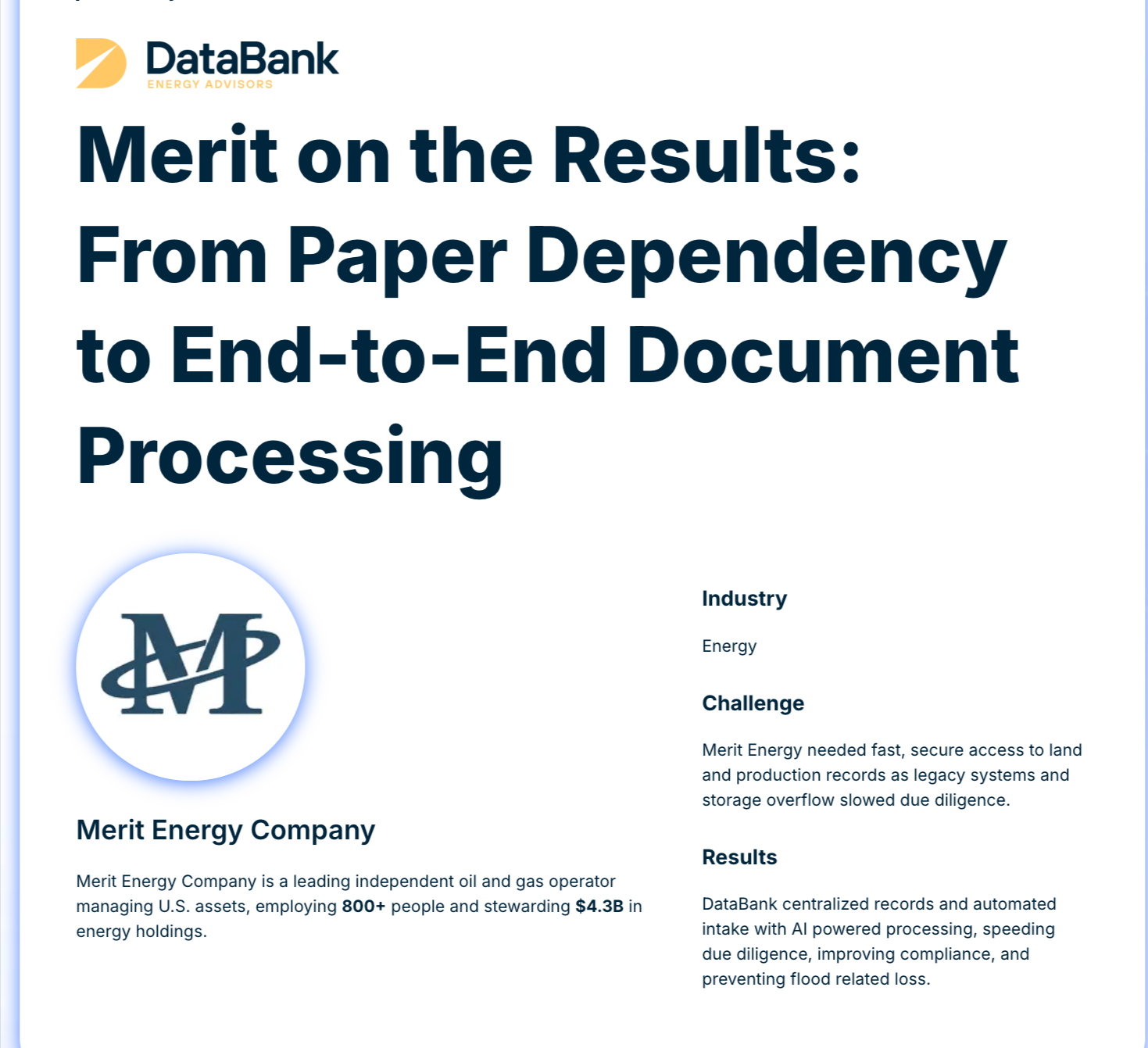
DataBank has processed over one billion records for companies across regulated industries, including oil and gas operators like Merit Energy.
For Merit, we implemented AI-powered intelligent document processing to centralize records, speed up due diligence, improve compliance, and prevent flood-related loss.
Our entire operation is built around document management, and oil and gas is one of the many regulated industries we serve. This article draws on the work we’ve done to help companies like yours manage, protect, and get more value from their records.
Oil and gas document management is the practice of capturing, organizing, storing, and retrieving the records that are needed to support operations throughout an oil and gas asset’s lifecycle.
To understand why it matters, consider all the documents that follow a single well from planning to production.
Before you drill, you’ve got lease agreements, title opinions, mineral rights documentation, and permits. During drilling, you’re producing daily reports, mud logs, directional surveys, and completion records. Once the well is producing, you need to add production reports, royalty calculations, regulatory filings, and maintenance records.
From a single well, you could have thousands of documents. Multiply that across the thousands of wells your company may own, and you are looking at millions of records.
And the challenge with these documents isn’t just how many there are. It’s that they also need to be easily retrievable and accessible to landmen, engineers, accountants, regulatory teams, and field operators. Even when each stakeholder group needs different records at different times, for different reasons.
And most of these records have legal retention requirements, so you must keep them for the stated duration and can’t simply delete them as volume grows.
Proper document management gives you a consistent way to organize and retrieve these numerous records, keep critical information accessible to the people who need it, and stay on top of retention requirements.
That way, your team can spend most of their day doing actual work instead of searching through shared drives, inboxes, paper files, or disconnected systems.
Document control in oil and gas tends to most commonly fail in three places:
Plenty of operators still have warehouses full of well files, land records, and legacy engineering documents in paper form. And some of those records go back decades.
Need to find a specific lease amendment from 1987 in a setting like this? That means sending an employee to dig through a filing cabinet.
And if that record was misfiled or was found damaged, it becomes impossible to retrieve.
Most oil and gas companies use a mix of software for different functions.
Quorum or P2 handles production accounting, SAP handles financials, and Landmark or Petra covers geosciences. Then there’s SharePoint or a shared drive for everything else.
This disconnected setup often results in the same document having multiple versions across systems. So, your land team has one version of a division order and your accounting team has another, and there’s no automated way to keep them in sync.
Federal leases, state leases, and pipeline operations all have different retention rules. Without a schedule that maps each document type to its retention requirement, you end up either keeping everything forever (causing unnecessary storage and management costs) or discarding records you’re still legally required to hold (leading to regulatory non-compliance).
The types of records you need to manage depend on where you sit in the value chain. But whether you are in upstream, midstream, or downstream operations, a few document categories show up across the industry:
Oil and gas retention rules vary by jurisdiction, document type, and the agency overseeing those assets. There’s no single standard that covers everything, which is why a centralized retention schedule matters so much.
However, here are the three most common frameworks:
Across these 3 frameworks and others, the common thread is that regulators expect you to produce records quickly when asked. During an audit, “we have it somewhere” isn’t an acceptable answer. You need to know exactly where each record is, how long you’ve held it, and when you’re legally allowed to dispose of it.
If you’re starting from scratch or fixing a document management system that has fallen behind, take these 4 steps to build a system that keeps your records organized, accessible, and compliant:
If you have warehouses full of paper records, digitize them first using high-volume document scanning and proper indexing, so every document is searchable by well name, lease number, document type, or date.
And since you are in oil and gas, where large-format documents like plat maps, surveys, and engineering drawings are notorious, use a specialized oil and gas document scanning service that can handle documents up to 54 inches wide.
Map every document type to its regulatory requirement. Federal leases, state leases, pipeline operations, and financial records all have different timelines.
Knowing what you must keep and for how long helps you build a system that manages disposal automatically.
Once your oil and gas records are digital and organized, don’t keep them in isolation. Instead, integrate them with the field and back-office systems your teams already use.
After all, a division order doesn’t help your accounting team unless they can see it in their own system. And a well completion report is pointless if production accounting doesn’t know the well exists.
Document management in oil and gas is most efficient when records connect to the systems your teams use every day. That means integrating your content management platform with tools like Quorum, P2 Energy Solutions, SAP, and Landmark. That way, when a landman updates a lease, the accounting team can see the change without re-keying anything.
And for companies running field operations across multiple basins, this connection has to extend to the field. Inspectors and field engineers need to be able to pull up safety records, work orders, and permits from a tablet, not just from a desktop at headquarters.
Once you are able to bridge the gap between where your documents live and where your team workflows run, you can eliminate re-keying, reduce version conflicts, and give regulators a single source of truth during audits.
The last step is to use intelligent document processing to handle high-volume document types like division orders, royalty statements, and incoming correspondence.
Using modern AI and machine learning technology, this process extracts key data fields automatically and routes them to the right system. Human reviewers then validate the output, which keeps accuracy high. Adopting this lets you organize large volumes of incoming records quickly, without letting manual data entry bottleneck your pace.
DataBank IMX is a document and data operations firm for regulated US industries, including oil and gas.
For document processing, we handle the full lifecycle from capturing and digitizing paper records to managing them on enterprise content platforms to automating the workflows that depend on them.
For oil and gas operators specifically, we scan and digitize leases, deeds, division orders, well files, and large-format engineering documents up to 54 inches wide. We also convert microfilm and microfiche for legacy records that predate digital systems.
Our intelligent document processing pairs AI-powered extraction with subject matter expert validation. So, for documents that carry legal and financial weight, you get the speed of automation without the risk of unchecked errors.
DataBank integrates with platforms like Quorum, P2, SAP, and Landmark and connects your records directly to the systems your teams already use every day. We also operate three owned scanning facilities across the US, with SOC 2 Type II controls and a documented chain of custody on every project. With us, you won’t have to worry about losing track of your records or compromising their security while they’re being digitized.
If you’re dealing with paper backlogs, disconnected systems, or retention headaches in your oil and gas company, connect with an expert on our team to talk through how we can help.
When it comes to document management, especially when you’re starting with lots of old paper records, disconnected systems, and manual processes, you don’t need to fix everything at once.
Instead, start with the documents that carry the most regulatory risk or cost you the most time to find. For most operators, that’s well files and land records.
Digitize them, index them properly, connect them to your existing systems, and build a retention schedule that matches your actual obligations. Once the foundation is in place, you can extend the same approach to every other document type in your operation.
And if you’d rather not build this on your own, talk to our team. We’ve helped other oil and gas operators like Merit Energy get their records under control.
The biggest categories are land and lease records, well files, regulatory filings, and production reports. Others include financial documents like joint interest billing and royalty calculations, plus field records like safety inspections and maintenance logs. Retention requirements differ for each type depending on the jurisdiction and the governing agency.
It depends on the document type and the regulator. Federal leases under BLM rules require at least seven years of retention for well records and production data. Texas RRC rules set a general floor of three years. Pipeline operators under PHMSA rules must keep pressure test records for the life of the pipeline. A centralized retention schedule is the only reliable way to stay on top of all of them.
Document management is the practice of capturing, organizing, and retrieving business documents. Records management is a subset focused on documents with legal or regulatory retention requirements. In oil and gas, the two overlap heavily because so many operational documents are also regulated records.
Yes, but it works best for specific, high-volume tasks. Intelligent document processing uses AI to extract data from documents like division orders, lease agreements, and regulatory filings. But it’s most effective when paired with human validation because oil and gas documents often include handwritten notes, poor scan quality, or non-standard formats that AI alone might capture incorrectly.
We’ve talked through process mapping, what it is, and how you can leverage it. We even dug into process mining and how to get into the nitty-gritty aspects of your solution.
At this point, you should have a detailed, holistic view of your current state:
Once you’ve achieved all of those steps, you can now focus on opportunities for improvement by leveraging new technologies or changing process steps to gain greater efficiency and ROI. For example, you can apply Robotic Process Automation (RPA) to eliminate manual, repetitive tasks or implement workflows to handle exceptions that may be slowing down the process.
RPA is non-intrusive and will leverage the company’s current infrastructure without causing any interruptions or needing to replace these systems. Using RPA, efficiency, and compliance is no longer an issue but simply a part of the automation process.
True process management takes commitment. It’s more than just implementing process mapping or process mining and then walking away once you have identified opportunities for optimization. To create an organization that is dedicated to continuous process improvement, you likely need to change your organization’s culture.
In order for process improvement to be scalable and sustainable, you should implement a process management program. Regardless of which tools or practices you use for process improvement, you should have executive sponsorship and business process ownership that sets the cadence of how, when, and why process management will be embedded within your organization’s operational excellence.
Process management requires methods to easily collaborate on processes, regularly reviewing existing processes, a mechanism to solicit improvement ideas or feedback, and, of course, visibility into the documented processes.
Higher education institutions face the challenge of managing vast amounts of information and data while striving to streamline internal processes. Manual procedures, paper-based workflows, and fragmented systems hinder operational efficiency and the ability to offer optimal services to students and staff. Explore how adopting Content Management Systems (CMS), structured workflows, and modern technologies can eliminate paper processes, consolidate systems, and pave the way for a more effective, streamlined, and future-ready higher education environment.
Content Management Systems are powerful tools that enable higher education institutions to organize, store, and manage vast volumes of digital content efficiently. By implementing a robust CMS, universities can move away from paper-based documents and embrace digital files. This reduces paper waste and physical storage requirements and enhances accessibility and data security. Faculty members can effortlessly share course materials, administrative staff can collaborate on projects seamlessly, and students can access essential resources from anywhere, anytime.
Higher ed institutions often operate on multiple disconnected systems, leading to data silos and inefficiencies. Consolidating systems into a unified platform powered by a CMS can streamline data management, eliminate duplication, and improve data accuracy. Structured data, organized within the CMS, allows for easier reporting, analytics, and data-driven decision-making. By harnessing the power of structured data, institutions can gain valuable insights into student performance, enrollment trends, and overall institutional performance.
Manual processes often suffer from bottlenecks, delays, and human errors. Structured workflows within a CMS create standardized and automated pathways for tasks and approvals, ensuring smooth and efficient processes. With structured workflows, routine administrative tasks like approvals for enrollment, financial aid, and course registration can be streamlined, reducing processing time and enhancing overall productivity. Moreover, by incorporating notifications and reminders, institutions can ensure critical tasks are completed on time.
The digital transformation of higher education involves phasing out outdated paper processes. By embracing CMS and structured workflows, institutions can significantly reduce their reliance on physical documents. This contributes to sustainability efforts and enhances document retrieval and management. Digitizing student records, administrative forms, and academic materials allows faster access, greater accuracy, and easy data sharing across departments.
Transitioning to a more tech-driven environment requires strong internal process adoption. Comprehensive training programs and workshops can help faculty and staff become familiar with the CMS and structured workflows, ensuring widespread usage and optimal utilization of available tools. This cultural shift fosters an environment where technology is embraced and leveraged to drive efficiency and collaboration.
By adopting cutting-edge technologies, consolidating systems, and implementing structured workflows, universities unlock the potential to create a seamless and enriching educational journey for students. Streamlined interactions with admissions, enrollment, and academic services foster a sense of empowerment and engagement. Meanwhile, employees experience a reduction in manual tasks, allowing them to focus on more meaningful and impactful initiatives that directly impact the students they serve.
Moreover, using usable structured data enables data-driven decision-making, leading to better educational outcomes and personalized student support. As higher ed institutions stride towards a tech-driven approach, they not only position themselves as pioneers but also cultivate an environment where students and employees thrive in a digitally empowered ecosystem.
The future of higher education lies in these transformative technologies, paving the way for an exceptional and forward-looking educational experience for all stakeholders involved. Embracing innovation and digitization, universities are poised to lead toward a brighter future in higher education. Learn more about DataBank’s Higher Education services.
We get asked a lot – “How do I know it’s time to upgrade?”
The answer – it depends. Here’s why.
If you’re running on EP5 or below, upgrade now.
There are abundant reasons to regularly upgrade OnBase, but here are some reasons you should consider making an upgrade project a priority very soon:
Older software stays on older servers with older operating systems. Custom development falls out of recommended security standards. You may end up paying more for software and hardware maintenance, and in time integrations will reach their end of life.
The longer you let things go without making updates to your OnBase environment, the more difficult and daunting your next upgrade will be. Putting off the costs may prove more costly in the long run.
If you haven’t already had the Windows 10 discussion yet with your IT department, you will: 1.4 billion devices are running on Windows 10 or 11 worldwide.
Why Windows 10? Creators Update and Beyond has focused on security enhancements primarily tailored for enterprises and IT administrators. Support for the most recent Windows 10 Creators Updates starts in OnBase 17 Service Pack 2. So, if you don’t have one of the latest versions of OnBase, your users can’t have the latest version of Windows 10. It’s that simple.
Also, Microsoft support for Windows Server 2008 R2 is about to expire. If you have OnBase servers still running this version, you are a great candidate for an Incremental Parallel Upgrade (IPUP), which includes a server migration.
Raise your hand if:
We’ve all got our hands raised by now.
The point is that even if your OnBase solution is just one or two versions behind, you may be missing out on process improvements that could benefit users around your organization.
OnBase 24.1 boasts some new features as well as the latest security updates, including:
These improvements are geared towards greater usability and better end-user experience, a boon to anyone looking to increase accessibility and collaboration within the platform.
In today’s world, it is essential to keep pace with technology to keep your solutions relevant. This means operating systems, internet browsers, and application suites. It is important to adapt to the ever-changing world of technology around us to keep up with modern business and modern life.
If you haven’t upgraded recently, you’re making things more difficult for yourself in the upcoming years – particularly if your organization is in a competitive space.
As the average user adapts to a more technological lifestyle, their expectations grow when it comes to user interfaces. Employees are looking for additional ways to be more versatile and more efficient when it comes to their work. Employers look at ways to facilitate a mobile user base, and sometimes a remote workforce.
When updated software launches, there’s pros and cons. On the pro side, you have security enhancements, new features, and fixes. On the con side, while you have software that’s been fully regression tested, the new version has not been thoroughly vetted by countless environmental variables and real-world scenarios.
There are many benefits to upgrading early in a release cycle, but the risk of unexpected behavior is always a bit higher for early adopters.
If you feel like it’s been such a long time since you’ve upgraded that you wouldn’t know where to start, don’t let that hold you back! Start the conversation with your DataBank Account Manager or connect with our team, and we’ll help you take the next step.
Remember, the object of an OnBase upgrade project isn’t the upgrade itself – the real objective is to improve your organization’s readiness for today’s challenges and strategically align yourself to face tomorrow’s.
Keep improving your resilience for the future by upgrading.
Efficient data accessibility and retrieval have become the lifeblood of successful businesses driven by relentless data demands. To meet these challenges head-on, accessible data is imperative, meaning digitizing physical assets is no longer a luxury. While we tend to think of our world today as fully digital, paper is very much part of many business processes, and always will be. But in order to keep the data and do more with it, it can’t remain in a file cabinet.
Disparate file types and servers, duplicate copies, the sheer difficulty of locating that document you need – these are all obstacles keeping you from operating at peak efficiency. If you’re carrying the burden of paper, here are five reasons why it’s time to finally shed the paper weight:
Document scanning for high volumes of archival or transactional (active) records can be a pretty complex undertaking. It’s way more than just scanning a PDF and dumping it into a folder. We think of it as step one in creating a secure, powerful data supply chain that feeds your organization.
Using advanced scanning technology, you can do more than just convert paper-based documents into searchable and editable digital formats – the data in those records can then be extracted, structured, and indexed so it’s freed from its container and ready to be put to work.
It’s a simple concept, but keeping all your mission-critical data in one place is actually a game-changer. Digitized documents and data from scanning services are stored in a centralized data repository, accessible to authorized personnel from anywhere. Once your documents are scanned, think about where they’re going – and prepare for that with a system that integrates all your software, applications, and content repositories.
This centralized approach to data storage eliminates the risk of lost or misplaced documents and enables efficient collaboration among team members, regardless of their physical location. Moreover, with proper indexing and tagging, locating specific records becomes a breeze, resulting in improved response times and streamlined workflows.
Document scanning services offer robust data security measures to protect sensitive information. Digital documents can be encrypted, and access controls can be implemented to ensure only authorized users can view and modify the data. Additionally, organizations can establish audit trails and track document access, contributing to regulatory compliance and safeguarding against potential legal issues.
The digitization of documents through scanning services significantly reduces the time spent on manual data retrieval and processing. Employees can quickly access the necessary information, minimizing downtime and improving productivity. Furthermore, digitized data enables automation and integration with other systems, further streamlining business processes and reducing operational costs associated with physical storage and document handling.
Digitized data and documents are crucial to an organization’s disaster recovery plan. Physical documents are vulnerable to damage from fires, floods, or other catastrophic events, potentially causing irreparable data loss. However, with digitized records securely stored on remote servers or in the cloud, businesses can ensure business continuity and rapid data recovery in case of unforeseen disasters.
The significance of document scanning services transcends convenience when it comes to your data-driven operations. It emerges as a catalyst that propels businesses towards growth and adaptability. By embracing the digitization of documents, organizations can unlock benefits, from bolstered data security and regulatory compliance to the seamless flow of information.
Learn more about high-volume document scanning services and intelligent document processing, or connect with our team today.
Now is the time to move your organization forward and bring automation into your supply chain. If you’re anything like the dozens of manufacturing companies we work with, you might be dealing with a lot of paper and cumbersome, highly manual processes. Now, more than ever, supply chains are under pressure to increase production while keeping costs down. In our recent webinar with KnowledgeLake, we discussed how to future-proof supply chain operations through a more robust data management strategy.
Paper will always exist, so catch data early. 80% of actionable information for an organization typically resides within documents, while the other 20% are in rows & columns in databases and business systems. It’s critical to figure out the processes and strategies for how you manage the documents that flow into your organization. With data intake, you aren’t just digitizing documents, you are creating a way to understand the data coming into your organization and eliminating paper at the source. This is called cognitive capture, which implies understanding the content you are capturing. In doing so, you are taking the first step to modernizing your processes to bring resilience to your manufacturing supply chain.
Make sure your organization is leveraging the right technology to refine and structure your information. AI, machine learning, and RPA can help you accomplish this. Finding the right technology can bring you peace of mind, like eliminating duplicate data caused by human error. By automating processes, you reduce these errors. Plus, bots don’t take lunch, and they work 24/7. All of this leads to the end game of increasing visibility of the information flowing in and making it actionable by deploying it into a workflow or using it for better reporting.
There is a lot of information locked and stored in your documents that contains value and it isn’t practical to waste time going through each one when routine processes can be automated. Paper documents are often stored in multiple locations which can make it difficult to access when you need them, especially if your employees are working remotely. Being able to find the right information stored in past documents is essential for a resilient manufacturing supply chain. The idea is to create universal access to all of the data and the important information they hold while eliminating redundancies in the process. Consider the cloud. There are many cloud storage solutions available and can allow your organization to better manage and access the same information at any time.
The main goal is to increase efficiency and put your best resources towards activities within the organization that add value. With data activation, your organization can unlock the values in data and turn it into actionable information. With this, you’ll see faster workflow approvals, reduced errors, and increased visibility with reporting and dashboards, which will change the game. Technology can provide flexibility to allow you to get to the right data and in turn, make that data actionable. This will enable you and your teams to make better, more accurate, decisions.
As we’ve experienced in the last year, your ability to quickly pivot is critical to being resilient to the whims of an unpredictable market. During times of change, a sound strategy for how information is ingested and flows throughout your organization will mean you have the line of sight you need into your processes, your data is accessible, and you’re operating at peak efficiency.
The Hospital Readmissions Reduction Program (HRRP) was created in 2010 by the Affordable Care Act in effort to make hospitals pay more attention to patients after they leave their facility. Prior to the beginning of this program in 2008, nearly a quarter of Medicare heart failure patients ended up back in the hospital within 30 days. HHRP wanted to encourage hospitals to improve their communication and care coordination to better engage patients and caregivers in discharge plans and, therefore, reduce avoidable readmissions by linking payment to the quality of hospital care.
Payments, or penalties, are calculated by tracking three years of Medicare patients. Once CMS sends hospitals their annual confidential Hospital-Specific Result (HSR), they are given 30 days to review and submit questions or recalculate corrections before payment is issued. These payments are often hundreds of thousands (if not millions) of dollars and can be a big hit to a hospital’s tight budget.
So how can your hospital reduce these costly penalties by reducing CMS patient readmissions overall?
When patients get discharged from your hospital, it is often nearly impossible for hospital physicians to remain looped into their care and how their treatment plans are going until it’s too late, and they end up readmitted back into an acute care setting. Utilizing tools with clinical insight into patients’ conditions while they’re still in a skilled nursing facility (SNF) or rehabilitation center can mean the difference between thousands of dollars (if not more) in readmissions costs as treatment plans can be tweaked in nearly-real time to better improve the discharged patient’s outcome.
The ability to supervise a patient’s medications and vitals in a post-acute setting can make all the difference in whether or not they end up back in the hospital. Being able to receive seamless access to data on their conditions enables care teams to prescribe medications such as antibiotics to ward off possibly dangerous infections as well as to reduce facility-acquired conditions. Real-time access to vital information means physicians can act quickly before patients’ conditions worsen to the point where they need to be readmitted into an acute care facility and can provide treatment while they remain in the SNF or rehabilitation setting.
Assessing condition data through predictive modeling tools can help care teams determine if recovery and care rates meet predetermined clinical expectations. Utilizing a tool that provides information on matching a patient’s discharge condition with the right care facility through at-a-glance dashboards can vastly improve outcomes and ensure that patients are recovering as to be expected based on what is typical of their state.
It’s a well-known fact that providers oftentimes have limited, if any, clinical line-of-sight into a patient’s condition once discharged, but that doesn’t need to be the case! DataBank’s hospital readmissions solution equips providers with real-time insight to high acuity discharged patients where they will receive seamless access to information about their vitals, medications, lab reports, and more at the discharged facility.
Accumulating more health and patient data than ever before, healthcare providers are facing complex challenges in operational workflow activities such as maintaining efficiency in their data management processes.
There are plenty of scenarios that may play a role in inefficiencies, but the main obstacle is having a healthcare data management solution that isn’t equipped to manage the growing amount of data arising in hospitals and outpatient facilities.
At this rate of continued growth, many health organizations are integrating new technologies and adopting best-practice methods to grow their processes and workflows along with the data to sustain and improve daily operations for staff to ultimately improve patient care.
Healthcare facilities encounter daily roadblocks such as lost or incomplete patient records. Health information is a continuous cycle and is always changing throughout a patient’s life, so the method of how it is collected, stored, and transferred is critical to maintaining complete and accurate health records to better enable patients to improve the quality of their long term well-being.
In the continuous flood of information that flows through a healthcare enterprise, there is a constant stream of new emerging data coinciding with existing patient data which all require the need to be distributed, stored, and exchanged accordingly. Data comes in various formats, both structured and unstructured that make it important to consider the aspect of compatibility to account for future growth and continuous functionality.
Top hospitals are standardizing their unstructured patient data and information to improve quality and accuracy. Data management inefficiencies occur when patient information and documentation are scattered or residing in silos, which are notorious for causing missing data in the patient’s chart.
Another core concern is patient safety, prompting health systems to implement capture solutions to bridge the information gaps and provide patient quality care on time. With the advantage of electronic data exchange, capture technologies speed up a healthcare organization’s ability to collect, access, and centralize critical information.
Many healthcare facilities also struggle with exchanging data between different departments. More providers are using capture solutions to offer better usability for clinical staff and bolster interoperability. This has enabled health systems to establish a more effective process to index, classify, and capture data.
Utilizing a health data management platform will help your organization access the resources you need, and break down the data silos.
Data migration is a process, but it doesn’t have to be a problematic one. Preparing and understanding how to move your data properly will help avoid any preliminary pitfalls and make a successful migration possible.
While working through data migration, it’s beneficial to evaluate the digital infrastructure of your system and consider both the content and volume of your data.
It’s important to have a capable system for data migration to ensure user stability. Once you know how you want to store and access the data, you can decide the next best step to plan the appropriate migration method. A managed migration can assist the transition by staging data for synchronicity, compatibility, and long-term success.
By following the principles below, you’ll ensure your data migration undertaking is not only successful but efficient.
Transferring data using disparate systems increases the risk of lost data. By converting data entry with software, speeds up the process and diminishes the manual maintenance of the migration. The conversion also avoids extended delays in critical situations and gives readily available access to needed information. When going from one system to another, you don’t want to alter the data, but you’ll need to understand it. Work towards creating a compatible format, then by extracting the data, it’ll not only be secure, but it will come without unnecessary cost.
Migrated data receives a source system ID and indexes meta-data for document classification. The unique identity can track and find any file by its name, size, and location. It is critical to properly match the source ID so nothing is lost in translation. Avoiding this common mistake, enables a mass amount of data to be filtered into a format to be better managed, have higher visibility, and be more organized.
Data can be moved from anywhere to anywhere. To ensure the smoothest migration, it’s crucial you choose a team of experts who utilize a combination of the right tools and technology. Experienced professionals will not only consolidate the different formats of data into an easily accessible and secure platform but also customize and configure that data to fit your needs.
Data migrations are an essential step in building a digital infrastructure for your organization, but taking that on internally can not only be taxing to your staff but can push your budget to the breaking point.
As you start to evaluate the system’s size and complexity, along with how the documents are classified, structured, and stored, it is easy to become overwhelmed by the project ahead. With adequate planning and resourcing you can be confident in the outcomes of your migration project.